Form SBA Form 1149 SBA Form 1149 Lender's Transcript of Account-2026

Get Form
Form SBA Form 1149 SBA Form 1149 Lender's Transcript of Account Preview on Page 1

Here's how it works

01. Edit your form online
Type text, add images, blackout confidential details, add comments, highlights and more.

02. Sign it in a few clicks
Draw your signature, type it, upload its image, or use your mobile device as a signature pad.

03. Share your form with others
Send it via email, link, or fax. You can also download it, export it or print it out.

How to use or fill out Form SBA Form 1149 Lender's Transcript of Account with Our Platform

Form edit decoration
9.5
Ease of Setup
DocHub User Ratings on G2
9.0
Ease of Use
DocHub User Ratings on G2
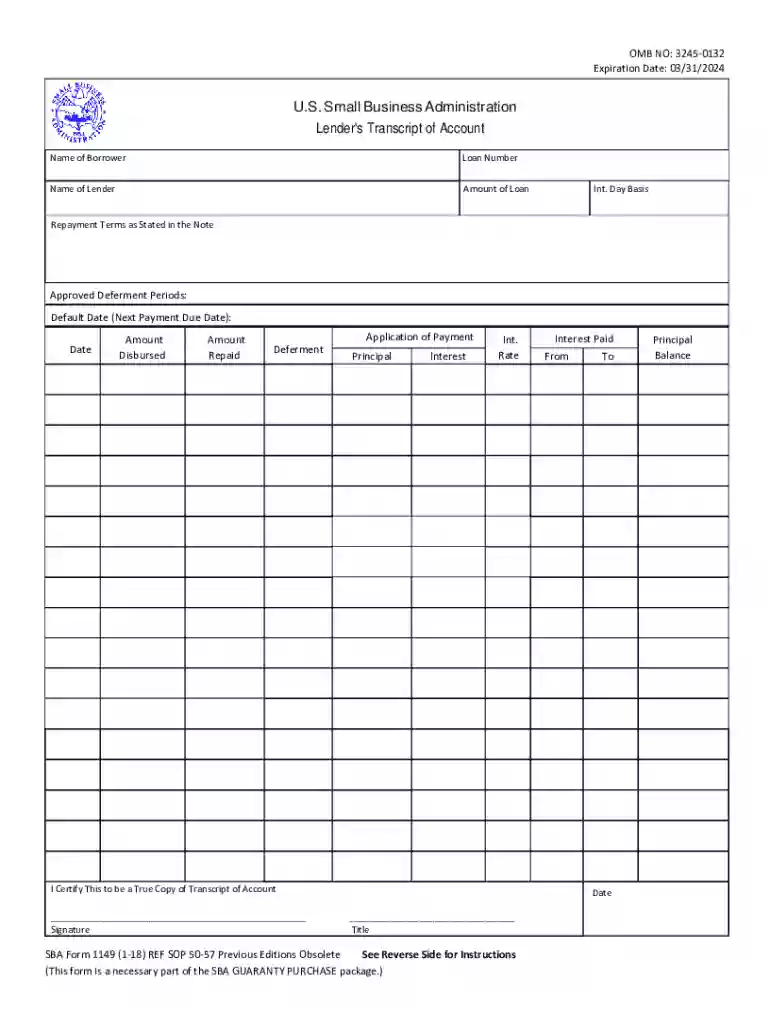
  1. Click ‘Get Form’ to open it in the editor.
  2. Begin by entering the 'Name of Borrower' in the designated field. This should be the trade name or the borrower's name if no trade name is used.
  3. Next, input the 'Loan Number', which is a ten-digit identifier for the SBA loan.
  4. Fill in the 'Name of Lender' to identify who provided the loan.
  5. Enter the 'Amount of Loan', specifying the total approved amount.
  6. For 'Interest Day Basis', indicate how interest is calculated, such as 30/365 or actual/365.
  7. Detail the 'Repayment Terms' as stated in your loan note, including maturity date and payment structure.
  8. Record each transaction date under 'Date' and specify amounts disbursed and repaid accordingly.
  9. 'Deferment' entries should indicate start ('B') and end ('E') dates for deferment periods.
  10. 'Application of Payment' requires you to allocate amounts paid towards principal and interest for each repayment made.
  11. 'Interest Rate' should reflect the rate applicable at payment application time.
  12. 'Interest Paid' fields need consecutive dates for computing interest on the loan.
  13. 'Principal Balance' must be updated after each transaction to reflect current status.
  14. 'Signature and Title' must be completed by an official representative certifying accuracy, along with certification date.

Start using our platform today to easily complete your SBA Form 1149 online for free!

See more Form SBA Form 1149 SBA Form 1149 Lender's Transcript of Account versions

We've got more versions of the Form SBA Form 1149 SBA Form 1149 Lender's Transcript of Account form. Select the right Form SBA Form 1149 SBA Form 1149 Lender's Transcript of Account version from the list and start editing it straight away!
Versions Form popularity Fillable & printable
2021 4.1 Satisfied (56 Votes)
2018 4.7 Satisfied (58 Votes)
2008 4 Satisfied (57 Votes)
be ready to get more

Complete this form in 5 minutes or less

Get form

Got questions?

We have answers to the most popular questions from our customers. If you can't find an answer to your question, please contact us.
Contact us

eSignatures are a perfect alternative to traditional signing, as they save time, effort, and money people spend on printing, scanning, and paper delivery. You can eSign your Form SBA Form 1149 SBA Form 1149 Lender's Transcript of Account using a trustworthy and powerful online document processing services like DocHub. It complies with main eSignature regulations (ESIGN and UETA), so all forms approved there are legally binding and have the same validity as manually signed ones.

With a swift editing system like DocHub, you do not need anything but a web browser and internet connection to edit your Form SBA Form 1149 SBA Form 1149 Lender's Transcript of Account online swiftly. Upload your document or find the appropriate form in DocHub’s catalog, open our editor with one click, and finish it digitally. To revise your forms anytime, sign up a free profile with DocHub.

SBA Form 912 is used by the Small Business Administration (SBA) to assess your character and creditworthiness. It is one part of the assessment of program eligibility for SBA loans. Completing this form helps the SBA make a character and credit eligibility decision to fund or deny a loan.
A Web-based platform where SBA borrowers can view loan details, make payments, and access statements for COVID-19 EIDL, Disaster, or SBA-serviced 7(a) loans.
What Can Disqualify Someone from Getting an SBA Loan? While there are certain requirements for an SBA loan, there are also some individual and entity statuses that can potentially disqualify an SBA applicant. These can include: If your business is engaged in illegal activities, gambling, or multi-sales distribution.

Security and compliance

At DocHub, your data security is our priority. We follow HIPAA, SOC2, GDPR, and other standards, so you can work on your documents with confidence.

Learn more

People also ask

Documents needed for SBA loan Current profit and loss statement, along with schedules from the prior three fiscal years. One year of projected financial statements and a detailed explanation of how your business will meet these projections. List of affiliates and subsidiaries and their names and addresses.
Existing borrowers can use the MySBA Loan Portal (lending.sba.gov) to make payments and view loan documents on the following loan types: All SBA disaster loans including COVID-19 EIDL and physical loss loans.
This article is part of a larger series on Business Financing. The Small Business Administration (SBA) Statement of Personal History form, otherwise known as SBA Form 912, is used to determine a borrowers trustworthiness and evaluate whether the applicant or their business partners have any criminal history.
Borrowers can access their loan details and documents and make payments through the MySBA Loan Portal.
All SBA Loans that are fully disbursed and in regular servicing or liquidation status. Fully disbursed means that the loan has been closed and all disbursements have been made. On a revolving LOC fully disbursed means that the loan has been closed and the initial disbursement has been made.

Related links