




01. Edit your 2003 tax return online
Type text, add images, blackout confidential details, add comments, highlights and more.

Type text, add images, blackout confidential details, add comments, highlights and more.

Draw your signature, type it, upload its image, or use your mobile device as a signature pad.

Send 2003 irs tax via email, link, or fax. You can also download it, export it or print it out.
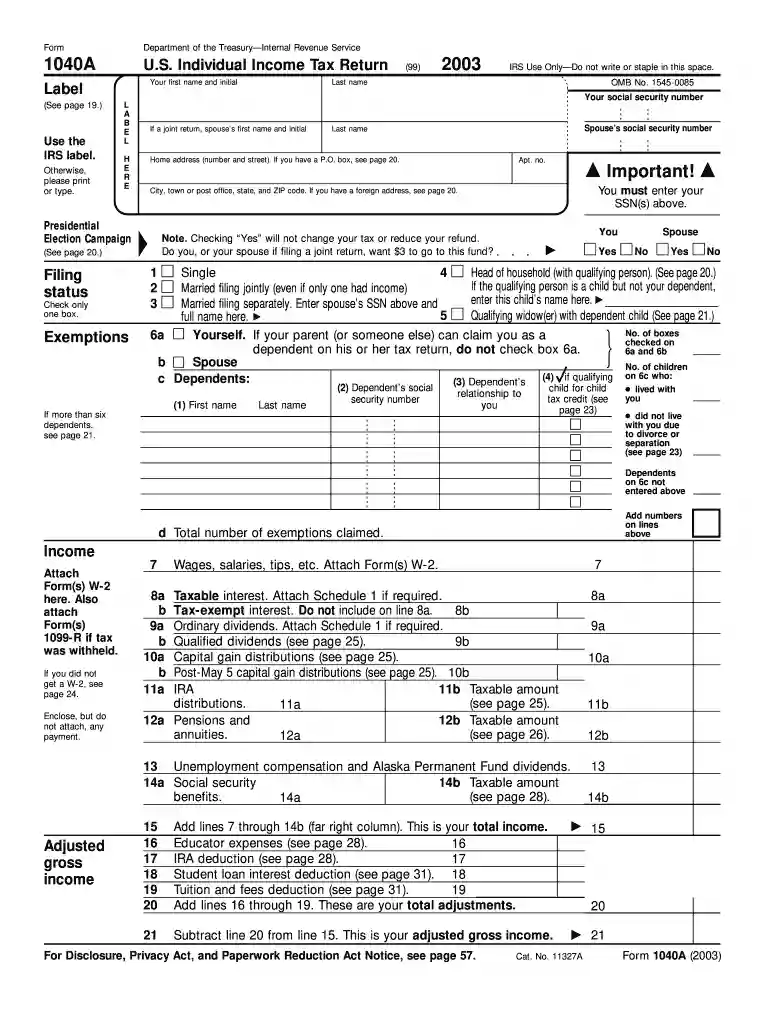
The 2003 Form 1040A serves as a U.S. Individual Income Tax Return. It allows taxpayers to report income, claim deductions and credits, and determine their tax liability. Primarily, this form is intended for straightforward tax situations, offering a simplified process compared to the standard 1040 form.
Filing taxes involves completing various sections on the 2003 Form 1040A accurately. Begin by filling in personal information such as your name, social security number, and filing status. Follow this with sections on exemptions and income details. Adjustments, tax calculations, and refund or payment options should be stated carefully to avoid errors.
Accessing the 2003 Form 1040A is straightforward. You can download the form from the IRS official website in the archives section. Libraries and post offices may also provide copies. For those who prefer digital access, many online tax software programs still maintain older forms for historical filing purposes.
Completing the 1040A requires careful attention to detail. Follow these steps:
The 2003 Form 1040A is primarily used by individuals with simpler tax situations. This includes those claiming standard deductions without significant additional income sources or complicated financial portfolios.


Several critical sections of the 2003 Form 1040A affect the reporting process:
Understanding terminology is essential for accurate filing:
The IRS provides comprehensive guidelines on how to correctly use the 2003 Form 1040A. Key pointers include:
Meeting deadlines ensures compliance and avoids penalties:
Understanding these components and applying them effectively will aid in a smooth and error-free filing process using the 2003 tax return form.
We've got more versions of the 2003 tax return form. Select the right 2003 tax return version from the list and start editing it straight away!
| Versions | Form popularity | Fillable & printable |
|---|---|---|
| 2017 | 4.8 Satisfied (161 Votes) | |
| 2016 | 4.3 Satisfied (75 Votes) | |
| 2015 | 4.1 Satisfied (61 Votes) | |
| 2014 | 4 Satisfied (42 Votes) | |
| 2013 | 4 Satisfied (26 Votes) | |
| 2012 | 4 Satisfied (41 Votes) | |
| 2011 | 4.1 Satisfied (40 Votes) | |
| 2010 | 4.3 Satisfied (67 Votes) | |
| 2009 | 4.9 Satisfied (43 Votes) | |
| 2007 | 4.2 Satisfied (36 Votes) | |
| 2003 | 4.2 Satisfied (54 Votes) | |
| 2000 | 4 Satisfied (57 Votes) |
At DocHub, your data security is our priority. We follow HIPAA, SOC2, GDPR, and other standards, so you can work on your documents with confidence.
CERTIFICATION: By signing this form, I DocHub that all of the information reported on this form and any attachments hereto is true, complete and accurate.Read more
Attach Form 2441. 46. If you have a qualifying child, attach. Schedule EIC. 42. 43. 63. Spouses occupation. (. ) Form 1040 (2003). ○ People who checked any boxRead more
May 2, 2017 Do not use these forms to report wages subject to U.S. income tax withholding. Instead, use Form W-2 to show U.S. income tax withheld. TreatmentRead more


