
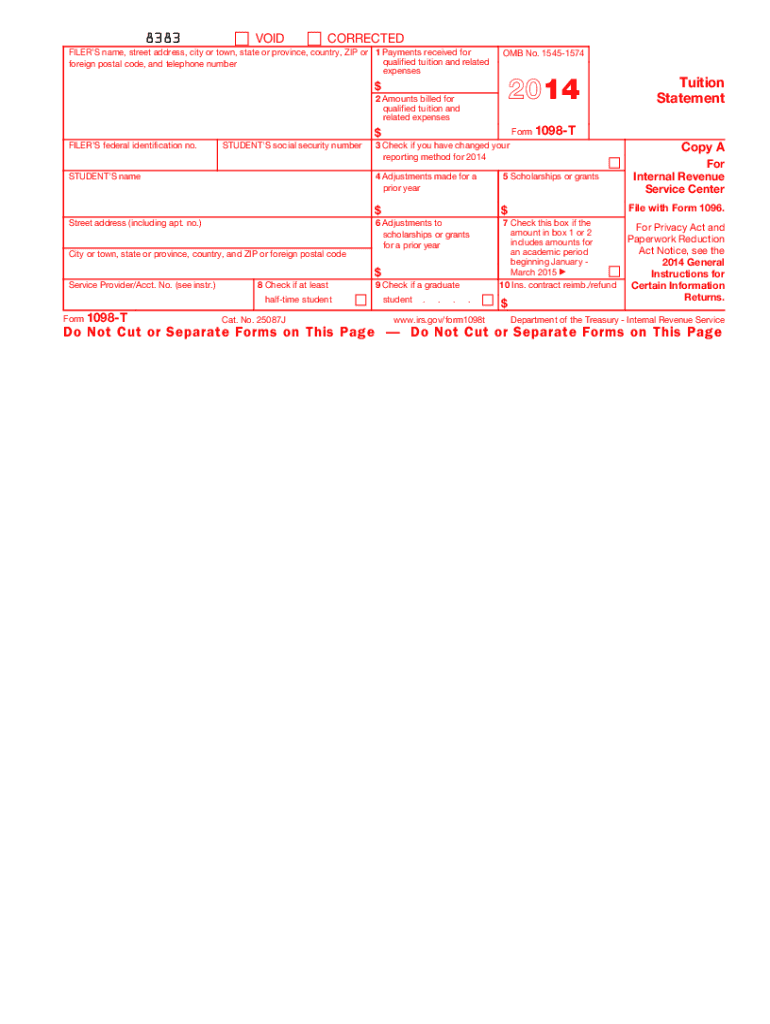







Definition and Purpose of the 1098-T 2014 Form
The 1098-T form is primarily used by educational institutions to report payments received for qualified tuition and related expenses. This form is essential for both students and the Internal Revenue Service (IRS) as it assists in calculating eligibility for education-related tax credits. The 2014 version of the 1098-T form continues this role by documenting key financial transactions between educational institutions and students, such as tuition fees, scholarships, and grants.
Key Components Reported on the Form
- Qualified Tuition Fees: Amounts received or billed during the calendar year, covering costs deemed necessary for enrollment.
- Scholarships and Grants: Details of financial aid that do not require repayments.
- Adjustments: Corrections to prior years’ tuition and aid, which may affect tax reporting.
Understanding these components helps ensure accurate reporting and maximizes eligible tax credits for both students and guardians.
How to Use the 1098-T 2014 Form
Using the 1098-T form correctly is crucial for students looking to claim education credits. Here's a detailed explanation on how to make the most of this form:
Step-by-Step Instructions
- Review the Information: Carefully examine each box on the form to verify accuracy against your own payment records.
- Identify School Terms Covered: Determine which academic terms the form reflects, as it may straddle two different entities.
- Use for Tax Credit: Enter relevant figures into your tax return software or provide them to your tax preparer to claim applicable credits such as the American Opportunity Credit or Lifetime Learning Credit.
- File Properly: Ensure electronic versions are not submitted, as the IRS requires scanned physical forms.
Practical Examples
- Calculating Tax Credits: Use the figures reported to estimate potential tax savings using IRS provided worksheets.
- Comparing Financial Aid: Reconcile the scholarships listed with your school's bursar statements to confirm eligibility.
How to Obtain the 1098-T 2014 Form
Typically, educational institutions issue the 1098-T form to their students by the end of January each year. Here’s how you can obtain your form:
Methods to Receive Your Form
- Direct Mailing: Schools often send printed forms to the student’s permanent address by January 31.
- Online Portal: Many institutions allow students to access this form electronically through university portals.
Necessary Steps
- Confirm Mailing Address: Check that your school has your correct postal information to avoid delays.
- Portal Access: Log in to your student account and navigate to the tax forms section to download your 1098-T.
Steps to Complete the 1098-T 2014 Form
Although the responsibility for completing the form rests with the educational institution, understanding what to look for can prevent errors:
Completing the Form Accurately
- Gather Records: Collect all relevant payment and grant records before reviewing the form.
- Check Box Entries: Ensure each box is filled with the correct dollar amounts.
- Contact the Bursar: Discrepancies should be addressed with the institution’s finance office immediately.
- Reconcile the Information: Use your records to validate figures reported in each section of the form.
Important Considerations
- Timing of Payments: Only payments made in the tax year should appear, even if they relate to another academic year.
- Tuition Variances: Exclude non-qualifying expenses like meal plans or housing.
IRS Guidelines for the 1098-T 2014 Form
Compliance with IRS regulations ensures that the tax credits associated with the 1098-T can be lawfully claimed.
Relevant IRS Provisions
- Eligible Expenses: Define what constitutes a legitimate educational expense under IRS rules.
- Calculation of Credits: Follow prescribed methods for accurately determining education-related tax deductions and credits.
- Filing Compliance: Use official guidelines to ensure forms are submitted correctly and on time.
Guidelines for Specific Situations
- Part-time Students: Understand how credit calculations adjust for less than full-time enrollment.
- Foreign Students: Determine unless legally required, foreign students may not receive this form due to varying tax residency statuses.
Penalties for Non-Compliance
Failing to utilize the 1098-T form properly can lead to penalties:
Types of Penalties
- Filing Incorrect Forms: Non-compliance can result in fines or a recalculation of eligible credits.
- Submission of Non-Scannable Forms: Adhering to the electronic form condition is crucial to avoid rejection.
Preventative Measures
- Use Correct Versions: Always ensure forms align with IRS requirements, avoiding outdated or incorrect versions.
- Request Corrections: Promptly correct any discovered errors to comply with IRS standards.
Examples of Using the 1098-T 2014 Form
Real-world scenarios illustrate how individuals and entities interact with the 1098-T:
Common Situations
- Students Claiming Credits: A full-time undergrad utilizing the form to claim the American Opportunity Credit.
- Part-time Learner: A continuing education participant who uses their form to offset costs with the Lifetime Learning Credit.
Special Cases
- Parent Filing: A parent claiming a dependent’s educational expenses using a child's 1098-T form.
- Reconciliation for Self-Pay Students: For students paying tuition directly, the form assists in tracking.
Using these various scenarios, students and tax preparers better understand the practical application of 1098-T in tax returns.
Digital vs. Paper Versions of the 1098-T 2014 Form
Understanding the distinctions between digital and paper forms enhances compliance:
Print and Online Differences
- Legibility and Scanning: Paper forms must be scannable to avoid IRS rejection, while digital formats serve mainly for personal verification.
- Record Keeping: Keep physical copies for audit peace of mind, even if a digital version is provided.
Choosing the Best Option
- Security Features: Enhance protection with print forms accompanied by privacy safeguards.
- Ease of Access: Digital copies can provide expedited access but must only be relied upon for record retrieval and not for formal submission.




