
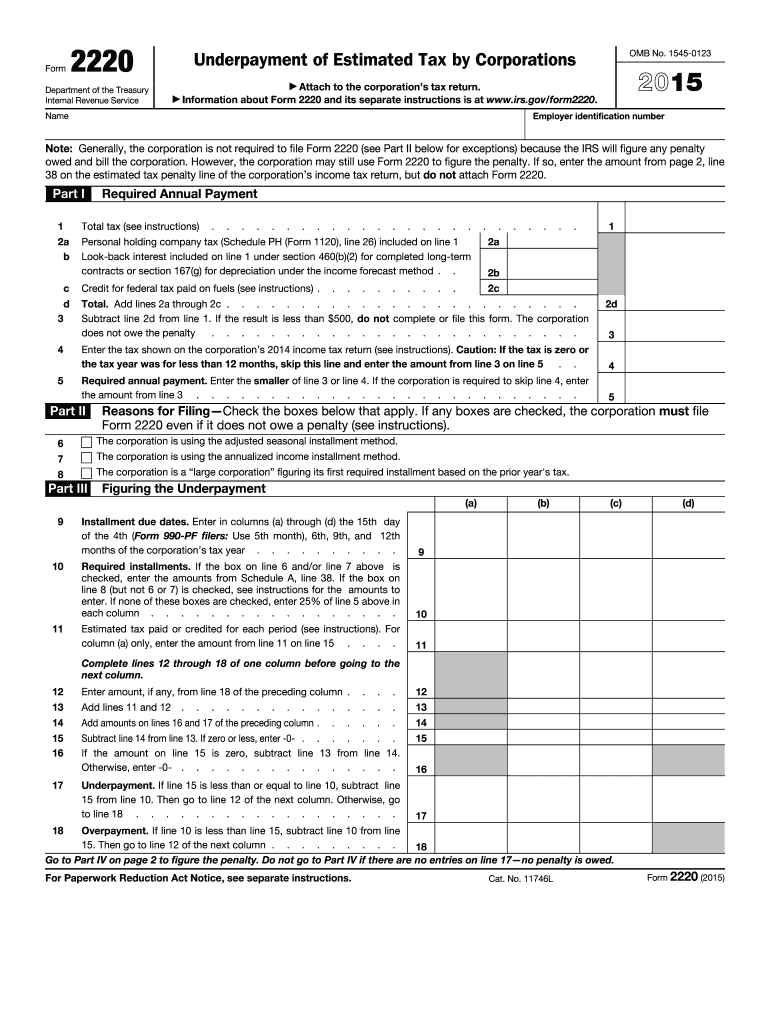







Definition and Purpose of the 2015 Form 2220
The 2015 Form 2220 is a tax document used by corporations to calculate penalties for underpayment of estimated tax. This form serves as a tool for businesses to determine any penalties they might owe based on their prior year’s tax liabilities. It helps corporations ensure they are compliant with the tax payment requirements set by the IRS and avoid unnecessary penalties.
Key Elements of the Form
- Estimated Taxes: Corporations use this form to assess their estimated tax obligations.
- Penalty Calculation: Provides a method for calculating penalties on underpaid taxes.
- Exceptions: Includes criteria where filing may not be necessary.
Guide to Using the 2015 Form 2220
Filing the 2015 Form 2220 requires understanding the specific sections related to tax estimation and penalties. Here's how to navigate it:
- Review Prior Year’s Taxes: Start by examining previous tax returns to set a baseline for current obligations.
- Estimate Annual Tax Payments: Use historical data or forecasted income to estimate the current year's tax dues.
- Determine Underpayment: Calculate any potential discrepancies between estimated payments and due taxes.
Steps to Complete the Form
- Gather Financial Data: Collect all necessary financial documents, including previous tax returns and transaction records.
- Fill Out Relevant Sections: Complete sections that calculate estimated tax and potential underpayment.
- Verify Information: Double-check all figures and ensure calculations are correct to avoid errors.
How to Obtain the 2015 Form 2220
Corporations can access the 2015 Form 2220 through several channels:
- Online: Downloadable from the IRS website.
- Tax Software: Available in various tax preparation software like TurboTax and QuickBooks.
Who Typically Uses the 2015 Form 2220
Primarily, the form is utilized by businesses, specifically:
- Corporations: Required to file estimated taxes quarterly.
- LLCs and Partnerships: Treated as corporations for tax purposes, depending on their election status.


Business Types That Benefit Most
- Large Corporations: With substantial income, ensuring compliance with estimated tax payments.
- Seasonal Businesses: Needing to adjust payments based on fluctuating annual income.
Legal Use and Compliance
Understanding the legal ramifications of filing the 2015 Form 2220 is crucial for all corporations:
IRS Guidelines and Compliance
- Mandatory Filing: For corporations with taxable income over a specified threshold.
- Penalties: Imposed for underpayment or late filing, emphasizing the need for timely and accurate submissions.
IRS Guidelines and Filing Deadlines
The IRS provides specific guidelines regarding the filing of the 2015 Form 2220, including critical deadlines and dates:
- Quarterly Payments: Corporations must make these in April, June, September, and January.
- End-of-Year Filing: Final reconciliation of estimated payments against actual taxes due.
Examples and Case Studies
For better understanding, consider these real-world scenarios:
- Example 1: A corporation underpaid its estimated taxes by $10,000, leading to a calculated penalty.
- Example 2: An LLC used seasonal income adjustments to avoid penalties by aligning estimated payments with fluctuating income streams.
Variants and Alternatives
While the 2015 form remains an important tool, alternatives are available:
Versions or Alternatives
- Previous Year Forms: Similar procedures apply with minor annual adjustments.
- State-Specific Forms: Some states have their own versions tailored to local tax laws.
Digital vs. Paper Filing Options
Corporations can choose between digital and paper submission methods for convenience:
- Electronic Filing: Offers faster processing and confirmation.
- Paper Submission: Traditional method, useful when digital access is limited.
Software Compatibility
The 2015 Form 2220 is compatible with major accounting software, making it accessible for digital completion:
- TurboTax and QuickBooks: Integrate seamlessly for easy tax management.
- DocHub: Supports editing and sharing of tax documents.
Penalties for Non-Compliance
Failing to file the 2015 Form 2220 or underestimating payments may result in financial penalties:
- Monetary Fines: Based on the amount of unpaid taxes.
- Interest Accumulation: On overdue amounts, increasing the financial burden over time.




