




Here's how it works



How to use or fill out york adams tax bureau with our platform

- Click ‘Get Form’ to open the York Adams Tax Bureau form in the editor.
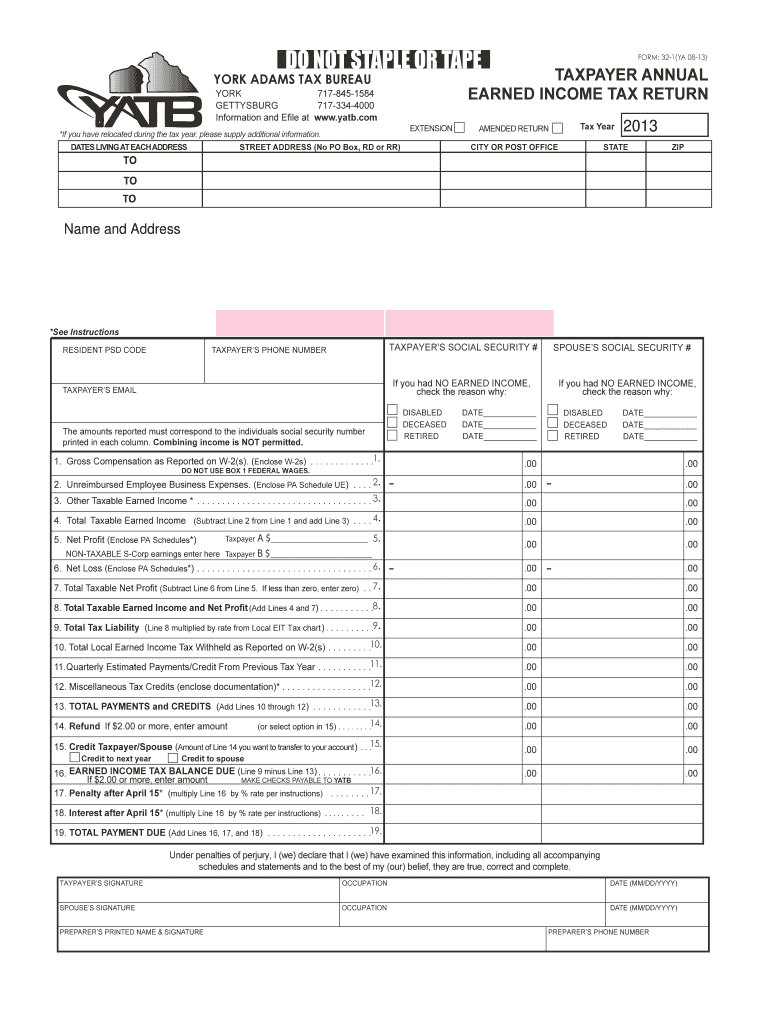
- Begin by entering your personal information, including your name, address, and Social Security number. Ensure that all details are accurate as they will be used for verification.
- Fill in the 'Gross Compensation' section by reporting your earnings as shown on your W-2 forms. Remember to enclose copies of these documents.
- If applicable, provide details about any unreimbursed employee business expenses and other taxable income in the designated fields.
- Calculate your total taxable earned income by following the instructions provided on the form. Make sure to double-check your calculations for accuracy.
- Complete the payment section by calculating any taxes owed or refunds due. If you have a balance due, ensure you include any penalties or interest if applicable.
- Finally, sign and date the form at the bottom. If filing jointly, ensure both signatures are included.
Start using our platform today to easily complete your York Adams Tax Bureau form online for free!
It's free
See more york adams tax bureau versions
Got questions?
How can I send my york adams tax bureau from Google Drive for approval?
If you regularly deal with documents stored in your Google Drive, DocHub is a perfect option for you to easily and quickly fill out, modify, and approve them. This editor integrates properly with Google services, so you can export your york adams tax bureau from your Google Drive to the editor without the need of downloading and re-uploading it. Right-click on your document, select Open With → DocHub PDF Sign and Edit. In our editor, add and assign Signature Fields for all people involved, then click on the Menu option above → Send → select how you want to share your paperwork.
Can I edit york adams tax bureau on my phone?
As a comprehensive document modifying platform, DocHub is accessible on mobile phones. Open DocHub in your choice of mobile internet browser and use our intelligent mobile-friendly toolset to complete your york adams tax bureau.
Security and compliance
At DocHub, your data security is our priority. We follow HIPAA, SOC2, GDPR, and other standards, so you can work on your documents with confidence.
Learn more




