




Here's how it works



How to use or fill out hepatitis b waiver form with our platform

- Click ‘Get Form’ to open the hepatitis B waiver form in the editor.
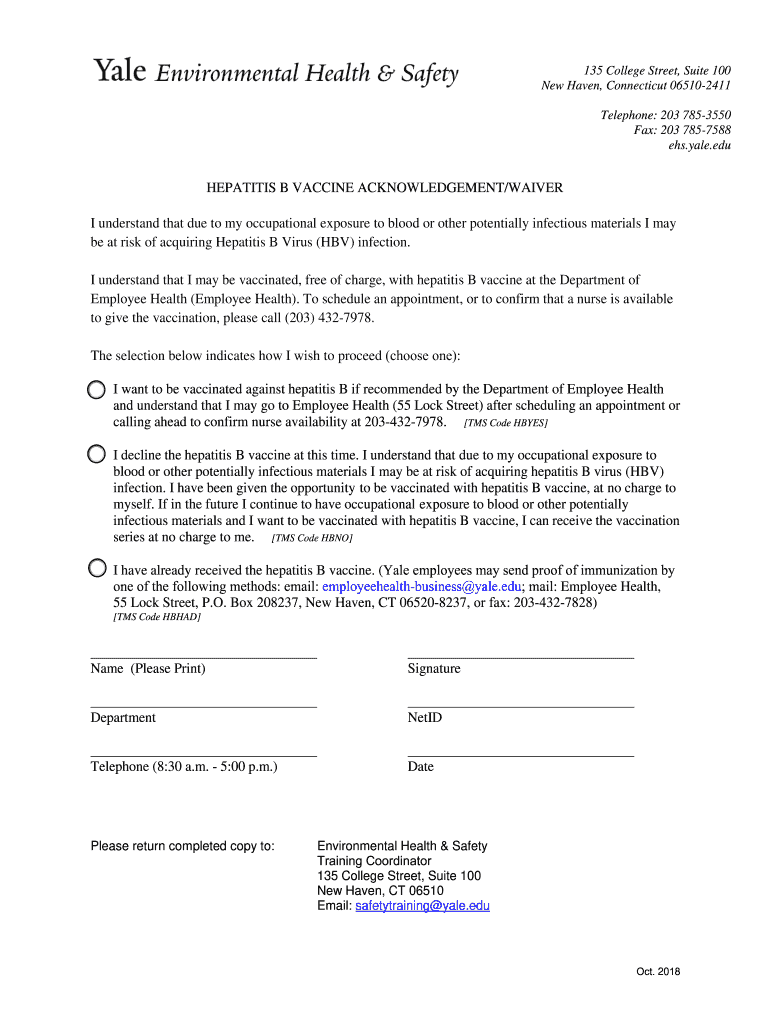
- Begin by entering your name in the designated field. Ensure that it is printed clearly for identification purposes.
- Next, select one of the options regarding your vaccination preference. You can choose to be vaccinated, decline the vaccine, or indicate that you have already received it. Make sure to check the appropriate box.
- Fill in your department and NetID in the respective fields to provide additional context about your employment.
- Enter your telephone number, ensuring it is during business hours (8:30 a.m. - 5:00 p.m.) for any follow-up communications.
- Finally, sign and date the form at the bottom to confirm your choices and understanding of the information provided.
Start using our platform today to fill out your hepatitis B waiver form easily and for free!
It's free
See more hepatitis b waiver form versions
Got questions?
How can I create an electronic signature in my hepatitis b vaccine waiver on Android?
Approving paperwork on a mobile device is quick, easy, and doesn’t require software installation if you have an account with DocHub. Log in from any browser, fill in your empty fields with your information, and click on Sign → Create your signature. You can draw your electronic signature the same way you usually do on paper, add its picture to your hepatitis b vaccine waiver, or type in your name and stylize its look. Whatever option you select, your paperwork will be valid.
How do you fill out hepatitis b waiver on Android?
It is a no-brainer on a computer or via a mobile phone to complete a hepatitis b waiver with DocHub. All you need to do is open any installed web browser on your smartphone and proceed to the DocHub website. Once authenticated, add your file and open it in editing mode. Use our toolbar to make your edits and save modifications. Optionally, keep your file in your files or send it to a recipient immediately.
What is hepatitis B waiver?
Can I delay the Hep B vaccine at birth?
What is a hepatitis B waiver?
Security and compliance
At DocHub, your data security is our priority. We follow HIPAA, SOC2, GDPR, and other standards, so you can work on your documents with confidence.
Learn more


