Agent Itinerary Form - garealtorcom 2026

Get Form
itinerary form Preview on Page 1

Here's how it works

01. Edit your itinerary form online
Type text, add images, blackout confidential details, add comments, highlights and more.

02. Sign it in a few clicks
Draw your signature, type it, upload its image, or use your mobile device as a signature pad.

03. Share your form with others
Send form itinerary via email, link, or fax. You can also download it, export it or print it out.

How to use or fill out Agent Itinerary Form - garealtorcom with our platform

Form edit decoration
9.5
Ease of Setup
DocHub User Ratings on G2
9.0
Ease of Use
DocHub User Ratings on G2
  1. Click ‘Get Form’ to open it in the editor.
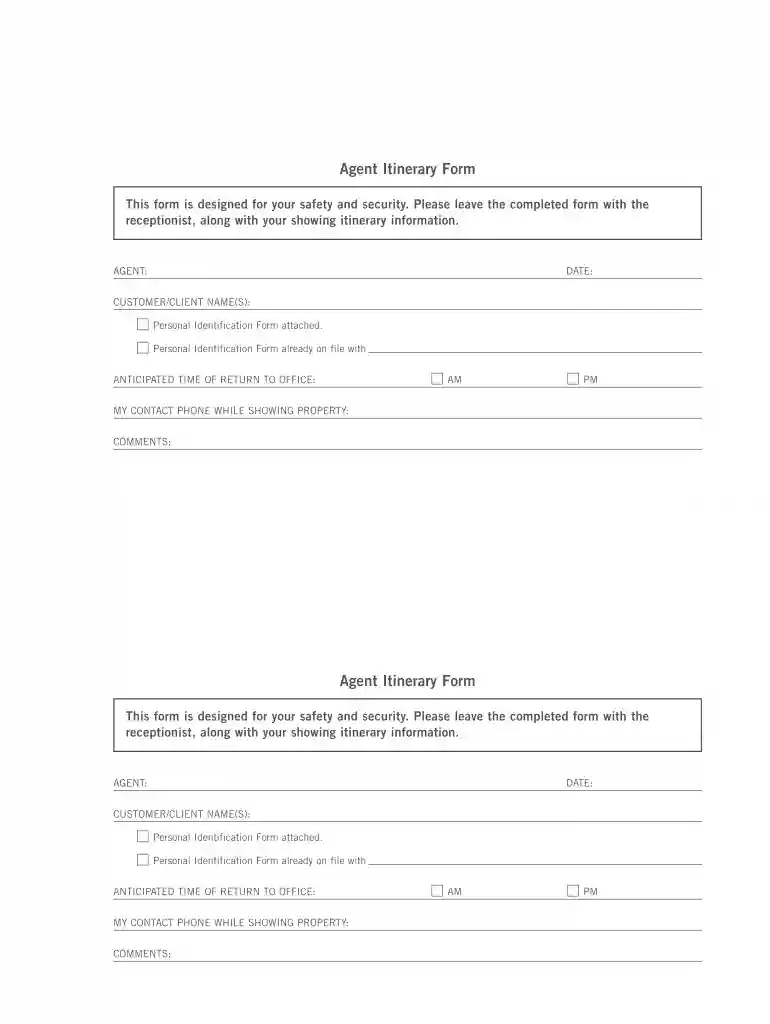
  2. Begin by entering your name in the AGENT field. This identifies you as the person responsible for the showing.
  3. Next, input the DATE of your showing. This helps keep track of when the appointment is scheduled.
  4. Fill in the CUSTOMER/CLIENT NAME(S) section. If you have a Personal Identification Form attached or already on file, make a note of that here.
  5. Indicate your anticipated time of return to the office by selecting either AM or PM from the options provided.
  6. Provide your contact phone number while showing property in the designated field. This ensures clients can reach you if needed.
  7. Lastly, add any additional COMMENTS that may be relevant for your itinerary before saving and submitting the form.

Start using our platform today to streamline your form completion process for free!

be ready to get more

Complete this form in 5 minutes or less

Get form

Got questions?

We have answers to the most popular questions from our customers. If you can't find an answer to your question, please contact us.
Contact us
How to Make a Trip Itinerary Start your itinerary early. Outline each day with dates. Mark things in red that you havent booked yet. Research your destination and add suggestions into each day of the itinerary. If you have specific time frames to stick to, add times in.
Travefy, Sygic Travel, Axus Travel App, Umapped, Tourwriter, and Wetu are top itinerary builders offering features like drag-and-drop interfaces, CRM integration, mobile access, and customizable branding. Travefy and Sygic Travel provide free versions suitable for small agencies or individual agents.
The best travel agency software in 2025 TravelPerk. TravelPerk is an all-in-one, end-to-end travel management system with a comprehensive digital platform for businesses and corporate travelers. Sabre. Ezus. Dolphin Dynamics. Travelport. Lemax. Juniper.
Here are some steps to write a travel itinerary; Step 1: Destinations and Time Allocation. Step 2: Organizing an Itinerary in Order. Step 3: Essential Details. Step 4: Travel Description. Step 5: Experience Type. Step 6: Extra Activities. The Introduction. The Overview.
If the primary need is itinerary builder, Travefy is much better than Traveljoy. Also, check out Umapped and Tern.

Security and compliance

At DocHub, your data security is our priority. We follow HIPAA, SOC2, GDPR, and other standards, so you can work on your documents with confidence.

Learn more
ccpa2
pci-dss
gdpr-compliance
hipaa
soc-compliance

People also ask

You can sell travel itineraries using Payhip, where you can create a free, customizable storefront to sell digital travel itineraries directly to customers. Payhip also has an online marketplace where you can docHub new buyers.

Related links