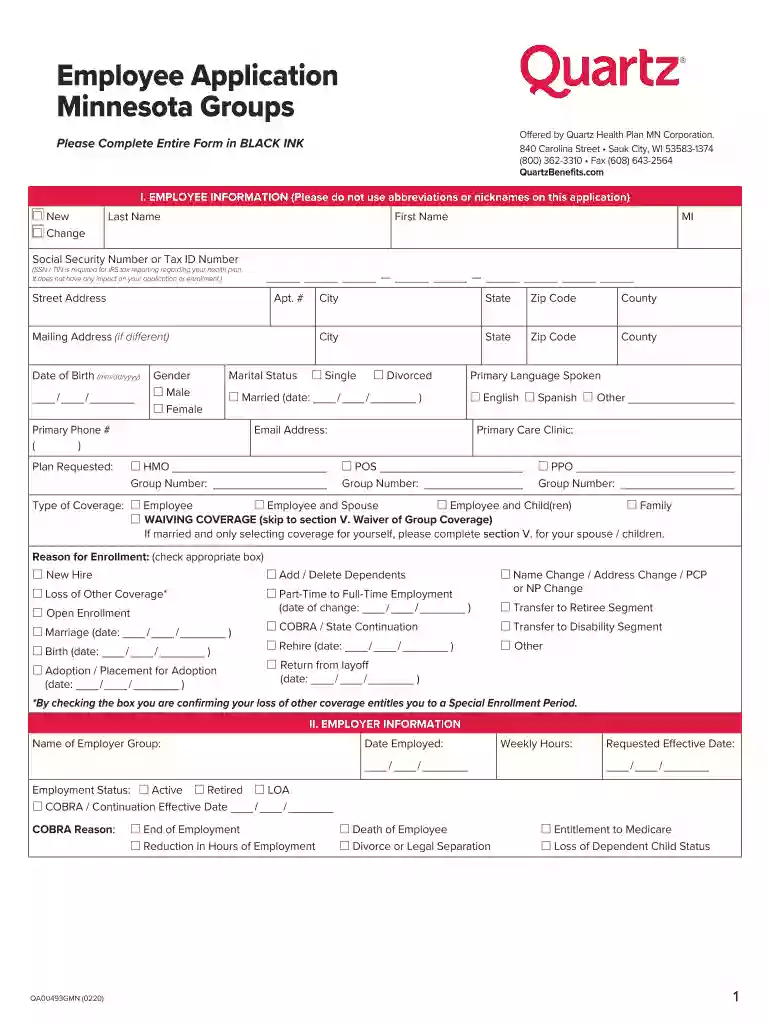
Medicare Select Enrollment Application - Quartz Preview on Page 1

Medicare Select Enrollment Application - Quartz 2026

Here's how it works

  • 01. Edit your form online

    Type text, add images, blackout confidential details, add comments, highlights and more.

  • 02. Sign it in a few clicks

    Draw your signature, type it, upload its image, or use your mobile device as a signature pad.

  • 03. Share your form with others

    Send it via email, link, or fax. You can also download it, export it or print it out.

How to use or fill out Medicare Select Enrollment Application - Quartz with our platform

Form edit decoration
9.5
Ease of Setup
DocHub User Ratings on G2
9.0
Ease of Use
DocHub User Ratings on G2
  1. Click ‘Get Form’ to open the Medicare Select Enrollment Application - Quartz in the editor.
  2. Begin by filling out Section I, Employee Information. Ensure you provide your full name, Social Security Number, and contact details without using abbreviations.
  3. In Section II, Employer Information, enter your employer's name and your employment details. Make sure to specify your employment status and requested effective date.
  4. Proceed to Section III for Dependent Information. List all dependents you wish to cover, including their names, Social Security Numbers, and relationship to you.
  5. Complete Section IV regarding Other Insurance Information. Indicate if you or any dependents are covered by Medicare and provide relevant dates.
  6. Finally, review all sections for accuracy before signing the application in the designated area at the end of the form.

Start filling out your Medicare Select Enrollment Application - Quartz today for free using our platform!

See more Medicare Select Enrollment Application - Quartz versions

We've got more versions of the Medicare Select Enrollment Application - Quartz form. Select the right Medicare Select Enrollment Application - Quartz version from the list and start editing it straight away!

VersionsForm popularityFillable & printable
20204.8 Satisfied (164 Votes)

be ready to get more

Complete this form in 5 minutes or less

Security and compliance

At DocHub, your data security is our priority. We follow HIPAA, SOC2, GDPR, and other standards, so you can work on your documents with confidence.

Related links

Medicare Health Plan Premium Rates | ETF

You and your dependents who are eligible for Medicare must be enrolled in Parts A and B upon retirement or when initially eligible. When you and/or yourRead more

Learn more
State Group Health Insurance

If you have questions, contact your Division HR Representative. Find an Application Form. Application Forms. Getting Started. Contact the HR office in yourRead more

Learn more
If you believe that this page should be taken down, please follow our DMCA take down process here