Type text, add images, blackout confidential details, add comments, highlights and more.
02. Sign it in a few clicks
Draw your signature, type it, upload its image, or use your mobile device as a signature pad.
03. Share your form with others
Send acirt via email, link, or fax. You can also download it, export it or print it out.
How to use or fill out acirt with our platform
Ease of Setup
DocHub User Ratings on G2
Ease of Use
DocHub User Ratings on G2
Click ‘Get Form’ to open the acirt document in the editor.
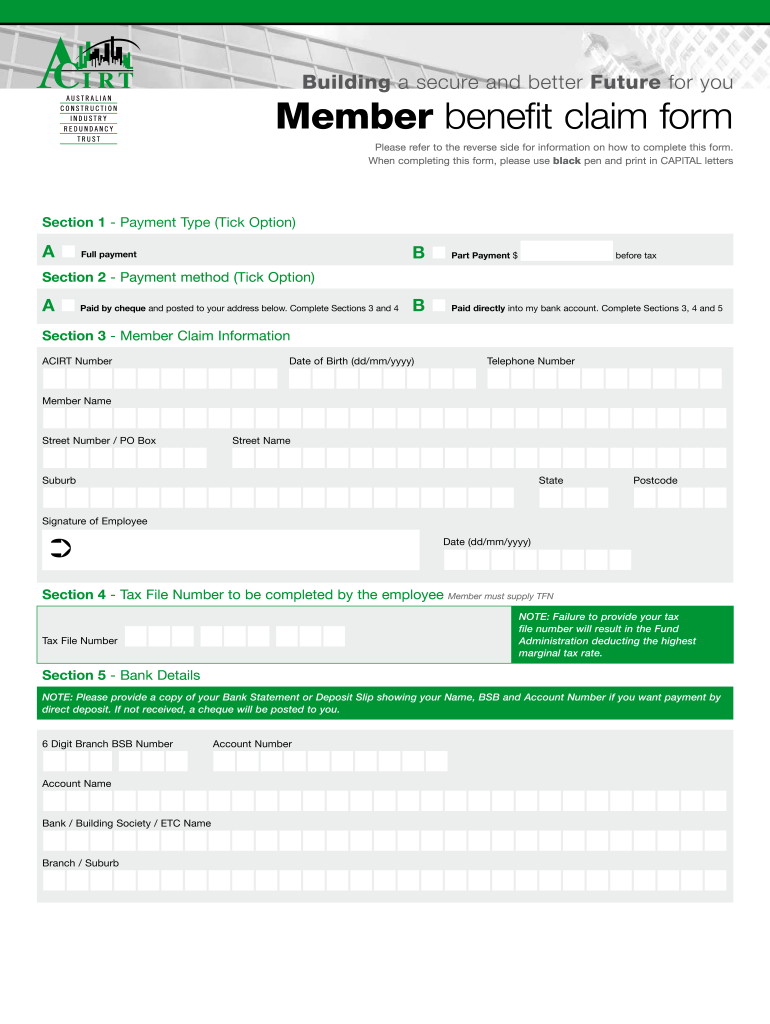
Begin with Section 1, where you will select your payment type by ticking either 'Full payment' or 'Part Payment'.
In Section 2, choose your payment method. If opting for a cheque, complete Sections 3 and 4. For direct deposit, fill out Sections 3, 4, and 5.
Proceed to Section 3 to enter your Member Claim Information. Fill in your ACIRT Number, Date of Birth, Telephone Number, Member Name, and address details.
In Section 4, provide your Tax File Number. Remember that failing to do so may result in higher tax deductions.
Finally, complete Section 5 with your Bank Details if you prefer direct deposit. Ensure you attach a copy of your bank statement or deposit slip.
Start filling out your acirt form online for free today!
Acirt loginAcirt paymentACIRT claim formWhen can I claim my ACIRTHow to claim ACIRTAcirt contributionsACIRT distribution payment 2025Acirt phone number
Security and compliance
At DocHub, your data security is our priority. We follow HIPAA, SOC2, GDPR, and other standards, so you can work on your documents with confidence.
Dr. Suzanne Sindi is the Co-Advisor of Cyberinfrastructure and Research Technologies (ACIRT), Associate Professor of Applied Mathematics, the Chair of theRead more
Cookie consent notice
This site uses cookies to enhance site navigation and personalize your experience.
By using this site you agree to our use of cookies as described in our Privacy Notice.
You can modify your selections by visiting our Cookie and Advertising Notice.