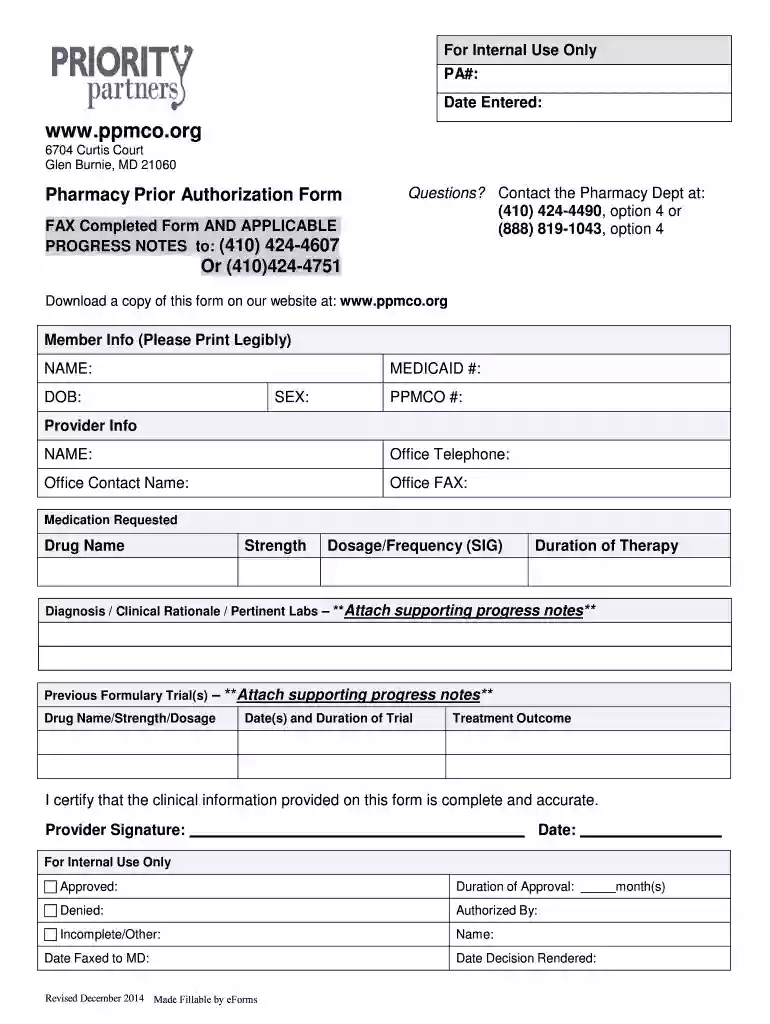
Priority Partners Prior Authorization Form 2026

Get Form
priority partners phone number Preview on Page 1

Here's how it works

01. Edit your priority partners phone number online
Type text, add images, blackout confidential details, add comments, highlights and more.

02. Sign it in a few clicks
Draw your signature, type it, upload its image, or use your mobile device as a signature pad.

03. Share your form with others
Send priority partners prior authorization form pdf via email, link, or fax. You can also download it, export it or print it out.

How to use or fill out Priority Partners Prior Authorization Form with DocHub

Form edit decoration
9.5
Ease of Setup
DocHub User Ratings on G2
9.0
Ease of Use
DocHub User Ratings on G2
  1. Click ‘Get Form’ to open the Priority Partners Prior Authorization Form in our editor.
  2. Begin by filling out the 'Member Info' section. Enter the member's name, Medicaid number, date of birth, sex, and PPMCO number clearly.
  3. Next, move to the 'Provider Info' section. Input the provider's name, office telephone number, contact name, and office fax number.
  4. In the 'Medication Requested' section, specify the drug name, strength, dosage/frequency (SIG), and provide a diagnosis or clinical rationale. Remember to attach any pertinent labs.
  5. Document any previous formulary trials including drug name/strength/dosage and treatment outcomes in the designated fields.
  6. Finally, ensure that the provider signs and dates the form certifying that all information is complete and accurate before submission.

Start using our platform today to fill out your forms online for free!

See more Priority Partners Prior Authorization Form versions

We've got more versions of the Priority Partners Prior Authorization Form form. Select the right Priority Partners Prior Authorization Form version from the list and start editing it straight away!
Versions Form popularity Fillable & printable
2014 4.8 Satisfied (176 Votes)
be ready to get more

Complete this form in 5 minutes or less

Get form

Got questions?

We have answers to the most popular questions from our customers. If you can't find an answer to your question, please contact us.
Contact us
The patient or their representative can contact their insurance company and provide the relevant information to start the Prior Authorization process. Its best to confirm with the healthcare provider if they have the information and are willing to submit the request.
Most insurance companies have specific forms that must be filled out and filed as part of the Prior Authorization procedure. Find those papers and complete them. You may get these forms on the insurance providers website or by contacting them directly.
A number, code, or other value that indicates the services provided on this claim have been authorized by the payee or other service organization, or that a referral for services has been approved. (Also called Prior Authorization or Referral Number). SOURCE: T-MSIS Analytic File (TAF) Claims.
Call Utilization Management (UM) at (952)883-6333with questions. Incomplete forms will be returned. Submit clinical documentation to support your request. Sign in at healthpartners.com/provider and use the Authorizations and referrals link to check the status of your prior authorization request.
Questions regarding enrollment or procedures that require prior authorization should be directed to the SmartHealth Customer Service Department at (888) 492-6811. (Hours of operation are 8:30am-4:30pm EST) Monday-Friday, excluding holidays.

Security and compliance

At DocHub, your data security is our priority. We follow HIPAA, SOC2, GDPR, and other standards, so you can work on your documents with confidence.

Learn more
ccpa2
pci-dss
gdpr-compliance
hipaa
soc-compliance

People also ask

Call your insurance company or log into their online portal to check if prior authorization is required. Some plans have searchable databases or medication lists to confirm this quickly. Ask for details about the documentation required to request approval.

Related links