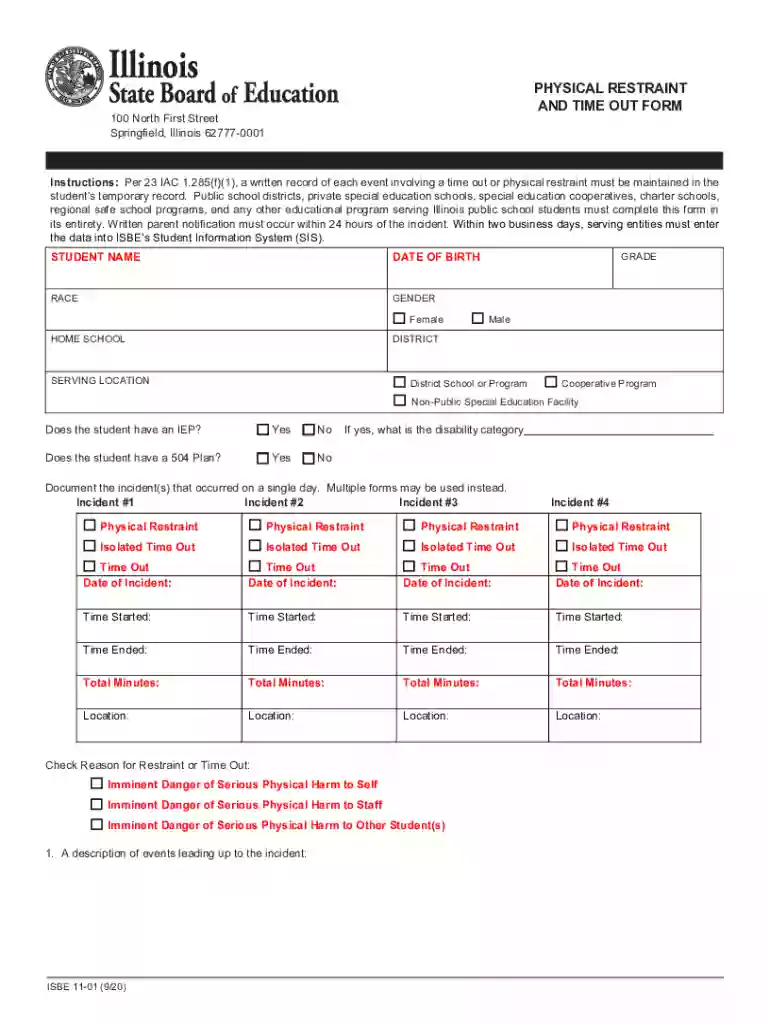
Isbe restraint form 2025

Get Form
isbe time out form Preview on Page 1

Here's how it works

01. Edit your isbe time out form online
Type text, add images, blackout confidential details, add comments, highlights and more.

02. Sign it in a few clicks
Draw your signature, type it, upload its image, or use your mobile device as a signature pad.

03. Share your form with others
Send isbe physical restraint form via email, link, or fax. You can also download it, export it or print it out.

How to use or fill out isbe restraint form with our platform

Form edit decoration
9.5
Ease of Setup
DocHub User Ratings on G2
9.0
Ease of Use
DocHub User Ratings on G2
  1. Click ‘Get Form’ to open the isbe restraint form in the editor.
  2. Begin by entering the student’s name, date of birth, race, gender, and home school. Use your mouse or Tab key to navigate through each field.
  3. Indicate whether the student has an IEP or a 504 Plan by selecting 'Yes' or 'No'. If applicable, specify the disability category.
  4. Document incidents that occurred on a single day. For each incident, provide details such as date, time started, time ended, and total minutes. Check the appropriate boxes for physical restraint or time out.
  5. In the description sections, detail events leading up to the incident and interventions used prior to restraint. This ensures compliance with regulations.
  6. After completing all fields, save your document to your hard drive for future updates or click the print button to finalize.

Start using our platform today for free to streamline your form completion process!

See more isbe restraint form versions

We've got more versions of the isbe restraint form form. Select the right isbe restraint form version from the list and start editing it straight away!
Versions Form popularity Fillable & printable
2020 4.8 Satisfied (213 Votes)
2020 4.2 Satisfied (36 Votes)
2019 3.8 Satisfied (36 Votes)
be ready to get more

Complete this form in 5 minutes or less

Get form

Got questions?

We have answers to the most popular questions from our customers. If you can't find an answer to your question, please contact us.
Contact us

Yes, you can utilize DocHub for signing any business and private documentation, including your isbe form for time out. All electronic signatures you generate with our tool are legally binding and court-admissible, as DocHub complies with standards required by ESIGN and UETA. Save your accomplished form with a detailed Audit Trail if needed.

If your go-to email service is Gmail, you can easily integrate your DocHub editor in your work. Modify your isbe restraint form with DocHub tools and attach it to your drafts in Gmail. See how easy it is to exchange documents and work together with a swift PDF editing solution at hand.

Form 51-77: This form is specifically designated for reporting incidents of time out, isolated time out, or physical restraint, making it the appropriate choice.
Restraint, time out, isolated time out (RTO) complaint process. The State RTO complaint and investigation process is a procedure where a person submits a signed, written complaint alleging that the school district has violated one or more of the restraint and/or time out regulations found in 23 IAC 1.285.
Non-violent (medical/surgical) restraint orders can never written as PRN or as Standing Orders.

People also ask

Public Act 102-0339 amends the Illinois School Code regarding the use of isolated time out, time out, and physical restraint interventions in public schools, special education cooperatives, and special education non-public facilities.

isbe form time out