Aflac account claim form 2026

Get Form
aflac customer service Preview on Page 1

Here's how it works

01. Edit your aflac customer service online
Type text, add images, blackout confidential details, add comments, highlights and more.

02. Sign it in a few clicks
Draw your signature, type it, upload its image, or use your mobile device as a signature pad.

03. Share your form with others
Send it via email, link, or fax. You can also download it, export it or print it out.

How to use or fill out aflac account claim form with our platform

Form edit decoration
9.5
Ease of Setup
DocHub User Ratings on G2
9.0
Ease of Use
DocHub User Ratings on G2
  1. Click ‘Get Form’ to open the aflac account claim form in the editor.
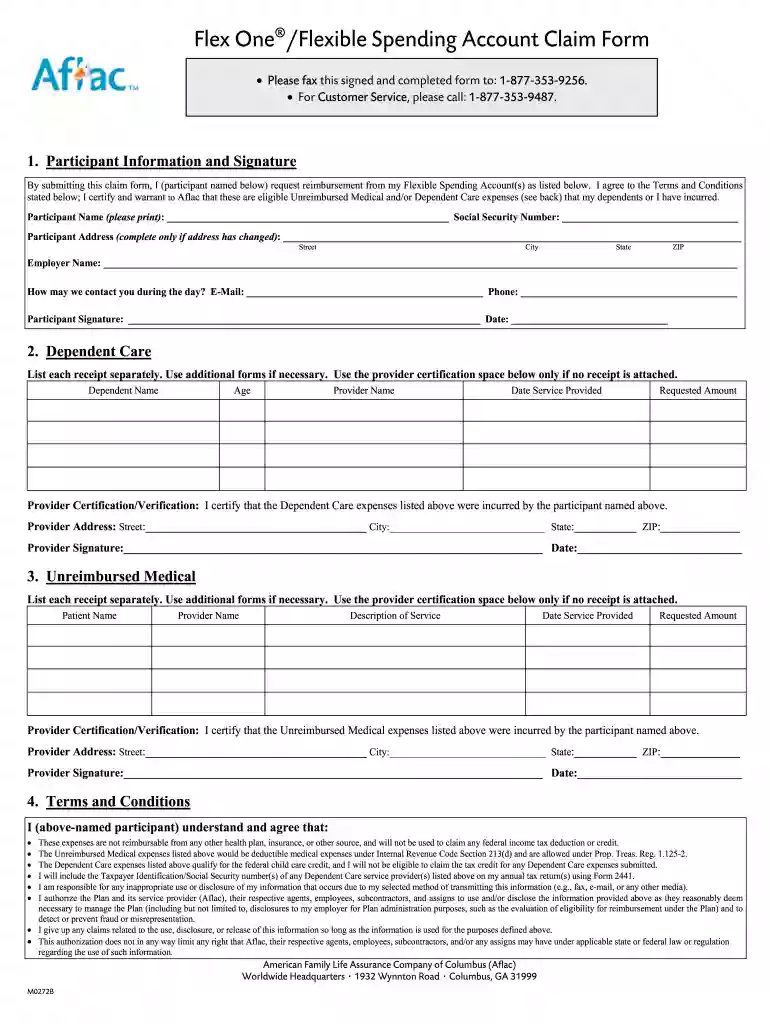
  2. Begin by filling out the Participant Information section. Enter your name, Social Security Number, and address if it has changed. Provide your employer's name and a daytime contact method (email and phone). Don’t forget to sign and date this section.
  3. Move on to the Dependent Care section. List each dependent care expense separately, including their name, age, provider's name, date of service provided, and requested amount. If you don’t have a receipt, use the provider certification space.
  4. Next, complete the Unreimbursed Medical section similarly. Document each medical expense with patient name, provider name, description of service, date provided, and requested amount. Again, use the certification space if needed.
  5. Review the Terms and Conditions carefully before submitting your completed form. Ensure all fields are filled accurately to avoid delays in processing.
  6. Finally, submit your completed form via fax or mail as instructed at the end of the document.

Start using our platform today for free to streamline your aflac account claim form submission!

be ready to get more

Complete this form in 5 minutes or less

Get form

Got questions?

We have answers to the most popular questions from our customers. If you can't find an answer to your question, please contact us.
Contact us
Once youve registered and logged in at aflac.com/login, you can set up direct deposit and get your money fast. Select My Account (then select Manage Account, if using Desktop). Select Billing Direct Deposit. Select Manage Direct Deposit to add your banking information and get paid fast.
How do I check the status of my claim? Log in to your account to check the status of your claim. From there, youll be able to check claim status, upload additional supporting documents if needed, and view your explanation of benefits. You may also check claim status by chat or phone by calling us at 800.992.3522.
Enroll in claims direct deposit1 and file an online claim to get paid quickly. File your claim online at aflac.com/mypolicy or on the MyAflac mobile app. 3 You may file up to 20 claims within a 24-hour period, and submit claims as far back as 10 years.
Aflac offers whole life insurance that comes with cash value. You can reap the benefits of the cash value component while youre still living, whether you want to withdraw funds or get a loan.

Security and compliance

At DocHub, your data security is our priority. We follow HIPAA, SOC2, GDPR, and other standards, so you can work on your documents with confidence.

Learn more
ccpa2
pci-dss
gdpr-compliance
hipaa
soc-compliance