




Here's how it works



How to use or fill out Form CT-2 Employee Representative's Quarterly Railroad Tax with DocHub

- Click ‘Get Form’ to open it in the editor.
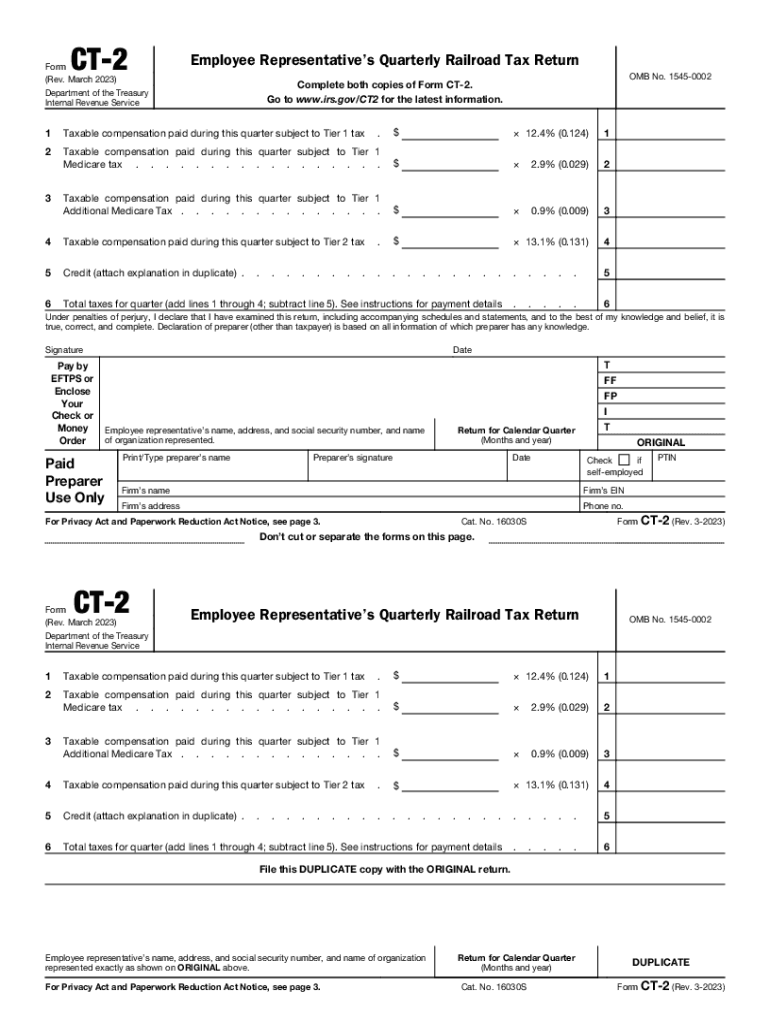
- Begin by entering your name, address, and social security number at the top of the form. Ensure this information matches exactly with your records.
- For Line 1, input the taxable compensation paid during the quarter subject to Tier 1 tax. Multiply this amount by 12.4% (0.124) to calculate the tax owed.
- Proceed to Line 2 and enter the taxable compensation for Tier 1 Medicare tax. This amount should be multiplied by 2.9% (0.029).
- On Line 3, report any additional Medicare tax applicable for compensation exceeding $200,000, multiplying that amount by 0.9% (0.009).
- For Line 4, enter the taxable compensation subject to Tier 2 tax and multiply it by 13.1% (0.131).
- If applicable, enter any credits on Line 5 and calculate total taxes for the quarter on Line 6 by adding Lines 1 through 4 and subtracting Line 5.
- Finally, sign and date the form before submitting both copies as instructed.
Start using our platform today to easily complete your Form CT-2 for free!
It's free
See more Form CT-2 Employee Representative's Quarterly Railroad Tax versions
Got questions?
How can I sign my Form CT-2 Employee Representative's Quarterly Railroad Tax without printing?
Electronic signatures are a great alternative to traditional signing, as they save time, effort, and costs people spend on printing, scanning, and paper delivery. You can electronically sign your Form CT-2 Employee Representative's Quarterly Railroad Tax using a trustworthy and robust online document processing services like DocHub. It complies with primary eSignature standards (ESIGN and UETA), so all documents approved there are legally binding and have the same validity as physically signed ones.
How do you edit Form CT-2 Employee Representative's Quarterly Railroad Tax on iOS?
You can easily edit and complete your Form CT-2 Employee Representative's Quarterly Railroad Tax on any iOS device. Open an internet browser of your choice, go to the DocHub site, authorize or create a new account, add your file for editing, and make your desired changes. Our service is mobile-friendly, so utilizing its features on your smartphone will be a no-brainer, even on the first try.
Under which condition is an employer not required to file a quarterly form 941?
Do I have to pay taxes on a 1099-R?
Who must file CT 1065?
Security and compliance
At DocHub, your data security is our priority. We follow HIPAA, SOC2, GDPR, and other standards, so you can work on your documents with confidence.
Learn more




