GOBIERNO DE PUERTO RICO - Departamento de Salud 2026

Get Form
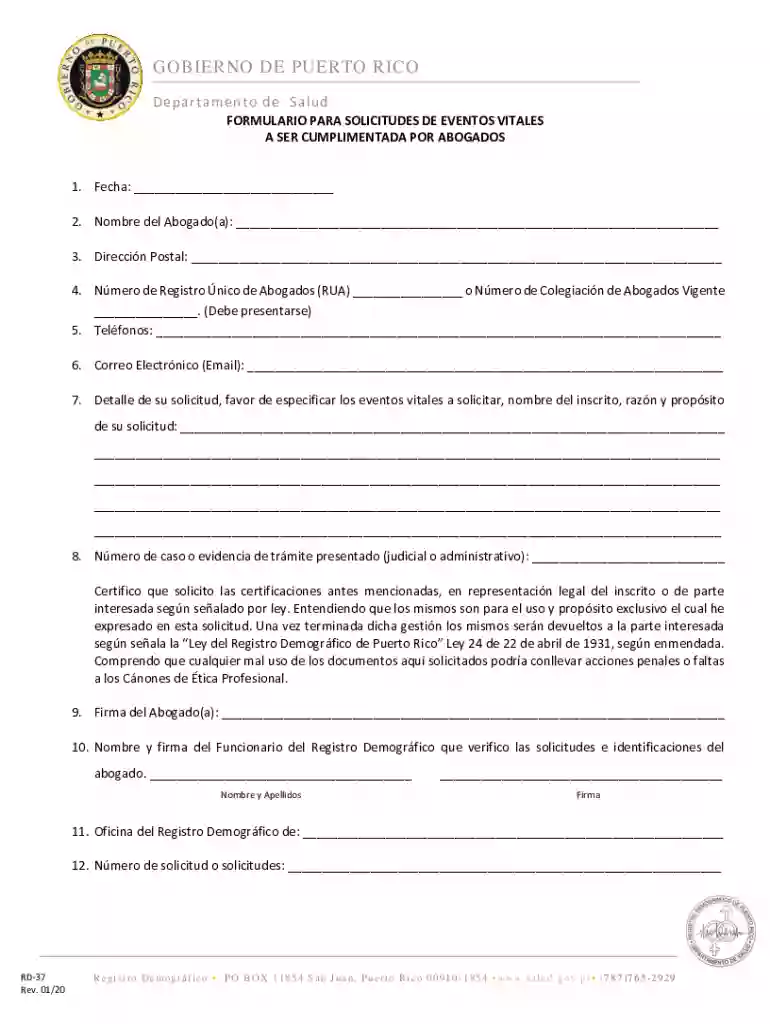
GOBIERNO DE PUERTO RICO - Departamento de Salud Preview on Page 1

Here's how it works

01. Edit your form online
Type text, add images, blackout confidential details, add comments, highlights and more.

02. Sign it in a few clicks
Draw your signature, type it, upload its image, or use your mobile device as a signature pad.

03. Share your form with others
Send it via email, link, or fax. You can also download it, export it or print it out.

How to use or fill out GOBIERNO DE PUERTO RICO - Departamento de Salud with our platform

Form edit decoration
9.5
Ease of Setup
DocHub User Ratings on G2
9.0
Ease of Use
DocHub User Ratings on G2
  1. Click ‘Get Form’ to open it in the editor.
  2. Begin by entering the date in the first field labeled 'Fecha'. This is essential for tracking your request.
  3. In the next field, provide your full name as the attorney ('Nombre del Abogado(a)'). Ensure accuracy for identification purposes.
  4. Fill in your postal address ('Dirección Postal') to ensure correspondence reaches you without delay.
  5. Enter your Unique Registration Number ('Número de Registro Único de Abogados (RUA)') or current Bar Association number. This is a mandatory requirement.
  6. Provide your contact numbers and email address to facilitate communication regarding your application.
  7. Detail your request in the specified section, including vital events you are requesting, names of those involved, and the purpose of your request.
  8. Input any case number or evidence of submitted procedures in the designated area to support your application.
  9. Sign and date where indicated as 'Firma del Abogado(a)' to validate your request legally.
  10. Finally, ensure that a representative from the Demographic Registry verifies and signs off on your submission before finalizing it.

Start using our platform today for free to streamline your document completion process!

See more GOBIERNO DE PUERTO RICO - Departamento de Salud versions

We've got more versions of the GOBIERNO DE PUERTO RICO - Departamento de Salud form. Select the right GOBIERNO DE PUERTO RICO - Departamento de Salud version from the list and start editing it straight away!
Versions Form popularity Fillable & printable
2020 4.5 Satisfied (52 Votes)
2016 4.8 Satisfied (49 Votes)
be ready to get more

Complete this form in 5 minutes or less

Get form

Got questions?

We have answers to the most popular questions from our customers. If you can't find an answer to your question, please contact us.
Contact us

Most eSignature services require users to have a paid subscription. With DocHub, there are two options for you to create an electronic signature to your GOBIERNO DE PUERTO RICO - Departamento de Salud at no cost:

  • You can do it during a 7-day trial period;
  • You can sign up for a free plan.

The second option, though, has restrictions on the number of signatures, sign requests, emails, and forms for adjusting available per month. You can check for full information here.

When you go for analog methods of completing your GOBIERNO DE PUERTO RICO - Departamento de Salud, it is simple to download your file for printing. Search DocHub’s Forms & Templates catalog to find the exact document template you require and open it for editing or download it on your gadget in the format of your liking. It is possible to complete your form electronically and place your handwritten signature on it after printing or eSign your document with DocHub.

Para hacer un Certificado de Buena Salud es necesario que acudas a un centro mdico pblico o privado que realice este tipo de documentos. Los requisitos para solicitarlo es llevar un examen de sangre y otro de orina, adems de entregar todos los datos personales correspondientes.
► Se hace en un formulario del Departamento de Salud. expide el Certificado de Salud.)
Toda persona puede solicitar voluntariamente y ser evaluado en las Oficinas Locales del Programa Medicaid del Departamento de Salud para el Plan de Salud Vital del Gobierno de Puerto Rico. Cualquier persona que quiera ver si puede inscribirse en Vital puede visitar su oficina local de Medicaid.

Security and compliance

At DocHub, your data security is our priority. We follow HIPAA, SOC2, GDPR, and other standards, so you can work on your documents with confidence.

Learn more
ccpa2
pci-dss
gdpr-compliance
hipaa
soc-compliance

People also ask

El Plan Vital ofrece servicios de salud mental, alcohol y abuso de sustancias. No tienes que ver a tu PCP primero para ver un doctor u otro proveedor para los servicios de salud mental, alcohol o abuso de sustancias. Puedes solicitar estos servicios cada vez que sea necesario.
Dnde puede solicitar? Puede solicitar a travs de Internet: .medicaid.pr.gov. A travs de nuestro Centro de Llamadas: (787) 641-4224 / (787) 625-6955 TTY/TDD de lunes a viernes de 8:00 am a 6:00 pm. En persona, visitando una de nuestras oficinas.
Para expedir el Certificado de Salud debe visitar un centro de vacunacin para que le suministren la vacuna de tuberculosis. Luego de 48 horas como tiempo mnimo, necesita regresar al centro para la prueba de Tuberculina con el propsito de determinar si la vacuna fue aceptada por su cuerpo exitosamente.
Para generar tu certificado en lnea debers seguir estos pasos: Ingresa a nuestro portal transaccional. Selecciona la opcin Servicios en Lnea Ingresa por la opcin Afiliados POS Selecciona la opcin Servicio al Cliente Ingresa a Certificaciones
Puede obtener una cita a travs de internet: .medicaid.pr.gov o a travs de nuestro Centro de Llamadas: (787) 641-4224 / (787) 625-6955 TTY/TDD de lunes a viernes de 8:00 am a 6:00 pm.

Related links