




Here's how it works



How to use or fill out Pricing, Revenues and Participation under Washington State with our platform

- Click ‘Get Form’ to open it in the editor.
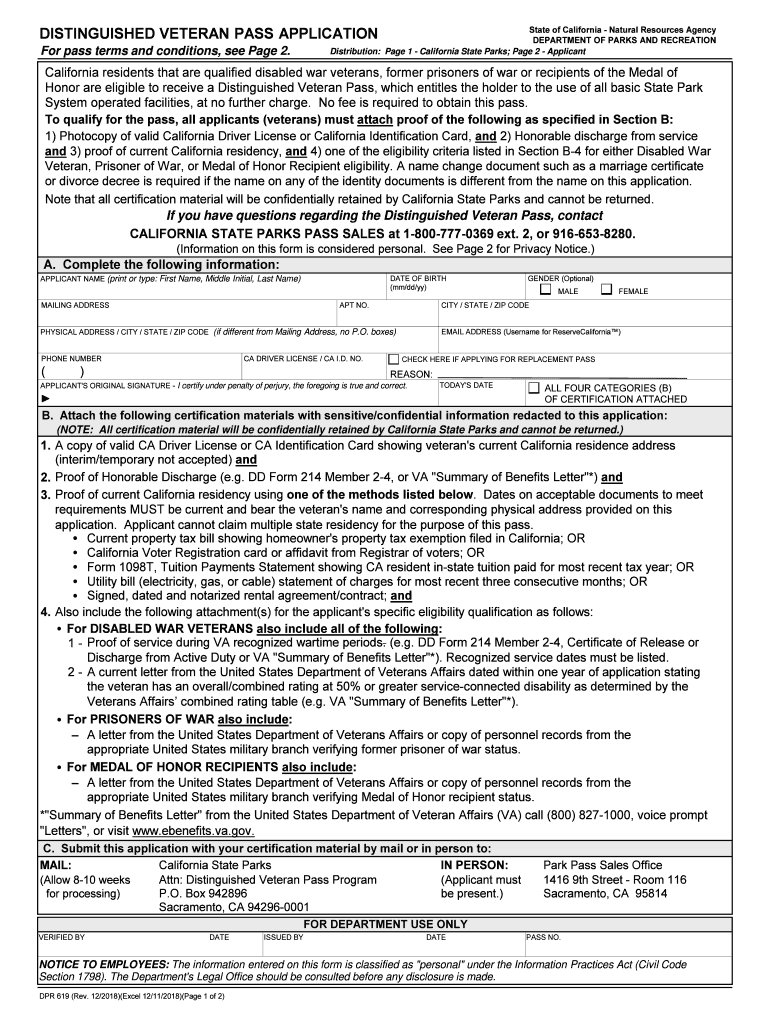
- Begin by entering your DATE OF BIRTH in the specified format (mm/dd/yy). This is essential for verifying your eligibility.
- Fill in your APPLICANT NAME clearly, ensuring to include your First Name, Middle Initial, and Last Name as required.
- Provide your MAILING ADDRESS along with any apartment number if applicable. Ensure accuracy for correspondence purposes.
- Enter your PHONE NUMBER and EMAIL ADDRESS. The email will serve as your username for online services.
- If applicable, check the box indicating you are applying for a REPLACEMENT PASS and provide a reason.
- Sign the application to certify that all information provided is true and correct, then date it accordingly.
- Attach all required certification materials as outlined in Section B before submitting the application either by mail or in person.
Start using our platform today to streamline your form completion process effortlessly!
It's free
See more Pricing, Revenues and Participation under Washington State versions
Got questions?
Can I complete and sign my Pricing, Revenues and Participation under Washington State online?
Sure, and it’s really straightforward! DocHub is an online PDF editor with advanced document management functions that allow you quickly adjust your paperwork, complete blank fields and insert new ones for other people to fill out, and create electronic signatures in several ways. Add your Pricing, Revenues and Participation under Washington State, provide information as requested, and select how you want to eSign your template - by typing your name, drawing your signature, uploading its picture, or utilizing a QR code.
How do you create an e-signature for the Pricing, Revenues and Participation under Washington State on iOS?
Apart from an extensive toolset for editing PDFs on mobile devices, DocHub allows you to sign your Pricing, Revenues and Participation under Washington State along the way. Open our editor in your internet browser, make changes using DocHub’s toolset, and complete your editing by eSigning the completed form.
Security and compliance
At DocHub, your data security is our priority. We follow HIPAA, SOC2, GDPR, and other standards, so you can work on your documents with confidence.
Learn more


