01. Edit your retirement letter to employer online
Type text, add images, blackout confidential details, add comments, highlights and more.
02. Sign it in a few clicks
Draw your signature, type it, upload its image, or use your mobile device as a signature pad.
03. Share your form with others
Send simple retirement letter to employer via email, link, or fax. You can also download it, export it or print it out.
How to use or fill out retirement letter to employer with our platform
Ease of Setup
DocHub User Ratings on G2
Ease of Use
DocHub User Ratings on G2
Click ‘Get Form’ to open the retirement letter in the editor.
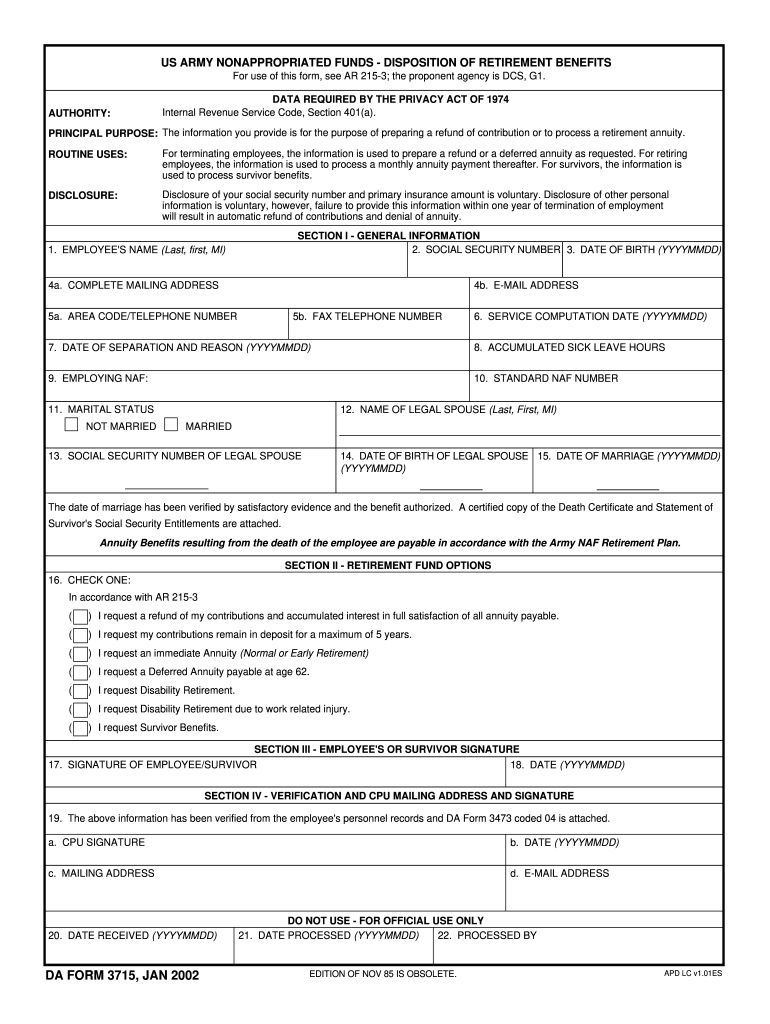
Begin by filling out Section I - General Information. Enter your name, social security number, date of birth, and complete mailing address. Ensure that your contact details are accurate for any follow-up communications.
In Section II - Retirement Fund Options, select one of the options that best fits your retirement plan. This could be a refund of contributions, immediate annuity, or deferred annuity among others. Make sure to read each option carefully before making your selection.
Proceed to Section III and provide your signature along with the date. If applicable, ensure that your spouse's information is filled out correctly in this section.
Finally, review all sections for accuracy and completeness before submitting the form through our platform. Utilize the editing features to make any necessary adjustments easily.
Start using our platform today for free to streamline your retirement letter process!
Fill out retirement letter to employer online It's free
We've got more versions of the retirement letter to employer form. Select the right retirement letter to employer version from the list and start editing it straight away!
Simple retirement letter to employerRetirement letter to employer templateBest retirement letter everSimple retirement letter to employer pdfFree sample retirement letter to employerBest retirement letter ever PDFRetirement letter to employer pdfSimple retirement letter to employer template Word
Security and compliance
At DocHub, your data security is our priority. We follow HIPAA, SOC2, GDPR, and other standards, so you can work on your documents with confidence.
Complete line 41a of your return if it applies to you. If you, or your spouse if filing jointly, had more than one employer for 2005 and total wages of overRead more
After submitting your application for a determination letter, you will receive an acknowledgement notice, which means the IRS has received your application.Read more
This letter is to inform you of my intentions to retire. My last day of employment at Wayne. State University will be . My retirement date will be the nextRead more
Cookie consent notice
This site uses cookies to enhance site navigation and personalize your experience.
By using this site you agree to our use of cookies as described in our Privacy Notice.
You can modify your selections by visiting our Cookie and Advertising Notice.