Medical questionnaire disability 2026

Get Form
medical questionnaire disability Preview on Page 1

Here's how it works

01. Edit your medical questionnaire disability online
Type text, add images, blackout confidential details, add comments, highlights and more.
02. Sign it in a few clicks
Draw your signature, type it, upload its image, or use your mobile device as a signature pad.
03. Share your form with others
Send it via email, link, or fax. You can also download it, export it or print it out.

How to use or fill out medical questionnaire disability with our platform

Form edit decoration
9.5
Ease of Setup
DocHub User Ratings on G2
9.0
Ease of Use
DocHub User Ratings on G2
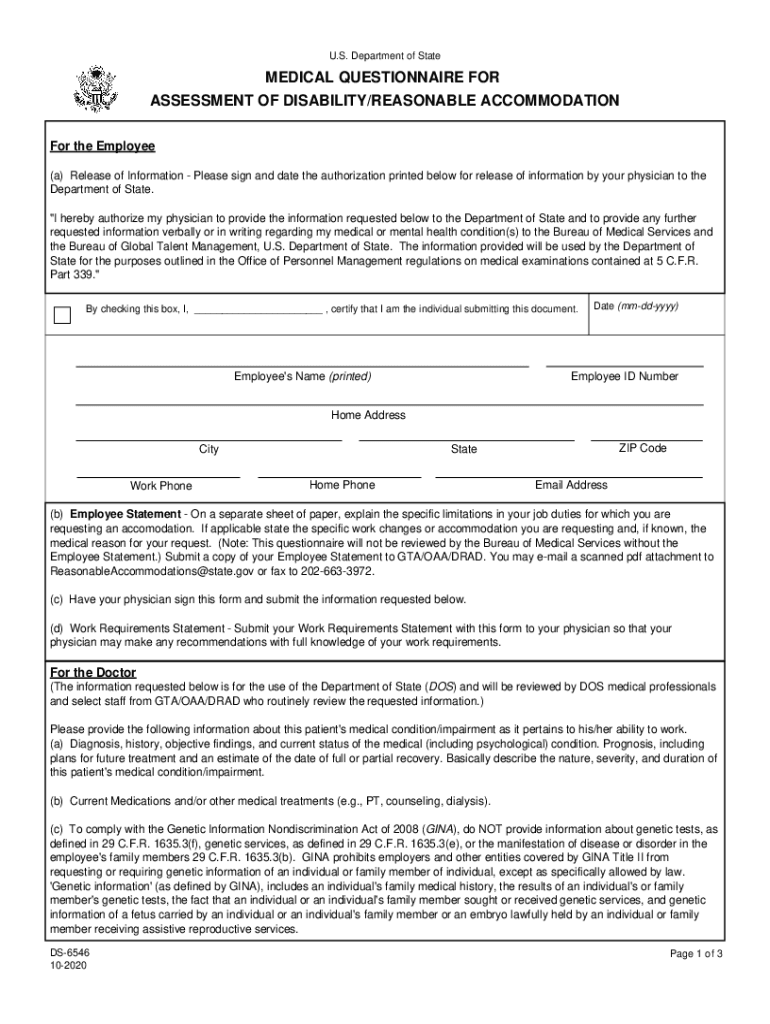
  1. Click ‘Get Form’ to open the medical questionnaire for assessment of disability in the editor.
  2. Begin by completing the Release of Information section. Sign and date the authorization, ensuring your physician can share necessary information with the Department of State.
  3. Fill in your personal details, including your name, employee ID number, contact information, and home address. This information is crucial for identification purposes.
  4. In the Employee Statement section, provide a detailed explanation of your job limitations and any specific accommodations you are requesting. Remember to submit this statement separately as instructed.
  5. Have your physician complete their section by providing a thorough assessment of your medical condition, including diagnosis and treatment plans. Ensure they sign and date the form.
  6. Finally, review all sections for accuracy before submitting the completed form via email or fax as specified in the instructions.

Start using our platform today to easily fill out your medical questionnaire for free!

See more medical questionnaire disability versions

We've got more versions of the medical questionnaire disability form. Select the right medical questionnaire disability version from the list and start editing it straight away!
Versions Form popularity Fillable & printable
2020 4.8 Satisfied (160 Votes)
be ready to get more

Complete this form in 5 minutes or less

Get form

Got questions?

We have answers to the most popular questions from our customers. If you can't find an answer to your question, please contact us.
Contact us
Those with Invisible Disabilities Are Not Faking It Heart disease. Lung disease. Hearing loss/auditory impairments. Multiple chemical sensitivities.
The HDQ is a 32-item screening questionnaire that highlights features of hidden disabilities including Dyslexia, Dyspraxia and Attention Deficit Disorder designed for people aged 14 and over.
Hidden disabilities include autism, mental health, acquired/traumatic brain injury, sensory processing, multiple sclerosis, epilepsy, partial sight and hearing loss. For instance, those with autism may need some extra time and space to process what is around them.
DBQs help collect necessary medical information to process your disability claims. You can use these forms to submit medical evidence from your health care providers.
Disability Benefits Questionnaires (DBQs) are downloadable forms for Veterans to use in the disability evaluation process. DBQs can help speed the processing of compensation and pension claims.

Security and compliance

At DocHub, your data security is our priority. We follow HIPAA, SOC2, GDPR, and other standards, so you can work on your documents with confidence.

Learn more
ccpa2
pci-dss
gdpr-compliance
hipaa
soc-compliance

People also ask

The doctor will typically perform a physical or mental evaluation (depending on your claimed disability). This could include a range of tests such as X-rays, MRIs, blood samples, or any procedures specifically called out by DDS.
The following stores/companies are a few of those participating in the Scheme: MS. Lanyards should be available from the order desks in stores or at the till point in outlet stores. Network Rail. Sainsburys. Argos. Tesco.

Related links