Loan Discharge Authority Form - My Home Loan 2026

Get Form
loan discharge authority form Preview on Page 1

Here's how it works

01. Edit your loan discharge authority form online
Type text, add images, blackout confidential details, add comments, highlights and more.
02. Sign it in a few clicks
Draw your signature, type it, upload its image, or use your mobile device as a signature pad.
03. Share your form with others
Send home loan discharge form via email, link, or fax. You can also download it, export it or print it out.

How to use or fill out Loan Discharge Authority Form - My Home Loan with our platform

Form edit decoration
9.5
Ease of Setup
DocHub User Ratings on G2
9.0
Ease of Use
DocHub User Ratings on G2
  1. Click ‘Get Form’ to open the Loan Discharge Authority Form in the editor.
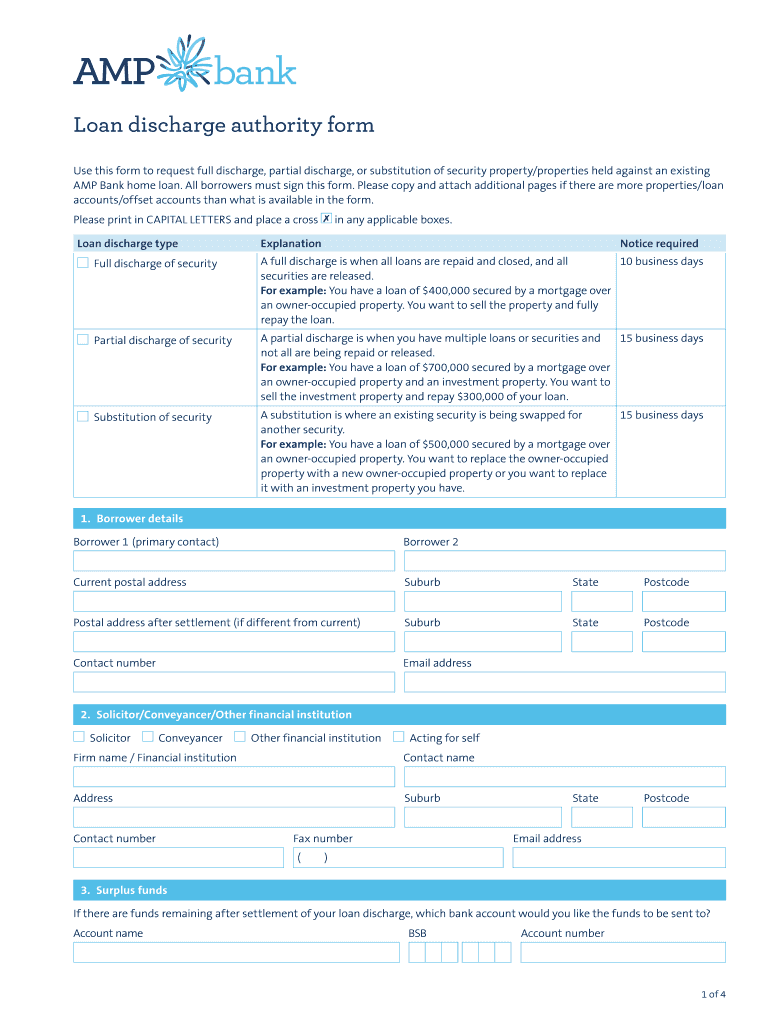
  2. Begin by filling out the 'Loan discharge type' section. Choose between full discharge, partial discharge, or substitution of security by placing a cross ✗ in the applicable box.
  3. In the 'Borrower details' section, enter information for both borrowers, including names, current postal address, and contact details. Ensure all fields are completed in CAPITAL LETTERS.
  4. If applicable, provide details of your solicitor or conveyancer in the next section. Include their firm name and contact information.
  5. For surplus funds, specify which bank account should receive any remaining balance after settlement by filling out the account name, BSB, and account number.
  6. Detail existing security property information including addresses, sale prices, anticipated settlement dates, and reasons for discharge.
  7. Complete any substitution security property details if you are replacing an existing property. Provide new addresses and estimated values.
  8. Indicate what you wish to happen with your existing loan accounts and offset deposit accounts in their respective sections.
  9. Finally, ensure all borrowers sign the declaration section at the end of the form before submitting it via email or mail as instructed.

Start using our platform today to easily complete your Loan Discharge Authority Form for free!

See more Loan Discharge Authority Form - My Home Loan versions

We've got more versions of the Loan Discharge Authority Form - My Home Loan form. Select the right Loan Discharge Authority Form - My Home Loan version from the list and start editing it straight away!
Versions Form popularity Fillable & printable
2019 4.2 Satisfied (32 Votes)
2018 4.6 Satisfied (40 Votes)
2015 4.3 Satisfied (49 Votes)
be ready to get more

Complete this form in 5 minutes or less

Get form

Got questions?

We have answers to the most popular questions from our customers. If you can't find an answer to your question, please contact us.
Contact us
A discharge authority form is used to release the security (e.g. property or cash security) youve provided for a home loan. Looking to refinance your CommBank home loan? Call us on 1300 219 166, 8am-6pm Monday to Friday (Sydney/Melbourne time) to make sure youre getting the most out of your CommBank home loan.
A mortgage discharge is when a mortgage securing your home loan is removed from the title of your property once you have repaid your home loan in full. Youll need to complete a mortgage discharge or release form to release the mortgage over the property you have provided as security to your home loan.
The solution is a Mortgage Discharge. Its a simple document, in which the bank tells the world (a) that your loan has been paid in full and (b) that the bank has released its lien on your property.
There are various reasons for requesting a discharge, these include selling, refinancing, loan repaid, and substitution of a security or releasing a guarantor. A discharge authority form is used to release the security (e.g. property or cash security) youve provided for a home loan.
Typically, your lender will provide a confirmation that you paid your mortgage in full. Most lenders dont send this confirmation unless you make a request. Check if your lender has a formal process for this request.

Security and compliance

At DocHub, your data security is our priority. We follow HIPAA, SOC2, GDPR, and other standards, so you can work on your documents with confidence.

Learn more
ccpa2
pci-dss
gdpr-compliance
hipaa
soc-compliance
be ready to get more

Complete this form in 5 minutes or less

Get form

People also ask

In a discharge of mortgage, your home loan (sometimes called an encumbrance) is officially removed from the title of your property. Essentially, your home officially becomes your own no lender is involved.

Related links