United States Tax Exemption Form GSA 2026

Get Form
United States Tax Exemption Form GSA Preview on Page 1

Here's how it works

01. Edit your form online
Type text, add images, blackout confidential details, add comments, highlights and more.
02. Sign it in a few clicks
Draw your signature, type it, upload its image, or use your mobile device as a signature pad.
03. Share your form with others
Send it via email, link, or fax. You can also download it, export it or print it out.

How to use or fill out United States Tax Exemption Form GSA with our platform

Form edit decoration
9.5
Ease of Setup
DocHub User Ratings on G2
9.0
Ease of Use
DocHub User Ratings on G2
  1. Click ‘Get Form’ to open the United States Tax Exemption Form GSA in the editor.
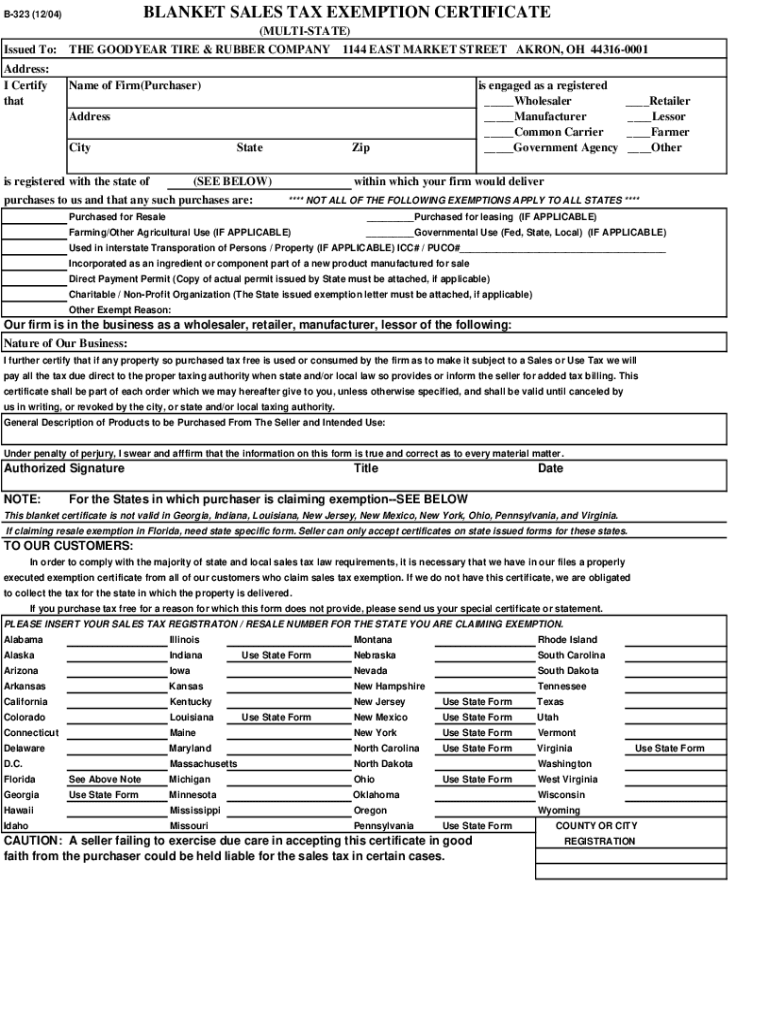
  2. Begin by filling in the 'Issued To' section with the name of your firm and its address. Ensure accuracy as this information is crucial for tax records.
  3. Select your business type from the options provided, such as Wholesaler, Manufacturer, or Government Agency. This classification affects your exemption eligibility.
  4. In the 'Purchased for' section, check all applicable boxes that describe how you intend to use the purchased items, such as for resale or governmental use.
  5. Complete the 'Nature of Our Business' field with a brief description of your business activities. This helps clarify your exemption status.
  6. Sign and date the form at the bottom. Your signature certifies that all information provided is accurate under penalty of perjury.

Start using our platform today to fill out your United States Tax Exemption Form GSA quickly and efficiently!

be ready to get more

Complete this form in 5 minutes or less

Get form

Got questions?

We have answers to the most popular questions from our customers. If you can't find an answer to your question, please contact us.
Contact us
Tax exemptions reduce the amount of income on which you owe tax. For example, if your gross income is $100,000 and you have a $5,000 exemption, you will be taxed on $95,000.
How to claim exempt status on a W-4. To claim an exemption, you must complete only lines 1, 2, 3, 4, and 7 and sign the form to validate it. (In Box 7, write EXEMPT. Writing this will guarantee that withholdings are not taken from your future paychecks.)
Exemption from withholding An employee can also use Form W-4 to tell you not to withhold any federal income tax. To qualify for this exempt status, the employee must have had no tax liability for the previous year and must expect to have no tax liability for the current year.
How to fill out Form ST-120? Open Form ST-120 in the PDF editor. Fill in your name, address, and sales tax registration number in the appropriate fields. Complete the sellers information if applicable. List the items being purchased for resale. Sign the form electronically. Download the completed form to your device.
The exemption certificate is properly completed and legible: Name and address of the purchaser. Description of the item to be purchased. The reason the purchase is exempt. Signature of purchaser and date; and. Name and address of the seller.

Security and compliance

At DocHub, your data security is our priority. We follow HIPAA, SOC2, GDPR, and other standards, so you can work on your documents with confidence.

Learn more
ccpa2
pci-dss
gdpr-compliance
hipaa
soc-compliance

People also ask

To claim exempt, write EXEMPT under line 4c. You may claim EXEMPT from withholding if: o Last year you had a right to a full refund of All federal tax income and o This year you expect a full refund of ALL federal income tax. NOTE: if you claim EXEMPT you must complete a new W-4 annually in February.
No U.S. citizen is exempt from paying taxes if they owe them to either the federal government or to their state. Their incomes may be exempt from taxation, however, so they dont owe anything. They may be exempt from filing because they dont owe any tax due to other tax provisions.

Related links