Form 2948-2026

Get Form
form 2948 plan of operation Preview on Page 1

Here's how it works

01. Edit your form 2948 plan of operation online
Type text, add images, blackout confidential details, add comments, highlights and more.

02. Sign it in a few clicks
Draw your signature, type it, upload its image, or use your mobile device as a signature pad.

03. Share your form with others
Send form 2948 via email, link, or fax. You can also download it, export it or print it out.

How to use or fill out form 2948 with our platform

Form edit decoration
9.5
Ease of Setup
DocHub User Ratings on G2
9.0
Ease of Use
DocHub User Ratings on G2
  1. Click ‘Get Form’ to open it in the editor.
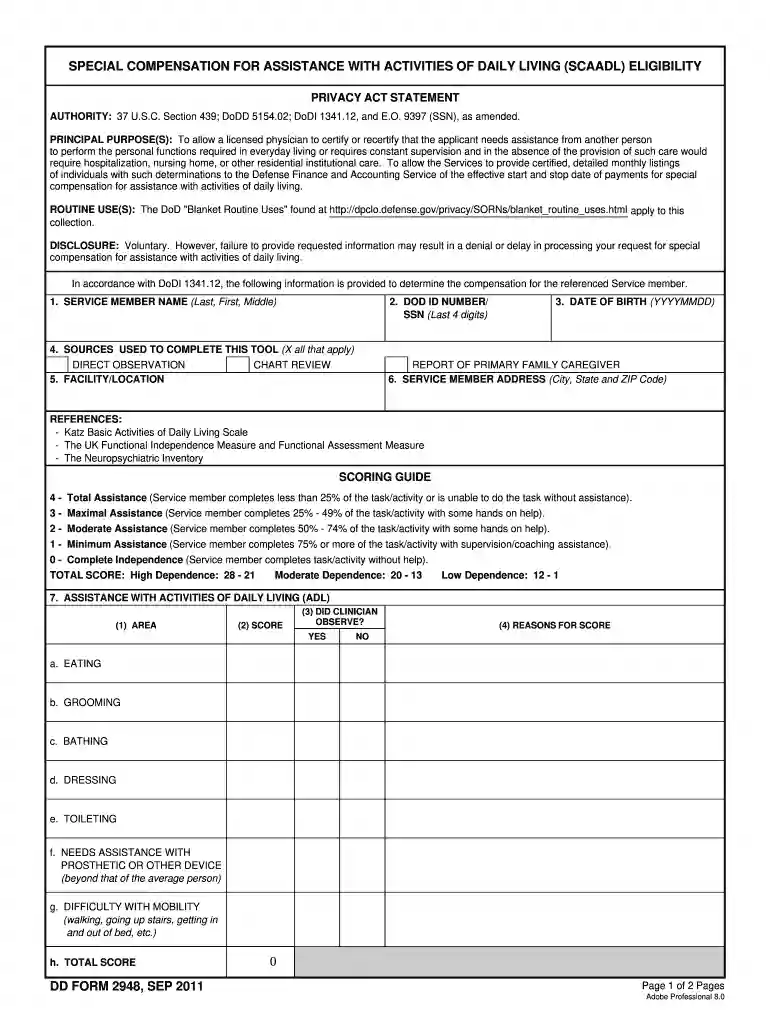
  2. Begin by entering the Service Member's name in the designated field, ensuring accuracy for proper identification.
  3. Input the last four digits of the DOD ID number or SSN, followed by the date of birth in YYYYMMDD format.
  4. Select all applicable sources used to complete this tool, such as direct observation or chart review, by marking the corresponding boxes.
  5. Fill in the Service Member's address, including city, state, and ZIP code for correspondence purposes.
  6. For each area of assistance with activities of daily living (ADL), provide a score based on observations and document reasons for each score.
  7. Complete the supervision/protection section similarly, scoring each area and noting clinician observations.
  8. Finally, ensure that all signatures are completed at the bottom of the form along with contact information for follow-up.

Start using our platform today to fill out form 2948 online for free and streamline your document processes!

See more form 2948 versions

We've got more versions of the form 2948 form. Select the right form 2948 version from the list and start editing it straight away!
Versions Form popularity Fillable & printable
2019 4.8 Satisfied (178 Votes)
2011 4.3 Satisfied (248 Votes)
be ready to get more

Complete this form in 5 minutes or less

Get form

Got questions?

We have answers to the most popular questions from our customers. If you can't find an answer to your question, please contact us.
Contact us
Purpose of Form Use Form 2848 to authorize an individual to represent you before the IRS. The individual you authorize must be a person eligible to practice before the IRS. The eligible individuals are listed in Part II, Declaration of Representative, items a-h.
Normally, a taxpayer must sign an IRS Form 2848, Power of Attorney and Declaration of Representative, to allow someone to represent them in a tax matter with the IRS -- the representative must also have certain professional credentials.
Taxpayers and electronic return originators (EROs) use this form to send any required paper forms or supporting documentation listed next to the checkboxes on the front of the form. Form 8453 is used solely to transmit the forms listed on the front of the form. Do not send Forms W-2, W-2G, or 1099-R.
The third party can be a family member or friend, a tax professional, attorney or business, depending on the authorization. There are different types of third party authorizations: Power of Attorney - Allow someone to represent you in tax matters before the IRS.
Because Form 2848 gives you all of the powers of Form 8821 plus representation and negotiation, you can use this form for all functions. However, if you do not need representation rights and you only need access to information, then Form 8821 will get the job done while also being less of a commitment for your client.

Security and compliance

At DocHub, your data security is our priority. We follow HIPAA, SOC2, GDPR, and other standards, so you can work on your documents with confidence.

Learn more
ccpa2
pci-dss
gdpr-compliance
hipaa
soc-compliance

People also ask

How Do I Fill Out Form W-8BEN? Part I Identification of Beneficial Owner: Line 1: Enter your name as the beneficial owner. Line 2: Enter your country of citizenship. Line 3: Enter your permanent residence/mailing address. Line 4: Enter your mailing address, if different.
Form 942 is a tax form used by employers who hire household employees, such as nannies, housekeepers, or caregivers. Its used to report and pay federal income tax, Social Security, and Medicare taxes for household employees. It is used to report any withheld income tax on wages paid to household employees.
A principal officer, director, trustee, or other official who is authorized to sign for the organization must digitally sign Form 1023. Generally, a principal officer is the president, vice president, secretary or treasurer.

Related links