Risk Management Audit Forms for Oxford Customers (NY, NJ & CT) This PDF contains the Employer Inform 2026

Get Form
Risk Management Audit Forms for Oxford Customers (NY, NJ & CT) This PDF contains the Employer Inform Preview on Page 1

Here's how it works

01. Edit your form online
Type text, add images, blackout confidential details, add comments, highlights and more.
02. Sign it in a few clicks
Draw your signature, type it, upload its image, or use your mobile device as a signature pad.
03. Share your form with others
Send it via email, link, or fax. You can also download it, export it or print it out.

How to use or fill out Risk Management Audit Forms for Oxford Customers (NY, NJ & CT) This PDF contains the Employer Inform

Form edit decoration
9.5
Ease of Setup
DocHub User Ratings on G2
9.0
Ease of Use
DocHub User Ratings on G2
  1. Click ‘Get Form’ to open it in the editor.
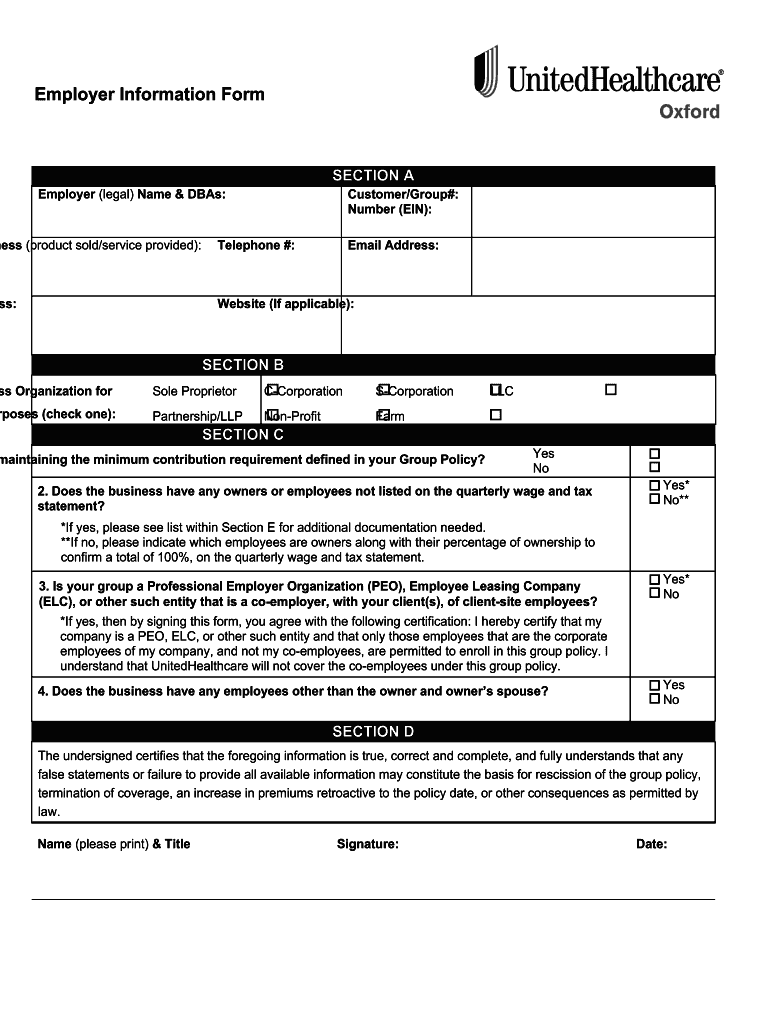
  2. Begin with Section A by entering your Employer (legal) Name and any DBAs. Fill in your Customer/Group#, Federal Employer Identification Number (EIN), Nature of Business, Telephone #, Email Address, Physical Address, and Website if applicable.
  3. Proceed to Section B to select the Type of Business Organization. Check the appropriate box for Sole Proprietor, C-Corporation, S-Corporation, Partnership/LLP, Non-Profit, Farm, or LLC.
  4. In Section C, answer the questions regarding contribution requirements and employee listings. If applicable, provide additional documentation as indicated.
  5. Complete Section D by certifying that all information is accurate. Print your name and title, sign the form, and date it.
  6. Section E requires you to attach a copy of the most recent quarterly wage and tax statement along with any necessary ownership documentation.
  7. Finally, review all sections for completeness before submitting through our platform for processing.

Start filling out your Risk Management Audit Form today using our editor for a seamless experience!

See more Risk Management Audit Forms for Oxford Customers (NY, NJ & CT) This PDF contains the Employer Inform versions

We've got more versions of the Risk Management Audit Forms for Oxford Customers (NY, NJ & CT) This PDF contains the Employer Inform form. Select the right Risk Management Audit Forms for Oxford Customers (NY, NJ & CT) This PDF contains the Employer Inform version from the list and start editing it straight away!
Versions Form popularity Fillable & printable
2021 4.3 Satisfied (29 Votes)
2020 4.2 Satisfied (43 Votes)
2014 4.8 Satisfied (63 Votes)
be ready to get more

Complete this form in 5 minutes or less

Get form

Got questions?

We have answers to the most popular questions from our customers. If you can't find an answer to your question, please contact us.
Contact us

If you often deal with documents stored in your Google Drive, DocHub is a superb option for you to easily and quickly complete, edit, and sign them. This editor integrates well with Google apps, so you can export your Risk Management Audit Forms for Oxford Customers (NY, NJ & CT) This PDF contains the Employer Inform from your Google Drive to the editor without the need of downloading and re-uploading it. Right-click on your file, select Open With → DocHub PDF Sign and Edit. In our editor, add and assign Signature Fields for all parties involved, then click on the Menu option above → Send → select how you want to share your form.

If you are using Chrome, there are two simple methods to modify your Risk Management Audit Forms for Oxford Customers (NY, NJ & CT) This PDF contains the Employer Inform online. First, go to the DocHub website, add your document, and modify it utilizing our toolbar. You can also install our Chrome extension and modify any document by dragging and dropping it in your web browser window.

Security and compliance

At DocHub, your data security is our priority. We follow HIPAA, SOC2, GDPR, and other standards, so you can work on your documents with confidence.

Learn more
ccpa2
pci-dss
gdpr-compliance
hipaa
soc-compliance