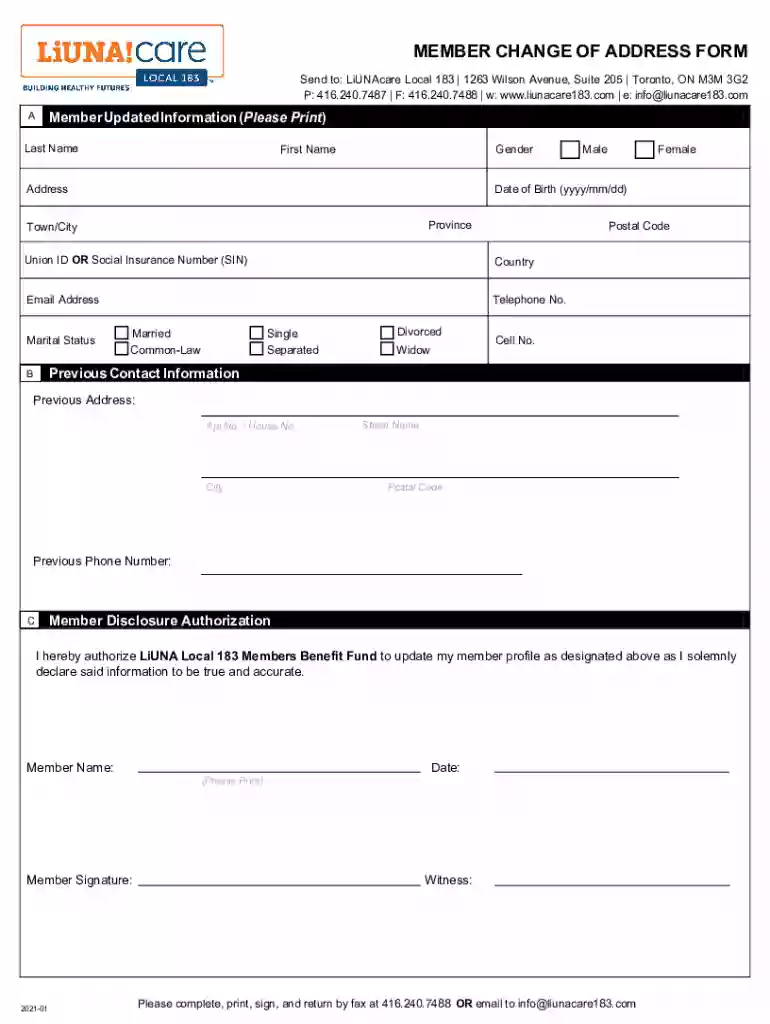
Member change of address form 2025

Get Form
member change of address form Preview on Page 1

Here's how it works

01. Edit your form online
Type text, add images, blackout confidential details, add comments, highlights and more.

02. Sign it in a few clicks
Draw your signature, type it, upload its image, or use your mobile device as a signature pad.

03. Share your form with others
Send it via email, link, or fax. You can also download it, export it or print it out.

How to use or fill out member change of address form with our platform

Form edit decoration
9.5
Ease of Setup
DocHub User Ratings on G2
9.0
Ease of Use
DocHub User Ratings on G2
  1. Click ‘Get Form’ to open the member change of address form in the editor.
  2. Begin by filling out your updated information in Section A. Enter your last name, first name, and gender. Provide your date of birth, address, province, town/city, postal code, union ID or social insurance number (SIN), country, email address, and telephone number.
  3. Indicate your marital status by selecting one of the options: married, common-law, single, separated, divorced, or widow. Don’t forget to include your cell number for additional contact.
  4. In Section B, provide your previous contact information. Fill in your previous address details including apartment/house number, city, street name, postal code, and previous phone number.
  5. Section C requires you to authorize the update of your member profile. Print your name and sign the document along with the date and a witness signature.
  6. Once completed, save the document and return it via fax at 416.240.7488 or email it to info@liunacare183.com.

Start using our platform today to easily manage your member change of address form for free!

See more member change of address form versions

We've got more versions of the member change of address form form. Select the right member change of address form version from the list and start editing it straight away!
Versions Form popularity Fillable & printable
2021 4.8 Satisfied (97 Votes)
2013 4 Satisfied (51 Votes)
be ready to get more

Complete this form in 5 minutes or less

Get form

Got questions?

We have answers to the most popular questions from our customers. If you can't find an answer to your question, please contact us.
Contact us
There are two ways you can change your address: Visit the Official USPS Change of Address page to enter the order. Fill out and submit PS Form 3575, available at any U.S. Post Office.
Go to the Official USPS Change of Address website. Choose an option for either an Individual, Family (where everyone has the same last name), or Business move, and complete the form. Verify your identity: Opt in online to receive a verification code or link on your mobile phone.
Go to USPS.com/move to change your address online. There is a $1.05 charge to change your address online. You will need a credit or debit card and a valid email address. The $1.05 charge to your card is an identity verification fee to prevent fraud and make sure youre the one making the change.
Print and mail the form. Its essential to keep a copy of the filled form for your records. As of now, Form 8822 cannot be filed electronically.
To get proof of address after a recent move, update your address with utility providers, your bank, government agencies, the postal service, or your employer, and wait for the next bill or paycheck. Alternatively, you may be able to use your new lease agreement as valid proof.

People also ask

You can use Form 8822 to notify the Internal Revenue Service if you changed your home mailing address. If this change also affects the mailing address for your children who filed income tax returns, complete and file a separate Form 8822 for each child.

Related links