Prescription & Enrollment Form Oncology (oral) (A-S) 2026

Get Form
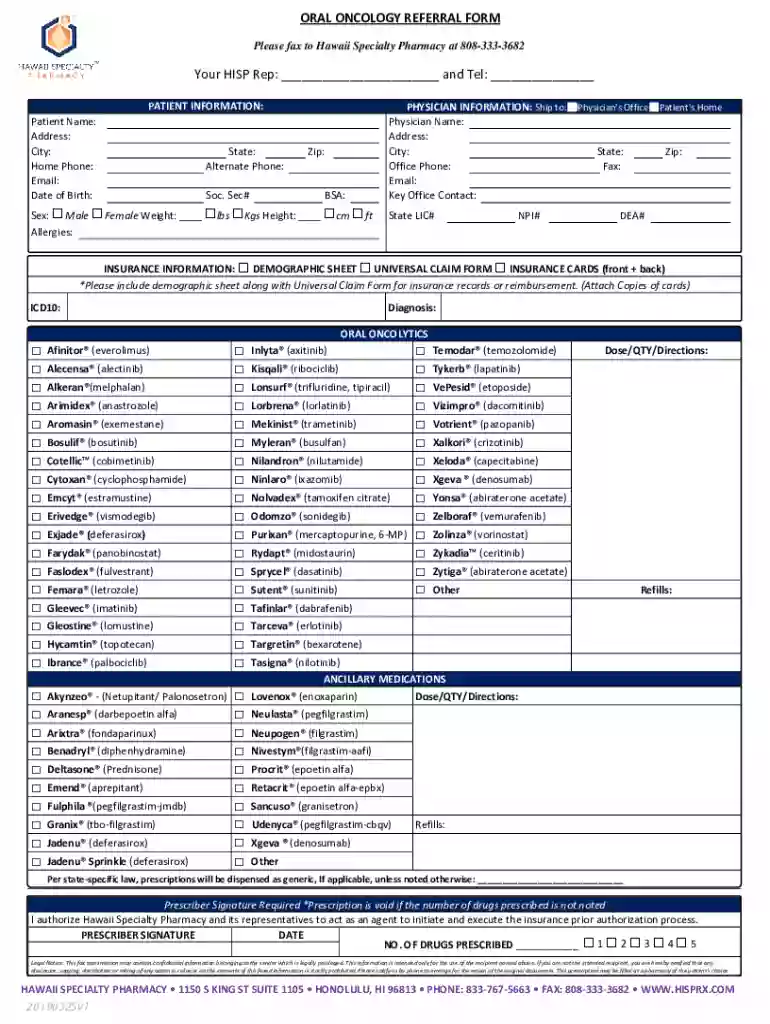
Prescription & Enrollment Form Oncology (oral) (A-S) Preview on Page 1

Here's how it works

01. Edit your form online
Type text, add images, blackout confidential details, add comments, highlights and more.

02. Sign it in a few clicks
Draw your signature, type it, upload its image, or use your mobile device as a signature pad.

03. Share your form with others
Send it via email, link, or fax. You can also download it, export it or print it out.

How to use or fill out Prescription & Enrollment Form Oncology (oral) (A-S) with our platform

Form edit decoration
9.5
Ease of Setup
DocHub User Ratings on G2
9.0
Ease of Use
DocHub User Ratings on G2
  1. Click ‘Get Form’ to open the Prescription & Enrollment Form Oncology (oral) (A-S) in the editor.
  2. Begin by filling out the 'Patient Information' section. Enter the patient's name, address, date of birth, and contact details. Ensure accuracy as this information is crucial for processing.
  3. Next, complete the 'Physician Information' section. Provide your name, office address, phone number, and any relevant licensing numbers. This helps in verifying your credentials.
  4. In the 'Insurance Information' section, attach necessary documents like insurance cards and demographic sheets. This ensures smooth reimbursement processes.
  5. Select the appropriate oral oncolytics from the list provided. Specify dosage and directions clearly to avoid any confusion.
  6. Finally, sign and date the form in the designated area. Remember that a signature is required for prescription validity.

Start using our platform today to streamline your document editing and signing process for free!

See more Prescription & Enrollment Form Oncology (oral) (A-S) versions

We've got more versions of the Prescription & Enrollment Form Oncology (oral) (A-S) form. Select the right Prescription & Enrollment Form Oncology (oral) (A-S) version from the list and start editing it straight away!
Versions Form popularity Fillable & printable
2019 4.7 Satisfied (29 Votes)
2018 4.4 Satisfied (43 Votes)
be ready to get more

Complete this form in 5 minutes or less

Get form

Got questions?

We have answers to the most popular questions from our customers. If you can't find an answer to your question, please contact us.
Contact us

Sure, you’ll find many different apps for this on the web. Nevertheless, if you need to eSign your Prescription & Enrollment Form Oncology (oral) (A-S) without installing additional software, DocHub is the optimum choice you can make. This powerful editor works on mobile devices just as on desktops. Open our editor in any internet browser, register or log in to your account, and start managing your documents.

You may complete and sign your Prescription & Enrollment Form Oncology (oral) (A-S) on the internet, even on a tight deadline. All you need to access top-notch editing tools on any device is a DocHub profile, that you can sign up within a couple of moments. Once you register, upload your file or find what you are looking for in our catalog, complete it using the editing tools you need, and place your electronic signature on it at the end.

The superscription includes the date the prescription order is written; the name, address, weight, and age of the patient; and the Rx (Take). The body of the prescription, or inscription, contains the name and amount or strength of the drug to be dispensed, or the name and strength of each ingredient to be compounded.
Prescription drugs are: Prescribed by a doctor. Bought at a pharmacy. Prescribed for and intended to be used by one person. Regulated by FDA through the New Drug Application (NDA) process. This is the formal step a drug sponsor takes to ask that the FDA consider approving a new drug for marketing in the United States.
Use of Prescription Drugs. The four categories of prescription drugs (pain relievers, tranquilizers, stimulants, and sedatives) cover numerous medications that currently are or have been available by prescription.

Security and compliance

At DocHub, your data security is our priority. We follow HIPAA, SOC2, GDPR, and other standards, so you can work on your documents with confidence.

Learn more
ccpa2
pci-dss
gdpr-compliance
hipaa
soc-compliance
be ready to get more

Complete this form in 5 minutes or less

Get form

People also ask

Parts of a prescription Prescriber information: The doctors name, address and phone number should be clearly written (or preprinted) on the top of the prescription form. Patient information: This portion of the prescription should include at least the first and last name of the patient and the age of the patient.
Your doctor prescribes a medicine for you at the doctors office by either writing a handwritten prescription or sending it electronically to your pharmacy. This could be a retail pharmacy, a pharmacy at your doctors office or a mail-order pharmacy.
Rx: A medical prescription. The symbol Rx is usually said to stand for the Latin word recipe meaning to take. It is customarily part of the superscription (heading) of a prescription.
A prescription is the piece of paper on which your doctor writes an order for medicine and which you give to a chemist or pharmacist to get the medicine. You will have to take your prescription to a chemist. 2. countable noun. A prescription is a medicine which a doctor has told you to take.
For a pharmacist to dispense a controlled substance, the prescription must include specific information to be considered valid: Date of issue. Patients name and address. Patients date of birth. Clinician name, address, DEA number. Drug name. Drug strength. Dosage form. Quantity prescribed.

Related links