Patient Forms - Midland Medical Center 2025

Get Form
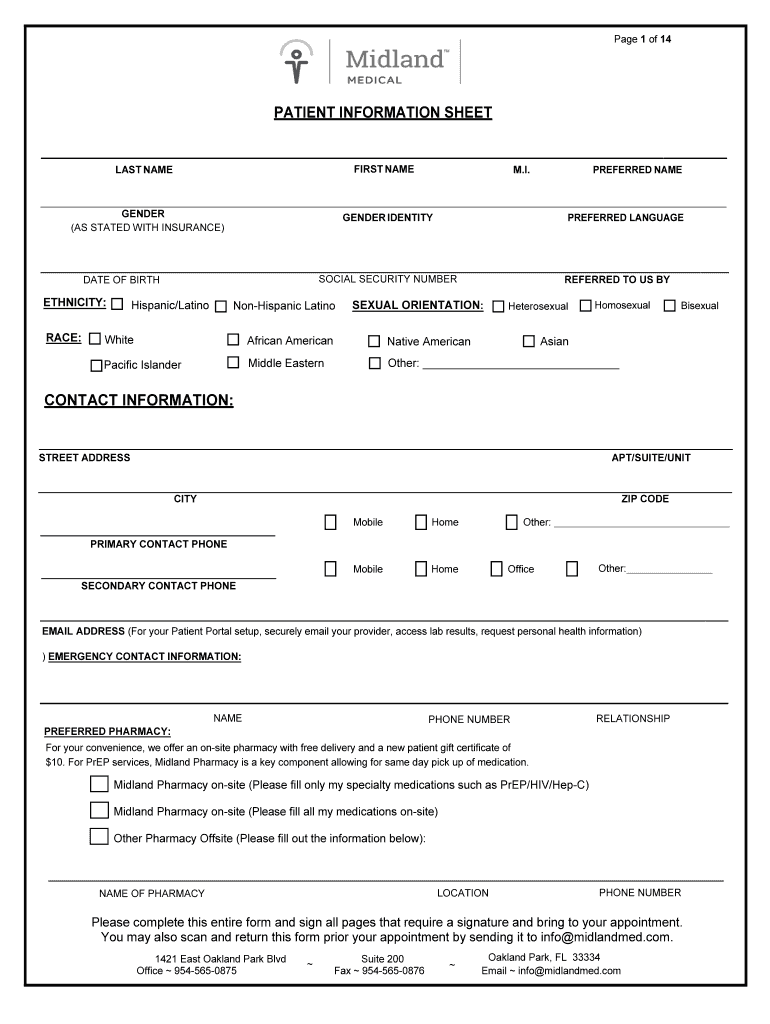
Patient Forms - Midland Medical Center Preview on Page 1

Here's how it works

01. Edit your form online
Type text, add images, blackout confidential details, add comments, highlights and more.
02. Sign it in a few clicks
Draw your signature, type it, upload its image, or use your mobile device as a signature pad.
03. Share your form with others
Send it via email, link, or fax. You can also download it, export it or print it out.

How to use or fill out Patient Forms - Midland Medical Center with our platform

Form edit decoration
9.5
Ease of Setup
DocHub User Ratings on G2
9.0
Ease of Use
DocHub User Ratings on G2
  1. Click ‘Get Form’ to open the Patient Forms - Midland Medical Center in the editor.
  2. Begin by filling out your personal information. Enter your first name, last name, preferred name, date of birth, and gender as stated with your insurance. Ensure accuracy for effective communication.
  3. Complete the contact information section. Provide your street address, city, zip code, and phone numbers for primary and secondary contacts. This ensures that the medical center can reach you when necessary.
  4. Fill in the emergency contact details and preferred pharmacy information. This is crucial for timely assistance during emergencies and medication management.
  5. Proceed to the health history sections. Answer questions regarding medical problems, surgeries, medications, allergies, and vaccinations honestly to provide a comprehensive view of your health.
  6. Review all entries for accuracy before signing where required. You can also scan and return this form via email prior to your appointment for added convenience.

Start using our platform today to easily complete your Patient Forms - Midland Medical Center online for free!

See more Patient Forms - Midland Medical Center versions

We've got more versions of the Patient Forms - Midland Medical Center form. Select the right Patient Forms - Midland Medical Center version from the list and start editing it straight away!
Versions Form popularity Fillable & printable
2021 4.9 Satisfied (40 Votes)
2019 4.8 Satisfied (59 Votes)
be ready to get more

Complete this form in 5 minutes or less

Get form

Got questions?

We have answers to the most popular questions from our customers. If you can't find an answer to your question, please contact us.
Contact us

Of course, electronically drawing your signature is acceptable, but only if you utilize a tool that complies with industry laws and regulations. Consider DocHub, which guarantees eSignature validity under ESIGN and UETA requirements. All you need to eSign your Patient Forms - Midland Medical Center is an account with DocHub and an internet connection. When you open your file in our editor, click Sign and select the Draw tool.

You can quickly fill out, modify, and even eSign your Patient Forms - Midland Medical Center using DocHub. Create a new account and begin your free trial. After that, you can upload the file with the form and easily make all the needed edits. No need to print on paper or use a third-party application to sign it, as you can put your electronic signature on your document quicker via DocHub.

Patient Portal Software Cost Estimate Patient portals featuresApprox time, Flutter (h)Approx cost ($) QA services 280 hours $25,200 DevOps services 40 hours $3,600 Project management 140 hours $12,600 Total 1,175 hours $98,0553 more rows Mar 5, 2025
The Cost of Patient Portal Software Development Project type and complexityApproximate cost A big, complex patient portal ~$200k-$300k A native app for a single platform (e.g., iOS) ~$120-$150k Native apps for iOS and Android ~$160k-$220k Jan 30, 2025
MyChart is EPICs patient portal. MyChart is a secure means for patients to access parts of their health records through a web browser and cell-phone apps.

People also ask

You can call the clinic, visit the website, or walk in to request an appointment. It is important to tell the staff that you are a new patient, so they can set aside extra time for your visit. You may be asked to complete new patient forms before your appointment.
The Centers for Medicare and Medicaid services expanded the ability of clinicians to bill for portal messaging through telehealth e-visits, if the message required at least 5 minutes of time and medical decision-making. With this policy change, several health care organizations have begun billing for portal messages.
How Much Does it Cost to Make a Web Portal? Web Portal TypeEstimated Cost Simple $15,000 $25,000 Medium $25,000 $50,000 Complex $50,000 $500,000+ Aug 5, 2025
A patient portal is a secure online website that gives patients convenient, 24-hour access to personal health information from anywhere with an Internet connection. Using a secure username and password, patients can view health information such as: Recent doctor visits. Discharge summaries. Medications.

Related links