




Here's how it works

01. Edit your estate tax return form close up pen online
Type text, add images, blackout confidential details, add comments, highlights and more.

02. Sign it in a few clicks
Draw your signature, type it, upload its image, or use your mobile device as a signature pad.

03. Share your form with others
Send tax return certificate via email, link, or fax. You can also download it, export it or print it out.
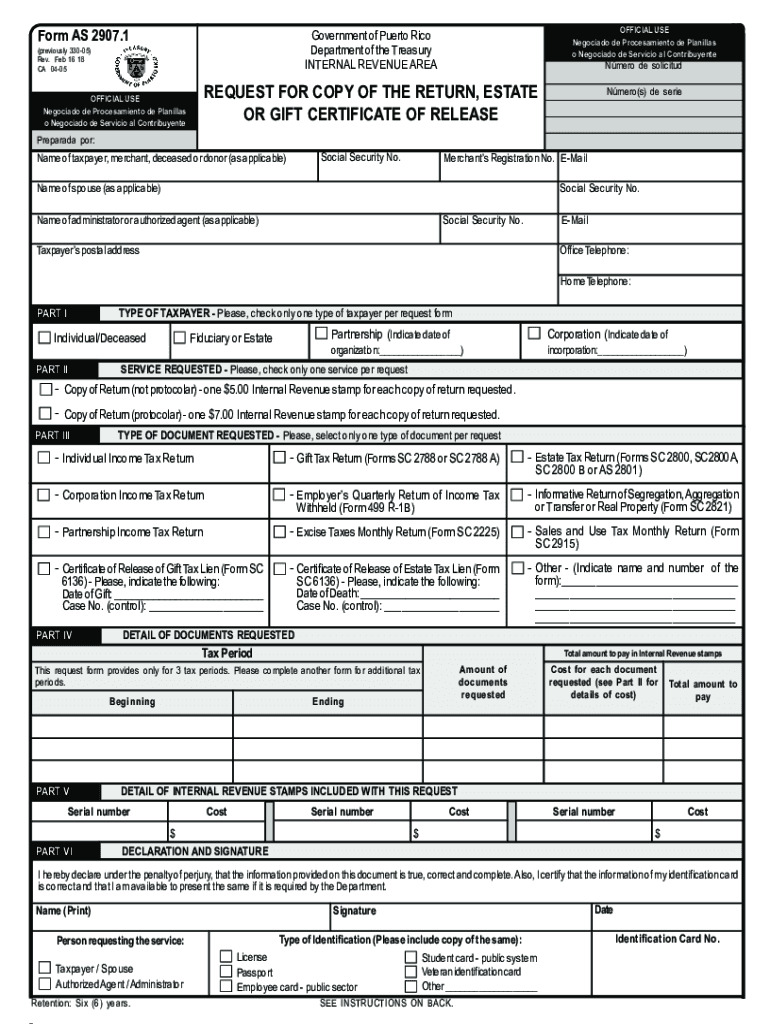
How to use or fill out Request For Copy Of The Return, Estate Or Gift Certificate Of Release with our platform

- Click ‘Get Form’ to open the Request For Copy Of The Return, Estate Or Gift Certificate Of Release in the editor.
- Begin by filling in your personal information, including your name, Social Security number, and contact details. Ensure accuracy as this information is crucial for processing your request.
- In Part I, select the type of taxpayer by checking only one box that applies to you—Individual/Deceased or Fiduciary/Estate.
- Proceed to Part II and choose the service you are requesting. Select either a copy of the return (not protocolar) or (protocolar), ensuring you include the correct Internal Revenue stamp for each copy requested.
- In Part III, specify the type of document you need by selecting one option from the list provided. This could range from Individual Income Tax Return to various tax certificates.
- Complete Parts IV and V by detailing the tax periods and total amounts due for Internal Revenue stamps. Make sure all sections are filled accurately.
- Finally, sign and date the declaration at the end of the form, confirming that all information is true and complete before submitting it through our platform.
Start using our platform today to streamline your document requests for free!
Fill out Request For Copy Of The Return, Estate Or Gift Certificate Of Release online
It's free
See more Request For Copy Of The Return, Estate Or Gift Certificate Of Release versions
We've got more versions of the Request For Copy Of The Return, Estate Or Gift Certificate Of Release form. Select the right Request For Copy Of The Return, Estate Or Gift Certificate Of Release version from the list and start editing it straight away!
Security and compliance
At DocHub, your data security is our priority. We follow HIPAA, SOC2, GDPR, and other standards, so you can work on your documents with confidence.
Learn more


