




01. Edit your 2018 form 990 pf online
Type text, add images, blackout confidential details, add comments, highlights and more.

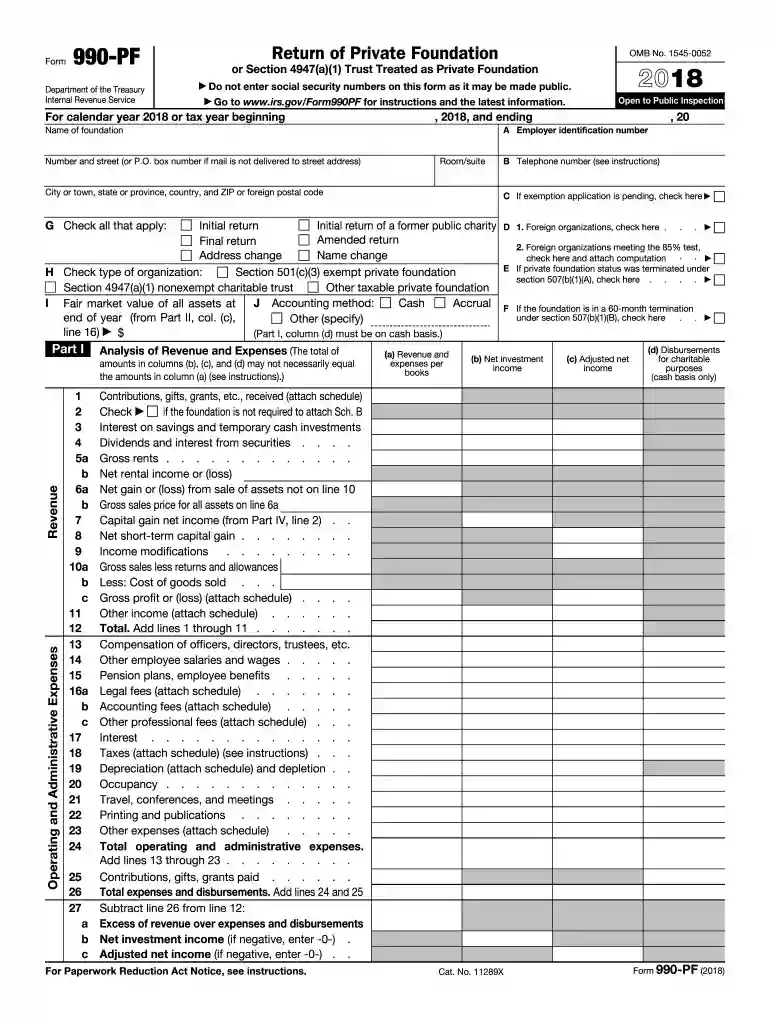
Type text, add images, blackout confidential details, add comments, highlights and more.

Draw your signature, type it, upload its image, or use your mobile device as a signature pad.

Send form 990 pf 2018 via email, link, or fax. You can also download it, export it or print it out.
The W-9 form, issued by the IRS, is a Request for Taxpayer Identification Number and Certification. It is mainly used for reporting income other than wages, salaries, and tips. The form's primary function is to provide correct Taxpayer Identification Number (TIN) to the person who needs to report information concerning the recipient to the IRS. Typically, a business will request a completed W-9 form from freelancers or independent contractors for income tracking and tax reporting purposes. In its 2017 format, this form remains a vital document for ensuring compliance with United States tax law.
When a business requires an individual to complete a W-9, they provide this form, which can be filled out manually or digitally using platforms like DocHub. The recipient needs to input their personal information, such as their name, business name (if applicable), TIN, and business type. Additionally, the form includes areas where filers can certify their tax compliance. After completing the form, it should be returned to the requesting entity, not to the IRS. Ensuring the correct information on this form is crucial for accurate 1099 issuance, which reflects the non-salary income paid to the individual.
The IRS website is a reliable source for downloading the W-9 form. For those preferring a printable version, various document management platforms, including DocHub, allow users to easily access and print this form. This accessibility ensures users can fill out the form as required for their tax documentation needs. Moreover, having a printable version can be particularly useful for individuals who prefer to maintain physical records or who need to provide the form to multiple businesses electronically or via mail.
Enter Personal Information: Start by filling in your name as shown on your tax return.
Business Name and Type: If you operate under a business name different from your legal name, include it here. Indicate the appropriate tax classification (e.g., individual/sole proprietor, LLC, corporation).
Provide TIN: Enter your TIN, which could be a Social Security Number (SSN) or Employer Identification Number (EIN).
Exemptions (if applicable): Include any exemption codes for FATCA if they apply to you.
Signature: Sign and date the document to certify its accuracy.
After completion, ensure you review all entries for accuracy and return the form to the requesting business, not to the IRS.
The W-9 itself does not have a filing deadline with the IRS because it’s not submitted directly to them. However, businesses use the information from the W-9 to issue 1099 forms, which do have strict IRS-imposed deadlines. Generally, businesses must issue 1099s to recipients by January 31 of the following year, necessitating prompt receipt of W-9 forms for accurate 1099 preparation. Maintaining current records ensures compliance and avoids potential financial penalties.
The IRS mandates that businesses collect W-9 forms to confirm the TINs of entities and individuals who receive income that needs reporting. This form is particularly significant for non-employment income such as interest and dividend payments, as well as other payments to independent contractors. The IRS provides a comprehensive set of instructions that accompany the form itself, ensuring that recipients understand the completion requirements and the ramifications of providing inaccurate information, which can include penalties or withheld income.
Failure to accurately complete the W-9 form or provide complete information may result in backup withholding of 24% on payments received. Businesses are required to withhold this percentage if accurate taxpayer information is not provided. In addition to withheld income, individuals and businesses may face further penalties from the IRS for non-compliance with information reporting requirements, emphasizing the importance of completing the form meticulously.
We've got more versions of the 2018 form 990 pf form. Select the right 2018 form 990 pf version from the list and start editing it straight away!
| Versions | Form popularity | Fillable & printable |
|---|---|---|
| 2025 | 4.7 Satisfied (39 Votes) | |
| 2024 | 4.6 Satisfied (30 Votes) | |
| 2023 | 4.2 Satisfied (21 Votes) | |
| 2022 | 4.9 Satisfied (57 Votes) | |
| 2021 | 4.8 Satisfied (110 Votes) | |
| 2020 | 4.3 Satisfied (151 Votes) | |
| 2019 | 4.3 Satisfied (59 Votes) | |
| 2018 | 4.3 Satisfied (90 Votes) | |
| 2017 | 4.1 Satisfied (75 Votes) | |
| 2016 | 4.4 Satisfied (629 Votes) | |
| 2015 | 4.3 Satisfied (64 Votes) | |
| 2014 | 4.1 Satisfied (66 Votes) | |
| 2013 | 4.1 Satisfied (49 Votes) | |
| 2012 | 4.2 Satisfied (29 Votes) | |
| 2011 | 4.1 Satisfied (53 Votes) |
At DocHub, your data security is our priority. We follow HIPAA, SOC2, GDPR, and other standards, so you can work on your documents with confidence.





Forms. Overview; POPULAR FORMS INSTRUCTIONS; Form 1040 Form 1040 Instructions Form W-9 Form 4506-T Form W-4 Form 941 Form W-2 Form 9465; POPULARRead more
Oct 19, 2017 Visit. IRS.gov/FormsPubs to download forms and publications for Form 1099-MISC and the Instructions for. Form 945. For moreRead more


