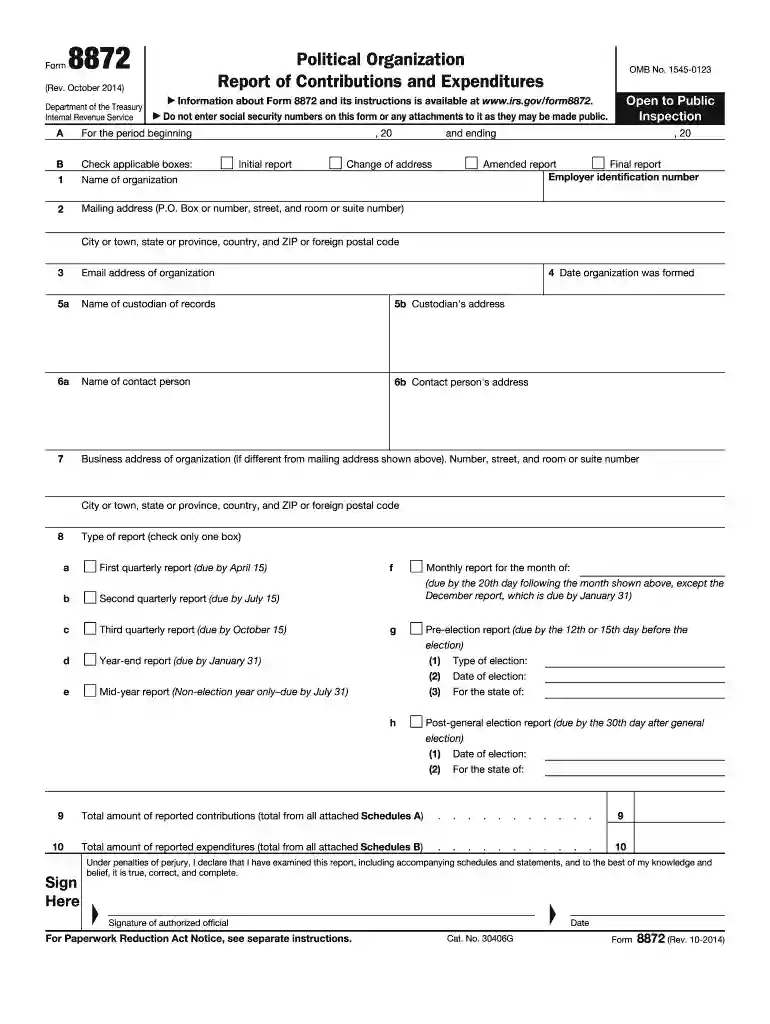
form 8872 Preview on Page 1

Form 8872 (Rev October 2014) Political Organization Report of Contributions and Expenditures-2026

Here's how it works

  • 01. Edit your form 8872 online

    Type text, add images, blackout confidential details, add comments, highlights and more.

  • 02. Sign it in a few clicks

    Draw your signature, type it, upload its image, or use your mobile device as a signature pad.

  • 03. Share your form with others

    Send 8872 form via email, link, or fax. You can also download it, export it or print it out.

How to use or fill out Form 8872 (Rev October 2014) Political Organization Report of Contributions and Expenditures

Form edit decoration
9.5
Ease of Setup
DocHub User Ratings on G2
9.0
Ease of Use
DocHub User Ratings on G2
  1. Click ‘Get Form’ to open it in the editor.
  2. Begin by filling out Section A, which includes the name of your organization, mailing address, and employer identification number. Ensure all information is accurate to avoid processing delays.
  3. In Section B, check the applicable boxes for the type of report you are submitting—initial, amended, or final report. This helps categorize your submission correctly.
  4. Proceed to enter the total amount of reported contributions in line 9 and expenditures in line 10. Make sure these figures reflect all attached Schedules A and B accurately.
  5. Complete the signature section at the bottom of the form. An authorized official must sign and date this section to validate your report.

Start using our platform today to fill out Form 8872 easily and for free!

See more form 8872 versions

We've got more versions of the form 8872 form. Select the right form 8872 version from the list and start editing it straight away!

VersionsForm popularityFillable & printable
20144.5 Satisfied (41 Votes)
20024.9 Satisfied (37 Votes)

be ready to get more

Complete this form in 5 minutes or less

Got questions?

We have answers to the most popular questions from our customers. If you can't find an answer to your question, please contact us.

Managing your paperwork with DocHub this way is extremely easy after you have downloaded its extension for Google Chrome. Navigate to the Chrome Web Store and install DocHub - Sign PDF from Gmail to get it. Give our tool access to your Google account, and then open an email with the irs form 8872 attached and point to the file with your cursor - the DocHub extension key will automatically appear there. Click on it to open your document in our editor. Make any required adjustments, fill out the blanks, and click Sign to create your legally-binding electronic signature.

If you need to edit your form 8872 instructions online easily, it does not matter what internet browser you employ. DocHub’s straightforward editing instruments are accessible using any internet browser. Simply open the appropriate tab in the editor, add your file, and fill it out without stress.

Unless excepted, tax-exempt political organizations are required to file periodic reports with the IRS. The report is filed on Form 8872 PDF. An organization must electronically file Form 8872.
Form 8872 - When to file Charitable organizations. Churches and religious organizations. Private foundations. Political organizations. FEC filing required for some 527 organizations. Filing requirements. Political organization filing and disclosure. Solicitation notice. Employment taxes for exempt organizations. Other nonprofits.
How can I get a copy of my organizations exemption letter? You can download copies of determination letters (issued January 1, 2014 and later) using our on-line search tool Tax Exempt Organization Search (TEOS).

Security and compliance

At DocHub, your data security is our priority. We follow HIPAA, SOC2, GDPR, and other standards, so you can work on your documents with confidence.

People also ask

Go to .irs.gov/Form8862 for instructions and the latest information. You must complete Form 8862 and attach it to your tax return to claim the EIC, CTC/RCTC/ACTC/ODC, or AOTC if both of the following apply.
New Form 8872, Political Organization Report of Contributions and Expenditures, is available from the IRSs Web site at .irs.gov under the Forms and Pubs section. Due dates for the Form 8872 will vary depending upon whether a reporting period occurs in an election or nonelection year.
Form 8871, Political Organization Notice of Section 527 Status. Form 8872, Political Organization Report of Contributions and Expenditures.

irs form 8872 pdf

Multiple Documents

Form 8872, Political Organization Report of Contributions and Expenditures, as a qualified state or local political organization? Yes No ✓. 10b If Yes

Learn more
ANNUAL REPORT 2024

Apr 2, 2025 In measuring the lease liability, the Group determines lease payments or revised lease payments (including both lease payments that areRead more

Learn more
About Form 8872, Political Organization Report of

Mar 31, 2026 Tax-exempt section 527 political organizations file this form to report certain contributions received and expenditures made, unless an exception applies.Read more

Learn more
If you believe that this page should be taken down, please follow our DMCA take down process here