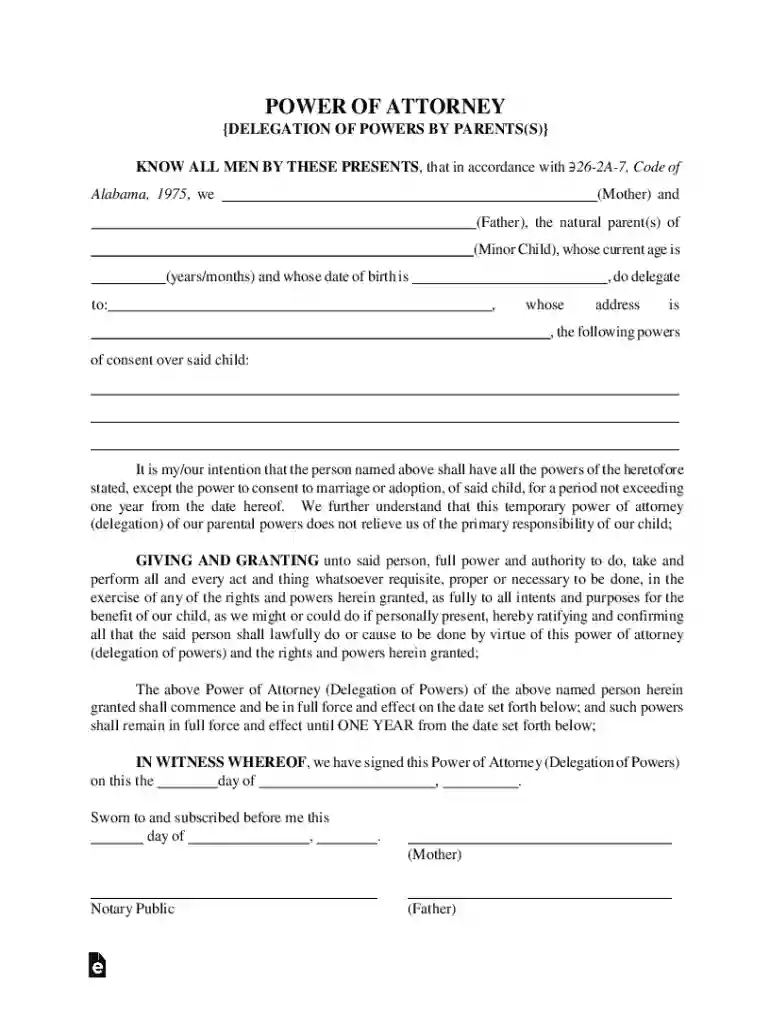
Alabama Minor Children Power of Attorney Form Preview on Page 1

Alabama Minor Children Power of Attorney Form 2026

Here's how it works

  • 01. Edit your form online

    Type text, add images, blackout confidential details, add comments, highlights and more.

  • 02. Sign it in a few clicks

    Draw your signature, type it, upload its image, or use your mobile device as a signature pad.

  • 03. Share your form with others

    Send it via email, link, or fax. You can also download it, export it or print it out.

How to use or fill out Alabama Minor Children Power of Attorney Form with DocHub

Form edit decoration
9.5
Ease of Setup
DocHub User Ratings on G2
9.0
Ease of Use
DocHub User Ratings on G2
  1. Click ‘Get Form’ to open the Alabama Minor Children Power of Attorney Form in our editor.
  2. Begin by entering the names of both parents in the designated fields. Ensure that you provide accurate information as this is crucial for legal validity.
  3. Next, fill in the minor child's name, age, and date of birth. This information helps identify the child for whom the powers are being delegated.
  4. In the section provided, specify the powers being granted to the designated caregiver. This could include permissions for medical treatment or travel.
  5. Review all entered information carefully to ensure accuracy. Once confirmed, proceed to sign the document in front of a notary public.
  6. After notarization, save your document and follow any additional instructions for recording it with the Probate Judge's office.

Start using our platform today to easily complete your Alabama Minor Children Power of Attorney Form for free!

See more Alabama Minor Children Power of Attorney Form versions

We've got more versions of the Alabama Minor Children Power of Attorney Form form. Select the right Alabama Minor Children Power of Attorney Form version from the list and start editing it straight away!

VersionsForm popularityFillable & printable
20254 Satisfied (34 Votes)
20254.8 Satisfied (31 Votes)
20254.3 Satisfied (34 Votes)
20254.2 Satisfied (34 Votes)
20254.6 Satisfied (55 Votes)
20254.5 Satisfied (44 Votes)
20254.2 Satisfied (37 Votes)
20254.7 Satisfied (34 Votes)
20244.3 Satisfied (21 Votes)
20244.6 Satisfied (51 Votes)
20244.5 Satisfied (23 Votes)
20244.8 Satisfied (29 Votes)
20244.1 Satisfied (28 Votes)
20244.9 Satisfied (51 Votes)
20244.4 Satisfied (31 Votes)

be ready to get more

Complete this form in 5 minutes or less

Got questions?

We have answers to the most popular questions from our customers. If you can't find an answer to your question, please contact us.

A power of attorney (POA) is a legal document that grants one person the authority to act on behalf of another in specific matters. While a POA can grant docHub decision-making powers, it does not inherently override parental rights.
How to make a power of attorney in 8 steps Decide which type of power of attorney to make. Choose your agent. Decide how much authority to give your agent. Fill out a power of attorney form. Execute your POA according to the laws in your state. Give a copy of your POA form to your agent and other interested parties.
To create a power of attorney in Alabama, you must choose a trusted competent adult as your agent, specify what authority you want to grant them, and sign the power of attorney document in front of a notary public.
To create a POA for a child, you need the following: Names, dates of birth, and contact information for yourself and your agent. Names and dates of birth of all children included in the POA. A description of when or how the POA starts and ends. A list of the powers you wish to give your agent.

Security and compliance

At DocHub, your data security is our priority. We follow HIPAA, SOC2, GDPR, and other standards, so you can work on your documents with confidence.

Related links

Durable Power of Attorney

Feb 15, 2019 You are not required to use this form. Download a PDF of the Alabama Power of Attorney Form. Unlike the Advance Directive for Health CareRead more

Learn more
If you believe that this page should be taken down, please follow our DMCA take down process here