




Here's how it works

01. Edit your ca form 568 online
Type text, add images, blackout confidential details, add comments, highlights and more.

02. Sign it in a few clicks
Draw your signature, type it, upload its image, or use your mobile device as a signature pad.

03. Share your form with others
Send form 568 example via email, link, or fax. You can also download it, export it or print it out.
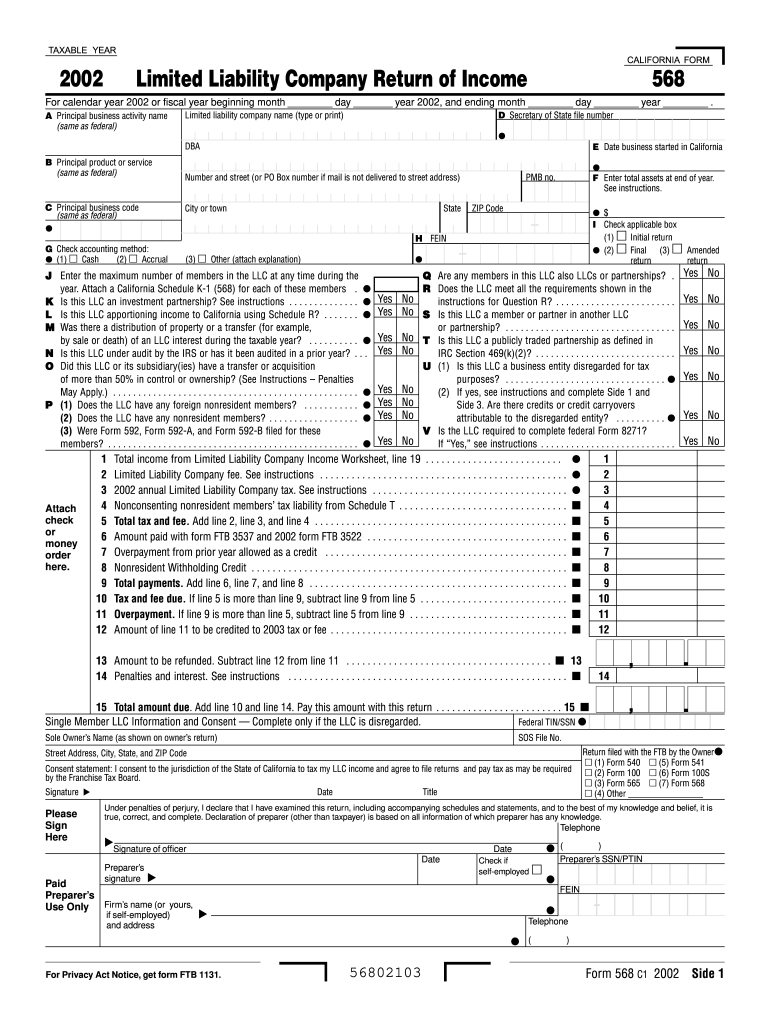
How to use or fill out ftb form 568 2001 with our platform

- Click ‘Get Form’ to open it in the editor.
- Begin by entering the taxable year at the top of the form. Ensure you specify whether it's for calendar year 2002 or a fiscal year.
- In section A, provide your LLC's principal business activity name and its official name. This should match what is listed on your federal documents.
- Complete sections D through F by entering your Secretary of State file number, DBA (Doing Business As) name, and total assets at the end of the year.
- Indicate your accounting method in section G and check applicable boxes in section I regarding return types (initial, final, amended).
- Fill out member-related questions in sections J through T, ensuring to attach any necessary schedules as indicated.
- Finally, review all entries for accuracy before signing and submitting your form. Use our platform’s features to save and share your completed document easily.
Start using our platform today for free to streamline your FTB Form 568 completion!
Fill out ftb form 568 2001 online
It's free
It's free
See more ftb form 568 2001 versions
We've got more versions of the ftb form 568 2001 form. Select the right ftb form 568 2001 version from the list and start editing it straight away!
| Versions | Form popularity | Fillable & printable |
|---|---|---|
| 2025 | 4.9 Satisfied (59 Votes) | |
| 2023 | 4.3 Satisfied (37 Votes) | |
| 2022 | 4.4 Satisfied (53 Votes) | |
| 2021 | 4.3 Satisfied (49 Votes) | |
| 2020 | 4.8 Satisfied (120 Votes) | |
| 2019 | 4.3 Satisfied (148 Votes) | |
| 2018 | 4.4 Satisfied (99 Votes) | |
| 2017 | 4.2 Satisfied (27 Votes) | |
| 2016 | 4.4 Satisfied (354 Votes) | |
| 2015 | 4.2 Satisfied (35 Votes) | |
| 2014 | 4 Satisfied (27 Votes) | |
| 2013 | 4 Satisfied (60 Votes) | |
| 2012 | 4.4 Satisfied (33 Votes) | |
| 2011 | 4 Satisfied (41 Votes) | |
| 2010 | 4 Satisfied (37 Votes) |
Security and compliance
At DocHub, your data security is our priority. We follow HIPAA, SOC2, GDPR, and other standards, so you can work on your documents with confidence.
Learn more


