Type text, add images, blackout confidential details, add comments, highlights and more.
02. Sign it in a few clicks
Draw your signature, type it, upload its image, or use your mobile device as a signature pad.
03. Share your form with others
Send pa mv 140 via email, link, or fax. You can also download it, export it or print it out.
How to use or fill out mv 140 with our platform
Ease of Setup
DocHub User Ratings on G2
Ease of Use
DocHub User Ratings on G2
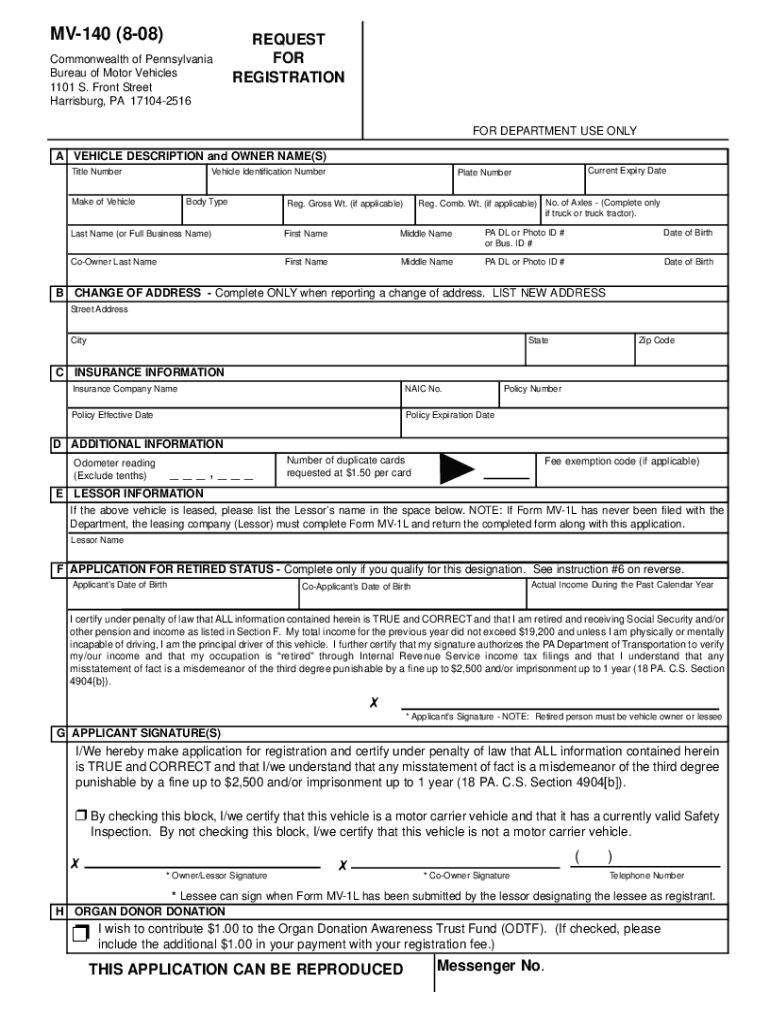
Click ‘Get Form’ to open the MV-140 in the editor.
Begin by completing Section A, which requires vehicle and owner information. Ensure you include your PA Driver’s License or Business ID where indicated.
If applicable, fill out Section B for a change of address. Only complete this if your current address differs from what is on your registration card.
In Section C, provide your insurance details. Include the Insurance Company Name and NAIC number, if available. If self-insured, indicate that in the appropriate fields.
Section D requires the current odometer reading and any duplicate cards requested. If you qualify for a fee exemption, list the code here.
If leasing the vehicle, complete Section E with the Lessor's name. Ensure all required forms are attached.
For those eligible for retired status, fill out Section F with income details and signatures as needed.
Finally, sign in Section G to certify that all information is accurate and true before submitting your application.
Start using our platform today to simplify your MV-140 form completion!
MV 140 PAMead MV-140PA title application MV-1Pennsylvania title application PDFPennsylvania title application form mv 1 pdfPennDOT registration copyPA title application with lienWww DMV PA gov online services
Security and compliance
At DocHub, your data security is our priority. We follow HIPAA, SOC2, GDPR, and other standards, so you can work on your documents with confidence.
MV-140 (1-26). REQUEST FOR REGISTRATION. FEE REQUIRED. (The space above is for Department use only). Bureau of Motor Vehicles 1101 South Front StreetRead more
The instruments are immersed for two hours at 90C and 90%rh followed by another calibration. In the third phase, the instruments are calibrated again beforeRead more
by P Saz-Leal 2024 Cited by 9 MV140 is a whole-cell bacterial mucosal (sublingual) vaccine containing E. coli and other species of bacteria associated with UTIs [21]. DespiteRead more
Cookie consent notice
This site uses cookies to enhance site navigation and personalize your experience.
By using this site you agree to our use of cookies as described in our Privacy Notice.
You can modify your selections by visiting our Cookie and Advertising Notice.