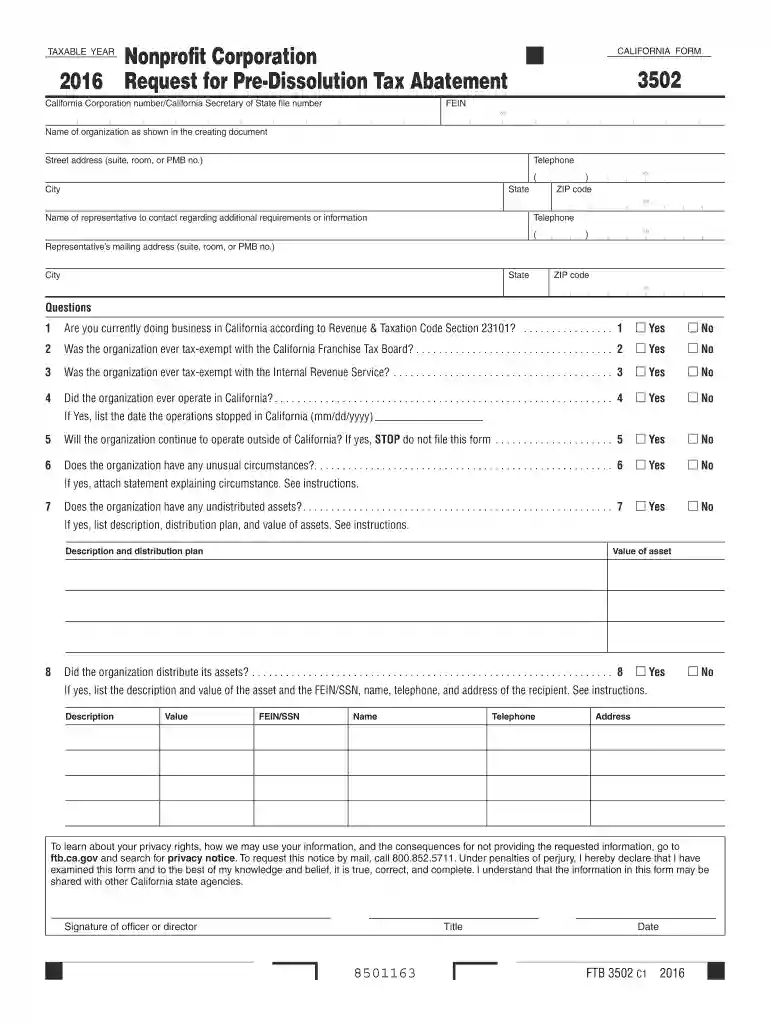
2016 CA FTB 3502 Preview on Page 1

2016 CA FTB 3502-2026

Here's how it works

  • 01. Edit your form online

    Type text, add images, blackout confidential details, add comments, highlights and more.

  • 02. Sign it in a few clicks

    Draw your signature, type it, upload its image, or use your mobile device as a signature pad.

  • 03. Share your form with others

    Send it via email, link, or fax. You can also download it, export it or print it out.

How to use or fill out 2016 CA FTB 3502 with DocHub

Form edit decoration
9.5
Ease of Setup
DocHub User Ratings on G2
9.0
Ease of Use
DocHub User Ratings on G2
  1. Click ‘Get Form’ to open the 2016 CA FTB 3502 in our editor.
  2. Begin by entering your California Corporation number and FEIN at the top of the form. Ensure that the name of your organization matches what is shown in your creating document.
  3. Fill in the street address, city, state, and ZIP code for your organization. Include a contact telephone number for any inquiries.
  4. Answer the questions regarding your organization's business status in California. For each question, select 'Yes' or 'No' as applicable.
  5. If applicable, provide details about any unusual circumstances or undistributed assets as prompted in the form. Attach additional statements if necessary.
  6. Finally, ensure that an officer or director signs and dates the form at the bottom before submission.

Start using our platform today to fill out your forms online for free!

See more 2016 CA FTB 3502 versions

We've got more versions of the 2016 CA FTB 3502 form. Select the right 2016 CA FTB 3502 version from the list and start editing it straight away!

VersionsForm popularityFillable & printable
20254.4 Satisfied (54 Votes)
20244.8 Satisfied (27 Votes)
20234.7 Satisfied (33 Votes)
20224.9 Satisfied (20 Votes)
20214.9 Satisfied (32 Votes)
20204.3 Satisfied (199 Votes)
20194.3 Satisfied (83 Votes)
20184.1 Satisfied (67 Votes)
20174.3 Satisfied (48 Votes)
20164.4 Satisfied (221 Votes)
20154.6 Satisfied (55 Votes)

be ready to get more

Complete this form in 5 minutes or less

Got questions?

We have answers to the most popular questions from our customers. If you can't find an answer to your question, please contact us.

Use form FTB 3502, Nonprofit Corporation Request for Pre-Dissolution Tax Abatement, to initiate the voluntary dissolution process.
Sole proprietors and general partnerships dont have to pay the California Franchise Tax, but they also dont have any personal liability protection. For some small businesses that have a low likelihood of being sued, operating as a sole proprietorship or general partnership may be good idea.
You must report the like-kind exchange on California Like-Kind Exchanges (FTB 3840) if both of the following occur: An exchange of one or more California real properties for one or more real properties located outside of California. Any portion of the California sourced realized gain or loss is not recognized.
However, there are differences between California and federal tax law. Certain specific areas of conformity and nonconformity are discussed in the affected tax forms instructions and in our Supplemental Guidelines to California Adjustments (Publication 1001 ).

Security and compliance

At DocHub, your data security is our priority. We follow HIPAA, SOC2, GDPR, and other standards, so you can work on your documents with confidence.

Related links

2024 Instructions for Form FTB 3502 Nonprofit Corporation

Use form FTB 3502 to request abatement of unpaid qualified taxes, interest, and penalties for the taxable years of a qualified nonprofit corporation.Read more

Learn more
2019 Increasing Uptake of Federal Funding to Support

Jul 10, 2019 We believe the available data support several broad conclusions regarding Californias success to date in accessing federal matching funds.Read more

Learn more
If you believe that this page should be taken down, please follow our DMCA take down process here