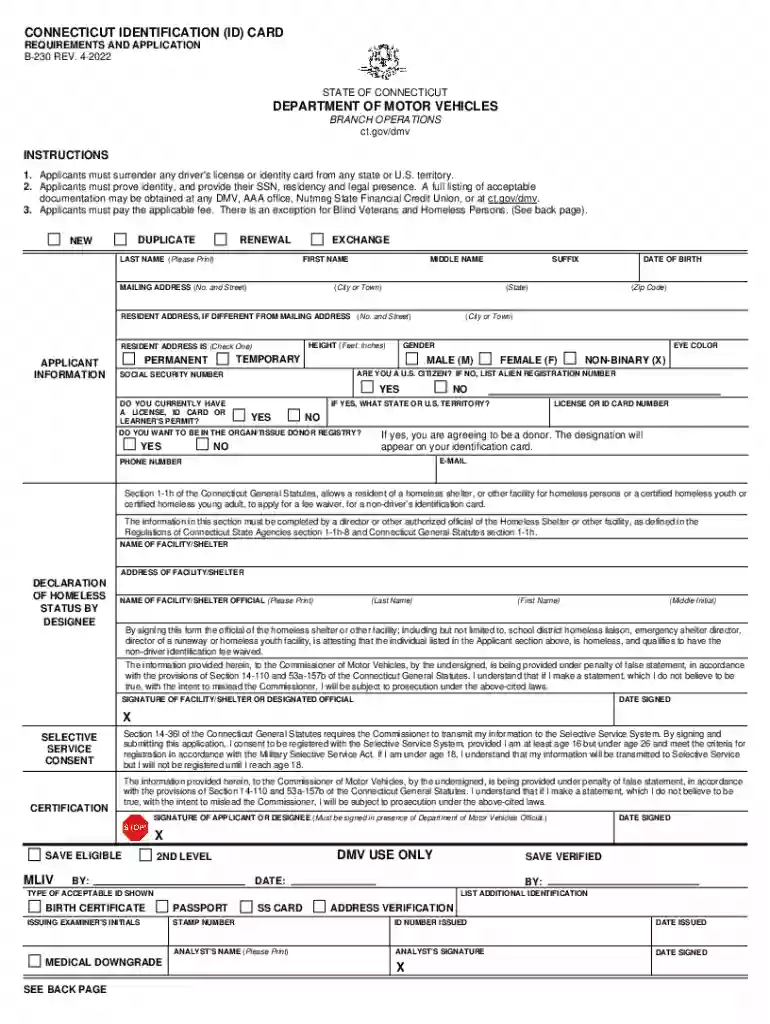
form b230 Preview on Page 1

CONNECTICUT IDENTIFICATION (ID) CARD DEPARTMENT OF 2026

Here's how it works

  • 01. Edit your form b230 online

    Type text, add images, blackout confidential details, add comments, highlights and more.

  • 02. Sign it in a few clicks

    Draw your signature, type it, upload its image, or use your mobile device as a signature pad.

  • 03. Share your form with others

    Send form b 230 via email, link, or fax. You can also download it, export it or print it out.

How to use or fill out CONNECTICUT IDENTIFICATION (ID) CARD DEPARTMENT OF with our platform

Form edit decoration
9.5
Ease of Setup
DocHub User Ratings on G2
9.0
Ease of Use
DocHub User Ratings on G2
  1. Click ‘Get Form’ to open the CONNECTICUT IDENTIFICATION (ID) CARD application in the editor.
  2. Begin by entering your last name, first name, and middle name in the designated fields. Ensure that all names are printed clearly.
  3. Provide your mailing address, including city, state, and zip code. If your resident address differs from your mailing address, fill in that information as well.
  4. Indicate your gender by selecting from the options provided: Male (M), Female (F), or Non-Binary (X).
  5. Fill in your date of birth and height in feet and inches. Additionally, specify your eye color.
  6. Answer whether you are a U.S. citizen and provide your Social Security Number. If applicable, list any current licenses or ID cards you hold.
  7. If you wish to register as an organ/tissue donor, check 'Yes' to agree to this designation.
  8. Complete the declaration of homeless status if applicable, ensuring it is signed by an authorized official from the relevant facility.
  9. Finally, review all entered information for accuracy before submitting the form through our platform.

Start filling out your CONNECTICUT IDENTIFICATION (ID) CARD application today for free using our editor!

See more form b230 versions

We've got more versions of the form b230 form. Select the right form b230 version from the list and start editing it straight away!

VersionsForm popularityFillable & printable
20224.7 Satisfied (28 Votes)
20084.9 Satisfied (203 Votes)

be ready to get more

Complete this form in 5 minutes or less

Security and compliance

At DocHub, your data security is our priority. We follow HIPAA, SOC2, GDPR, and other standards, so you can work on your documents with confidence.

connecticut id

Connecticut Public

The result is a blue circle with a line going down the middle, forming the CP part of the logo. Then, the CP moves to the left as the words ConnecticutRead more

Learn more
How to Get a CT Drivers License or Non-

You will need either the SSN or the denial letter for your DMV application. Bring the following to Social Security office: ❖ Passport. ❖ I-94 admission printout.Read more

Learn more
Get a non-driver ID

Step 1: Gather what youll need Complete an identification application (Form B-230) prior to your appointment. If you have a Connecticut-issued driversRead more

Learn more
If you believe that this page should be taken down, please follow our DMCA take down process here