
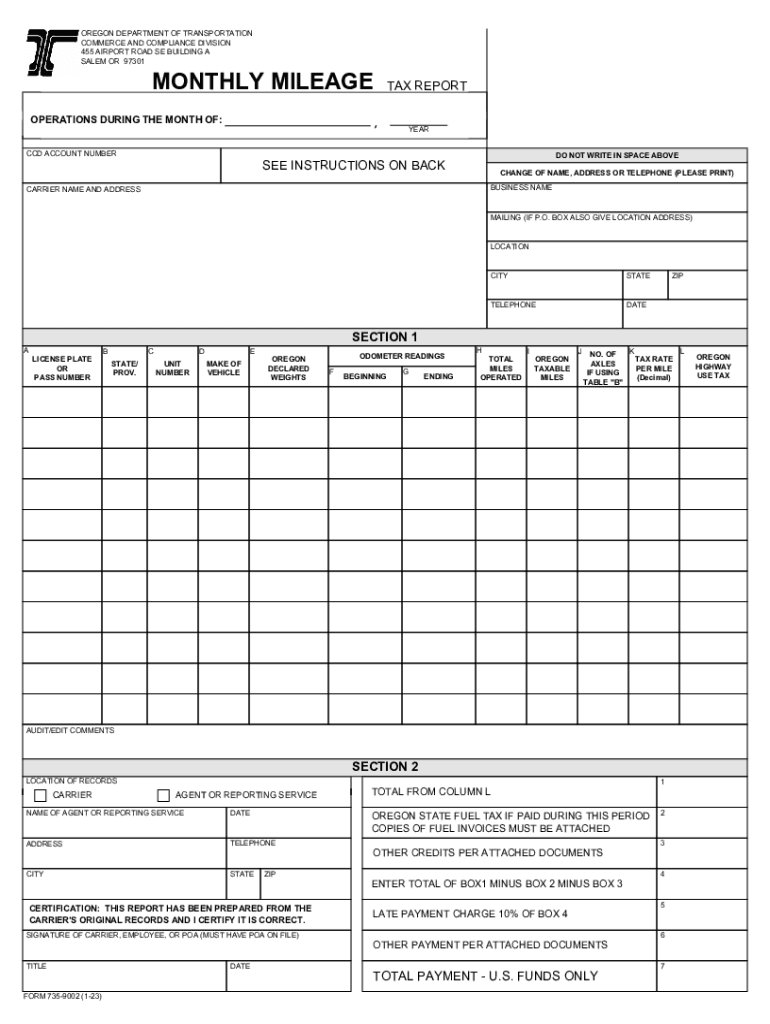



MONTHLY MILEAGE TAX REPORT 2026

Get Form
MONTHLY MILEAGE TAX REPORT Preview on Page 1

Here's how it works

01. Edit your form online
Type text, add images, blackout confidential details, add comments, highlights and more.

02. Sign it in a few clicks
Draw your signature, type it, upload its image, or use your mobile device as a signature pad.

03. Share your form with others
Send it via email, link, or fax. You can also download it, export it or print it out.

How to use or fill out MONTHLY MILEAGE TAX REPORT with our platform

Form edit decoration
9.5
Ease of Setup
DocHub User Ratings on G2
9.0
Ease of Use
DocHub User Ratings on G2
  1. Click ‘Get Form’ to open the MONTHLY MILEAGE TAX REPORT in the editor.
  2. Begin by entering your CCD ACCOUNT NUMBER and the BUSINESS NAME along with the CARRIER NAME and ADDRESS in the designated fields.
  3. In SECTION 1, fill out each column: A for LICENSE PLATE or PASS NUMBER, B for STATE/PROV., C for UNIT NUMBER, D for MAKE OF VEHICLE, and E for DECLARED WEIGHTS.
  4. Enter ODOMETER READINGS in columns F (BEGINNING) and G (ENDING), then calculate TOTAL MILES OPERATED in column H (G minus F) and OREGON TAXABLE MILES in column I.
  5. Complete columns J (NO. OF AXLES) and K (TAX RATE), then compute OREGON HIGHWAY USE TAX in column L (I times K).
  6. In SECTION 2, provide details about your LOCATION OF RECORDS and enter payment information in BOXES 1 through 7 as instructed.
  7. Finally, ensure that an authorized representative signs the report before submitting it via mail to ODOT.

Start using our platform today to streamline your MONTHLY MILEAGE TAX REPORT process for free!

See more MONTHLY MILEAGE TAX REPORT versions

We've got more versions of the MONTHLY MILEAGE TAX REPORT form. Select the right MONTHLY MILEAGE TAX REPORT version from the list and start editing it straight away!
Versions Form popularity Fillable & printable
2023 4.6 Satisfied (20 Votes)
2020 4.9 Satisfied (39 Votes)
2015 4.3 Satisfied (65 Votes)
2014 4.8 Satisfied (263 Votes)
be ready to get more

Complete this form in 5 minutes or less

Get form

Got questions?

We have answers to the most popular questions from our customers. If you can't find an answer to your question, please contact us.
Contact us
Write down the date, the purpose of your trip, your starting and ending locations, and the beginning and ending odometer readings on each trip. Subtract the starting reading from the ending reading to find out how many miles you drove. Make sure to keep this record updated regularly for accurate tracking.
An IRS-compliant mileage log should include: Total annual mileage: The total number of miles driven throughout the year for both business and personal use. Annual business mileage: The total number of miles driven specifically for business purposes during the year.
If you use your car for both business and personal purposes, youll need to divide your expenses based on your mileage for business and your mileage for personal use. First up: If you are self-employed, but occasionally use your personal auto for your business, youre likely qualified for a business expense deduction.
The best evidence for claiming the deduction for business use of a vehicle is a written record kept during the time the business miles are driven. This can be a written log, spreadsheet, mileage tracking app, or something similar. The record should include miles traveled, destination, and business purpose.
Two repair receipts or other documents with odometer readings - one near the first of the year and one from near the end of the year - would be needed as verification of the total miles driven.

Security and compliance

At DocHub, your data security is our priority. We follow HIPAA, SOC2, GDPR, and other standards, so you can work on your documents with confidence.

Learn more
ccpa2
pci-dss
gdpr-compliance
hipaa
soc-compliance
be ready to get more

Complete this form in 5 minutes or less

Get form

People also ask

There are three ways: Set your odometer readings at the start and end of the tax year. To use the trip setting on an odometer, simply press the odometers trip button until it displays Trip A or Trip B. Keep a mileage log. Using a mile tracker app.
Tracking your miles with a mileage log Keeping thorough records will help you document your business expenses. Car-related expenses are no different. If you plan on writing off your car expenses, you can do that with a mileage log template.
Record essential details: Include key information for each trip, such as the date, destination, purpose, and the starting and ending odometer readings. Keep supporting documents: Keep copies of receipts, invoices, and any other proof for your mileage claims.

Related links

