Certificate Surrender Request Form - Foresters Financial 2026

Get Form
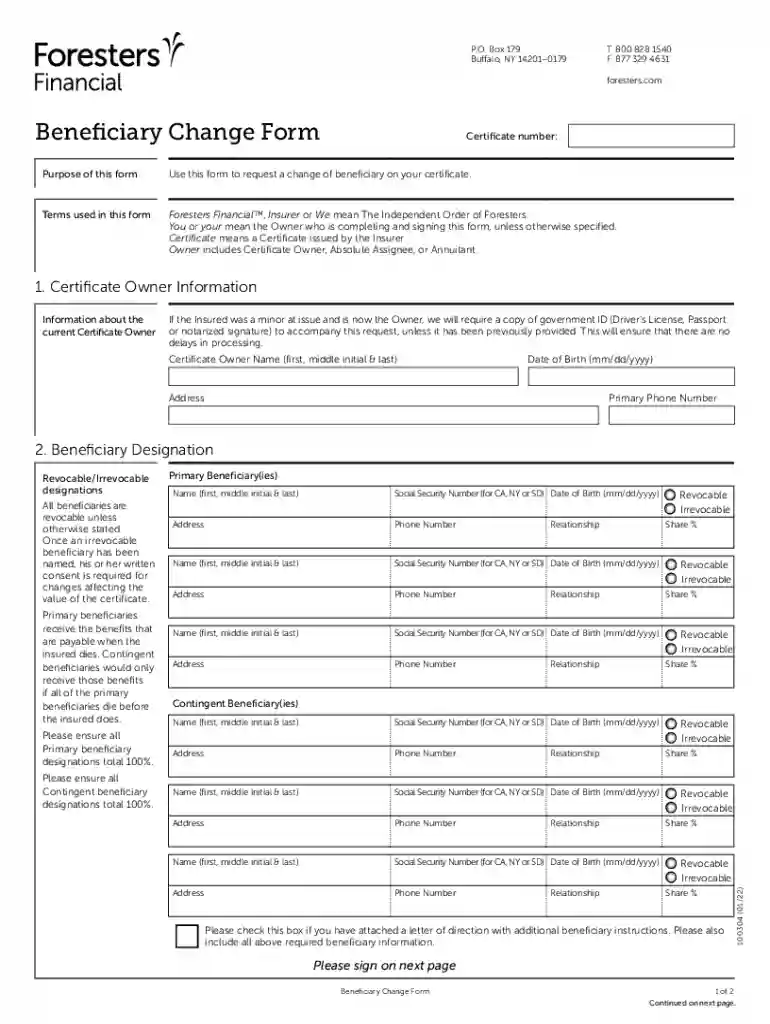
foresters beneficiary change Preview on Page 1

Here's how it works

01. Edit your foresters beneficiary change online
Type text, add images, blackout confidential details, add comments, highlights and more.

02. Sign it in a few clicks
Draw your signature, type it, upload its image, or use your mobile device as a signature pad.

03. Share your form with others
Send foresters beneficiary change form via email, link, or fax. You can also download it, export it or print it out.

How to use or fill out Certificate Surrender Request Form - Foresters Financial with our platform

Form edit decoration
9.5
Ease of Setup
DocHub User Ratings on G2
9.0
Ease of Use
DocHub User Ratings on G2
  1. Click ‘Get Form’ to open the Certificate Surrender Request Form in the editor.
  2. Begin by entering your Certificate Owner Information. Fill in your full name, date of birth, address, and primary phone number. If you are a minor owner, ensure to attach a government ID.
  3. Next, move to the Beneficiary Designation section. Here, list all primary beneficiaries along with their names, Social Security numbers (if applicable), dates of birth, addresses, and phone numbers. Ensure that the total share percentage for primary beneficiaries equals 100%.
  4. Continue by filling out the Contingent Beneficiary section using the same format as above. Again, ensure that their total share percentage also equals 100%.
  5. Review the Agreements and Authorizations section carefully before signing. Confirm your understanding of revocable and irrevocable beneficiary designations.
  6. Finally, sign and date the form in the Signature Section. If there are irrevocable beneficiaries, they must also provide their consent by signing.

Start editing your Certificate Surrender Request Form today for free on our platform!

See more Certificate Surrender Request Form - Foresters Financial versions

We've got more versions of the Certificate Surrender Request Form - Foresters Financial form. Select the right Certificate Surrender Request Form - Foresters Financial version from the list and start editing it straight away!
Versions Form popularity Fillable & printable
2022 4.1 Satisfied (36 Votes)
2017 4.2 Satisfied (38 Votes)
be ready to get more

Complete this form in 5 minutes or less

Get form

Got questions?

We have answers to the most popular questions from our customers. If you can't find an answer to your question, please contact us.
Contact us
You can deactivate and delete your account at any time by following the instructions provided on MyForesters. For a period of 30 days thereafter, you may recover your account, after which time, your account and all related Data permanently deleted from Foresters Go systems.
To make a withdrawal you will need a bank account in your name, for us to send you the money. After we complete all the checks on our side, your money will be in your bank account within 3-5 working days.
Certificate of Surrender (Form SURC) Upon the filing of the Certificate of Surrender by the Secretary of State, the foreign qualified corporation will be completely surrendered and the corporate rights, powers and privileges will cease in California.
To cancel a certificate, you need to return the contract package to Foresters Financial or provide a signed request to cancel within 10 days of receipt of contract. How can I cancel my certificate? To cancel your certificate, the Surrender Form must be completed and returned to the attention of Policy Administration.
You can withdraw from your Savings Investment Plan online with MyPlans or with a Financial Adviser or via Customer Services. The unit price displayed is for the previous working day, which changes daily, this means you may receive a little more or less than what you have chosen to withdraw.

Security and compliance

At DocHub, your data security is our priority. We follow HIPAA, SOC2, GDPR, and other standards, so you can work on your documents with confidence.

Learn more
ccpa2
pci-dss
gdpr-compliance
hipaa
soc-compliance