





Gov ukgovernmentpublicationsChange a company's registered office address (AD01) - GOV UK 2026

Get Form
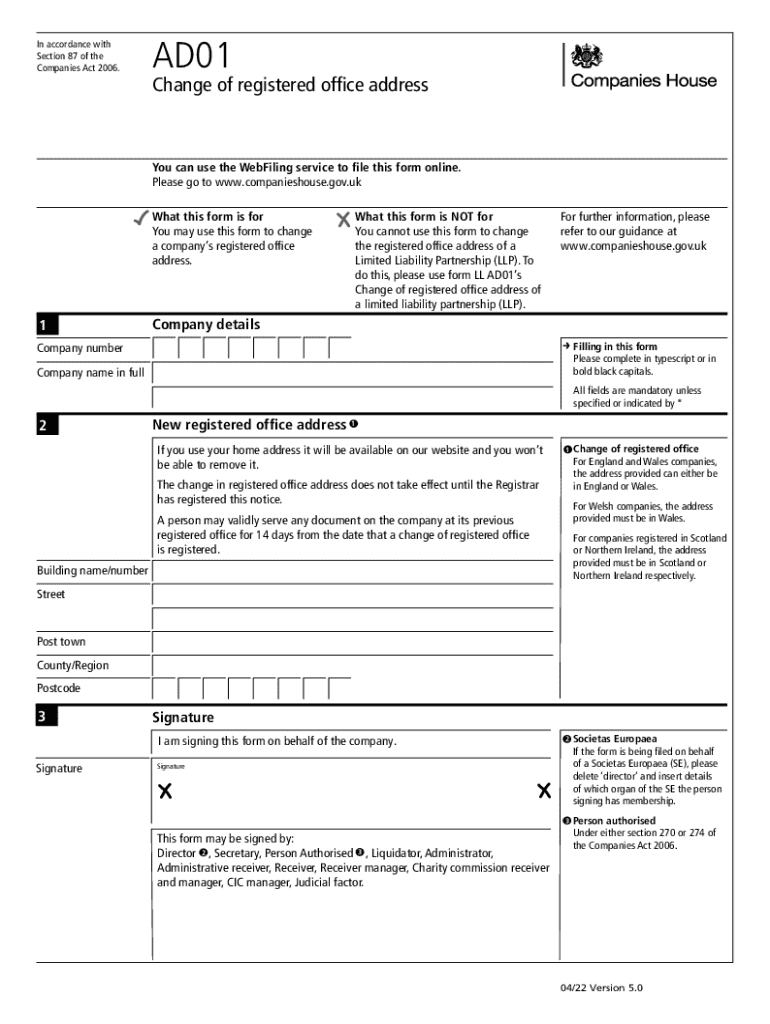
gov ukgovernmentpublicationsChange a company's registered office address (AD01) - GOV UK Preview on Page 1

Here's how it works

01. Edit your form online
Type text, add images, blackout confidential details, add comments, highlights and more.
02. Sign it in a few clicks
Draw your signature, type it, upload its image, or use your mobile device as a signature pad.
03. Share your form with others
Send it via email, link, or fax. You can also download it, export it or print it out.

How to use or fill out gov ukgovernmentpublicationsChange a company's registered office address (AD01) - GOV UK with DocHub

Form edit decoration
9.5
Ease of Setup
DocHub User Ratings on G2
9.0
Ease of Use
DocHub User Ratings on G2
  1. Click ‘Get Form’ to open the AD01 form in our platform's editor.
  2. Begin by entering your company number and full company name in the designated fields. Ensure that all information matches the public register to avoid processing delays.
  3. In section two, provide the new registered office address. Remember, if you choose a home address, it will be publicly available. Make sure the address complies with regional requirements based on where your company is registered.
  4. Proceed to sign the form on behalf of your company. You can select from various authorized signatories such as a director or secretary.
  5. Optionally, include presenter information for any queries Companies House may have regarding your submission. This information will also be visible on public records.
  6. Finally, review all entries for accuracy before submitting the form through our platform for a streamlined filing experience.

Start using our platform today to effortlessly complete and submit your AD01 form online for free!

See more gov ukgovernmentpublicationsChange a company's registered office address (AD01) - GOV UK versions

We've got more versions of the gov ukgovernmentpublicationsChange a company's registered office address (AD01) - GOV UK form. Select the right gov ukgovernmentpublicationsChange a company's registered office address (AD01) - GOV UK version from the list and start editing it straight away!
Versions Form popularity Fillable & printable
2022 4.4 Satisfied (48 Votes)
2010 4.8 Satisfied (144 Votes)
2009 4 Satisfied (28 Votes)
be ready to get more

Complete this form in 5 minutes or less

Get form

Got questions?

We have answers to the most popular questions from our customers. If you can't find an answer to your question, please contact us.
Contact us

Yes, a typed name is accepted as a legitimate electronic signature when you create it on your document utilizing a compliant solution like DocHub. Simply upload your gov ukgovernmentpublicationsChange a company's registered office address (AD01) - GOV UK to our editor, click Sign in the top tool pane → Create your signature → Type your name in the proper tab, and select how it will appear on your document.

If you are using Chrome, there are two easy ways to modify your gov ukgovernmentpublicationsChange a company's registered office address (AD01) - GOV UK online. First, go to the DocHub website, add your document, and modify it utilizing our toolbar. You can also install our Chrome extension and modify any document by dragging and dropping it in your browser window.

Businesses Complete Change of Address for Businesses, Exempt Organizations, Estates and Trusts (Form 3533-B) Mail your form Franchise Tax Board. PO Box 942840. Sacramento CA 94240-0002.
What form do you file to change your registered agent in North Carolina? There is one form to change the registered agent for all North Carolina business entity types. Just submit form BE-06, Statement of Change of Registered Office and/or Registered Agent to the North Carolina SOS.
Finding the registered office address of a company To find the registered address you are looking for, enter the company name on the Search the register page of Companies House Service. The registered office address of that company will appear under the companys name.

Security and compliance

At DocHub, your data security is our priority. We follow HIPAA, SOC2, GDPR, and other standards, so you can work on your documents with confidence.

Learn more
ccpa2
pci-dss
gdpr-compliance
hipaa
soc-compliance

People also ask

Complete and file the Certificate of Change with the Department of State. The completed Certificate of Change, together with the $30 filing fee, should be forwarded to: New York Department of State, Division of Corporations, One Commerce Plaza, 99 Washington Avenue, Albany, NY 12231.
This can be done by logging in to the Companies House website and following these steps: Find your company using the search function. Click on the file for this company tab and follow the instructions to change your address. Enter your new building name or number and postcode. Submit your changes.
Change in the registered office within the same city The company needs to file a form INC22 with the MCA. It should be filed within 30 days of passing the board resolution. The utility bill for business address proof, NOC from the owner, and the rental agreement is the place is rented must be attached.
Update your address with the PA Department of Revenue To file online, you need to use the myPath system. You can follow the Department of Revenue Address Change Guide for instructions. To file by mail, you need to use Form REV-854 to change your address with the Department of Revenue.
Change of Registered Address Within the same city The business must first call a board meeting and pass a resolution regarding it. The business must submit a form INC22 to the MCA. It must be submitted 30 days after the board resolution has been approved.