




Here's how it works



How to use or fill out Address Affidavit Procedures - Henrico County Public Schools with Our Platform

- Click ‘Get Form’ to open the Address Affidavit Procedures in the editor.
- Begin by filling in the date and the start date of shared housing. Ensure that all fields are completed accurately.
- Enter the student’s name, grade, and school information. Remember, a separate form is required for each enrolled student.
- Both the homeowner/leaseholder and parent/legal guardian must provide their information. Make sure to include contact numbers and previous addresses as needed.
- Complete the certification section by confirming that all provided information is true. Both parties must sign and date the affidavit.
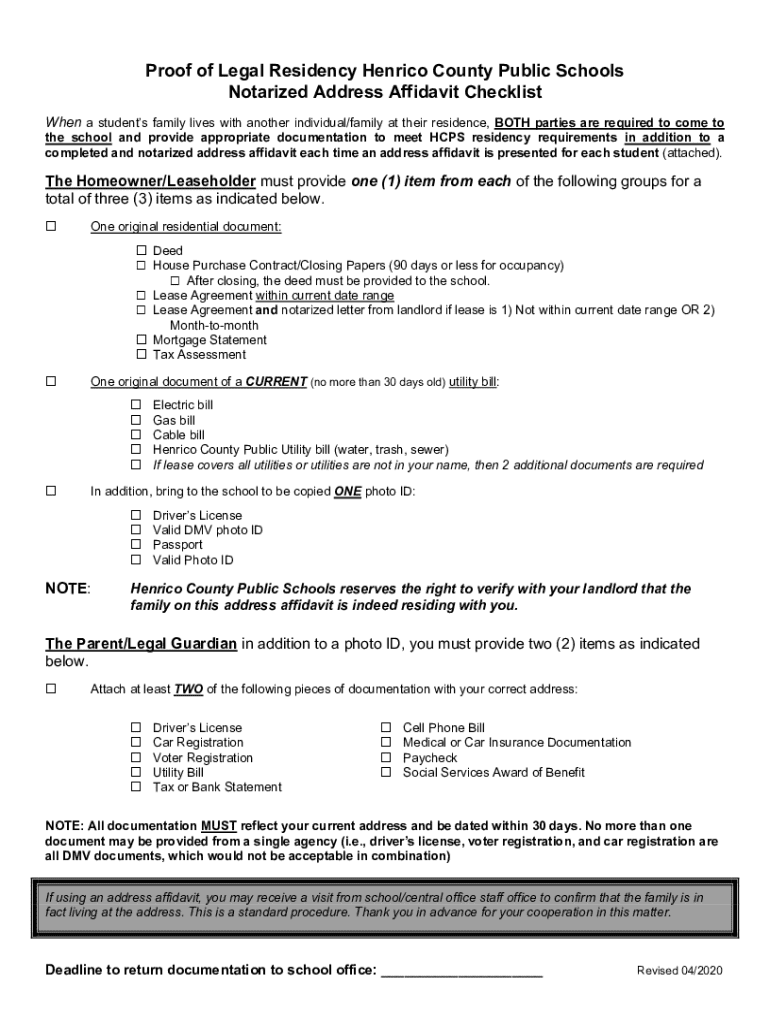
- Upload any required supporting documents as outlined in the checklist, ensuring they reflect current residency details.
- Once completed, save your document and submit it according to Henrico County Public Schools' guidelines before the deadline.
Start using our platform today to streamline your Address Affidavit Procedures for free!
It's free
See more Address Affidavit Procedures - Henrico County Public Schools versions
| Versions | Form popularity | Fillable & printable |
|---|---|---|
| 2020 | 4.5 Satisfied (22 Votes) |
Got questions?
How can I sign my Address Affidavit Procedures - Henrico County Public Schools online?
Sign in to your DocHub account and add your Address Affidavit Procedures - Henrico County Public Schools to our editor using one of its upload methods - from your device, cloud storage, protected URL, or your DocHub folders if you have already managed your form before. Open our editor, click the Sign key in the top toolbar, and decide on your signing method. You can upload a picture of your handwritten signature, draw it, enter your name, or use a QR code instead.
How do you edit Address Affidavit Procedures - Henrico County Public Schools on iOS?
You can easily edit fill out your Address Affidavit Procedures - Henrico County Public Schools on any iOS device. Open an internet browser of your liking, go to the DocHub website, authorize or create a new account, upload your file for editing, and make your desired adjustments. Our service is mobile-friendly, so using its features on your phone will be a no-brainer, even on the first try.
Security and compliance
At DocHub, your data security is our priority. We follow HIPAA, SOC2, GDPR, and other standards, so you can work on your documents with confidence.
Learn more


