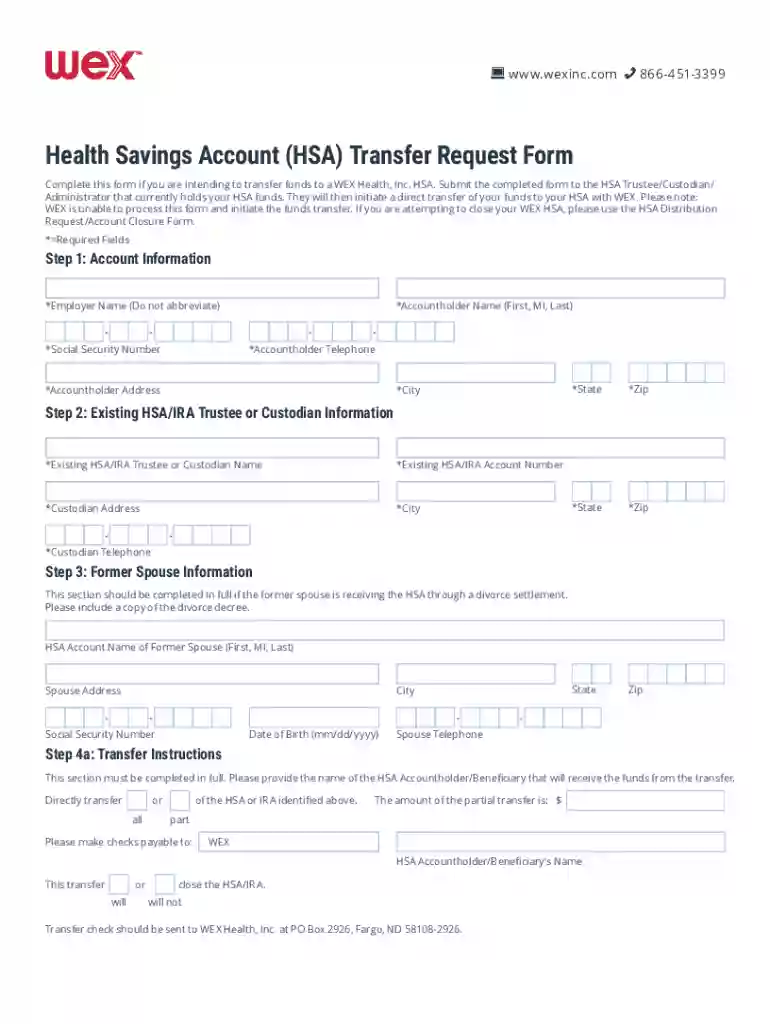
Health Savings Account Transfer Request Form - Benefit Extras 2026

Get Form
wex hsa transfer request form Preview on Page 1

Here's how it works

01. Edit your wex hsa transfer request form online
Type text, add images, blackout confidential details, add comments, highlights and more.

02. Sign it in a few clicks
Draw your signature, type it, upload its image, or use your mobile device as a signature pad.

03. Share your form with others
Send wex hsa transfer request via email, link, or fax. You can also download it, export it or print it out.

How to use or fill out Health Savings Account Transfer Request Form - Benefit Extras with our platform

Form edit decoration
9.5
Ease of Setup
DocHub User Ratings on G2
9.0
Ease of Use
DocHub User Ratings on G2
  1. Click ‘Get Form’ to open the Health Savings Account Transfer Request Form in the editor.
  2. Begin by filling out the Account Information section. Enter your employer name, accountholder name, social security number, telephone number, and address details accurately.
  3. Proceed to the Existing HSA/IRA Trustee or Custodian Information section. Provide the name of your current trustee or custodian, account number, and their contact information.
  4. If applicable, complete the Former Spouse Information section with their details and include a copy of the divorce decree if they are receiving funds through a settlement.
  5. In Step 4a, specify transfer instructions. Indicate whether you want to transfer all or part of your HSA/IRA funds and provide necessary payment details.
  6. For asset liquidation instructions in Step 4b, indicate if you want all assets liquidated immediately or provide specific instructions for each asset.
  7. Finally, sign and date the form in Step 5 to authorize the transfer. Ensure all information is accurate before submission.

Start using our platform today to easily complete your Health Savings Account Transfer Request Form for free!

See more Health Savings Account Transfer Request Form - Benefit Extras versions

We've got more versions of the Health Savings Account Transfer Request Form - Benefit Extras form. Select the right Health Savings Account Transfer Request Form - Benefit Extras version from the list and start editing it straight away!
Versions Form popularity Fillable & printable
2022 4.2 Satisfied (46 Votes)
2018 4.1 Satisfied (56 Votes)
be ready to get more

Complete this form in 5 minutes or less

Get form

Got questions?

We have answers to the most popular questions from our customers. If you can't find an answer to your question, please contact us.
Contact us

Electronic signatures are a great replacement for traditional signing, as they save time, effort, and money people spend on printing, scanning, and paper delivery. You can eSign your Health Savings Account Transfer Request Form - Benefit Extras utilizing a trustworthy and robust online document processing services like DocHub. It complies with main eSignature regulations (ESIGN and UETA), so all forms approved there are legally binding and have the same validity as physically signed ones.

When you edit your Health Savings Account Transfer Request Form - Benefit Extras with DocHub, you will not need to look for other software or services to eSign it. An electronic signature is a component of DocHub’s substantial editing toolset, which allows you to implement changes in your form without jumping between platforms. Just complete your form, double-check the correctness of your information and place your electronic signature at the end to make it submission-ready within a few minutes.

HSA rollovers can be performed in a few different ways: Your old provider may directly transfer your funds and any investments to your new provider. Your old provider may ask you to sell off your investments and then transfer only cash to your new provider.
HSA Bank does not charge any fees for transfer or rollover of your HSAs, your existing provider may charge an account closing fee.
You may designate a beneficiary to receive your HSA assets in the event of your death. If you name your spouse as beneficiary, your spouse can elect to treat the HSA as his or her own.

Security and compliance

At DocHub, your data security is our priority. We follow HIPAA, SOC2, GDPR, and other standards, so you can work on your documents with confidence.

Learn more
ccpa2
pci-dss
gdpr-compliance
hipaa
soc-compliance

People also ask

File Form 8889 to: Report health savings account (HSA) contributions (including those made on your behalf and employer contributions).
The Medicare HSA Loophole for Spouses Once you turn 65 and enroll in Medicare, you can no longer make HSA contributions. Yes, you can still make tax free and penalty withdrawals to pay for medical expenses and even to pay long term care insurance premiums.

Related links