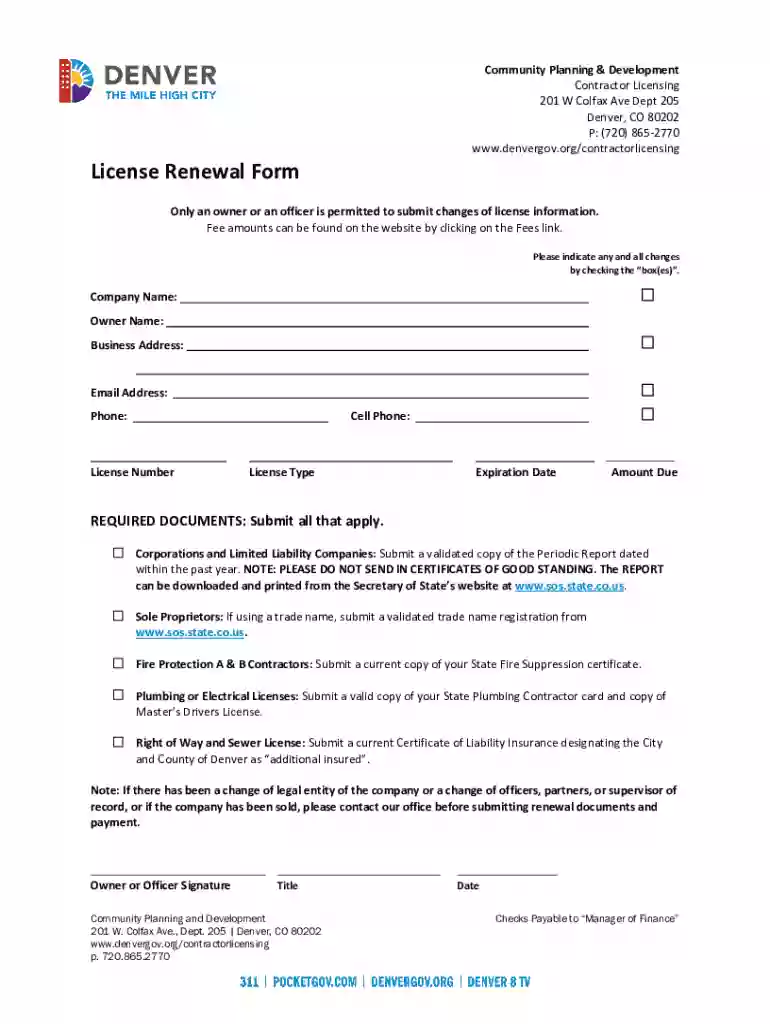
License Renewal Form License Renewal Form Preview on Page 1

License Renewal Form License Renewal Form 2026

Here's how it works

  • 01. Edit your form online

    Type text, add images, blackout confidential details, add comments, highlights and more.

  • 02. Sign it in a few clicks

    Draw your signature, type it, upload its image, or use your mobile device as a signature pad.

  • 03. Share your form with others

    Send it via email, link, or fax. You can also download it, export it or print it out.

How to use or fill out License Renewal Form License Renewal Form with our platform

Form edit decoration
9.5
Ease of Setup
DocHub User Ratings on G2
9.0
Ease of Use
DocHub User Ratings on G2
  1. Click ‘Get Form’ to open the License Renewal Form in the editor.
  2. Begin by entering your Company Name and Owner Name in the designated fields. Ensure that these names match your official documents.
  3. Fill in your Business Address, Email Address, Phone, and Cell Phone. Accurate contact information is crucial for communication regarding your license.
  4. Locate the License Number and License Type sections. Enter the appropriate details as they appear on your current license.
  5. Check the Expiration Date field to ensure it reflects your current license status. This helps avoid any lapses in licensing.
  6. Indicate any changes by checking the relevant box(es). If applicable, submit all required documents as specified for your business type.
  7. Finally, sign and date the form where indicated, ensuring that either an owner or officer completes this step.

Start using our platform today to streamline your License Renewal Form process for free!

See more License Renewal Form License Renewal Form versions

We've got more versions of the License Renewal Form License Renewal Form form. Select the right License Renewal Form License Renewal Form version from the list and start editing it straight away!

VersionsForm popularityFillable & printable
20204.8 Satisfied (52 Votes)
20104 Satisfied (43 Votes)

be ready to get more

Complete this form in 5 minutes or less

Got questions?

We have answers to the most popular questions from our customers. If you can't find an answer to your question, please contact us.

A lot of software applications are available out there for document modifying and signing. DocHub is one of the most widely used online solutions that comply with all security and compliance requirements and guarantees your eSigned documentation is legally enforceable. All you need to give it a try is to create an account, upload your License Renewal Form License Renewal Form, provide the necessary details, and click Sign. Create your electronic signature by typing, drawing it, uploading its picture to your template, or scanning a unique QR code.

You can easily complete, edit, and even eSign your License Renewal Form License Renewal Form utilizing DocHub. Create a new profile and begin your free trial. After that, you may add the file with the form and easily make all the needed edits. No need to print on paper or use a third-party application to sign it, as you can put your electronic signature on your document quicker via DocHub.

How to renew a license in-person A filled out application for an ID card, learners permit, or drivers license. Proof verifying your US citizenship or lawful presence. Proof of your residency in Massachusetts. Present the Social Security card or W-2 form that proves your Social Security Number (SSN). The renewal fee.
You can renew your Louisiana drivers license 180 days before expiration online, in person, or by mail. The cost is between $18.75 and $32.75, depending on your age and time of renewal.
What Youll Need to Do to Renew your Louisiana Driver License Online. Visit the Louisiana Office of the Motor Vehicles Expresslane at . Enter the renewal information and confirm the record. View the fee breakdown.

Security and compliance

At DocHub, your data security is our priority. We follow HIPAA, SOC2, GDPR, and other standards, so you can work on your documents with confidence.

People also ask

To renew your DL in person: Complete a DL or ID card application or bring in the DMV renewal notice mailed to you (cross out any old information and write in the current information). Have your thumbprint scanned. Pass a vision exam. Have your photo taken.
Form DL-43, Application for Renewal/Replacement/Change of a Texas Driver License or Identification Card, is a legal document completed by Texas residents to renew their driver licenses and identification cards, to request their replacement or update the information in these documents.
Requirements Proper Identification. Collection of the applicants social security number. Successful passing of vision test. Proof of current liability insurance, if applicable. Proof of Louisiana residency. Successful completion of required tests, if applicable.
The OMV ExpressLane is an easy way for Louisiana residents to renew their vehicle registration, drivers license, or ID card from the comfort of their home or office. The system is available 7 days a week and virtually 24 hours a day.
Your drivers license will expire six years from your nearest birthday. You can renew it within 180 days of the expiration date. You have a 10 day grace period after your expiration date before it is legally expired. If you renew after the ten-day grace period, there will be a $15 late fee on top of any regular fees.

Related links

22 Tex. Admin. Code 153.17 - License Renewal

(1) The Board will send a renewal notice to the license holder at least 90 days prior to the expiration of the license. It is the responsibility of theRead more

Learn more
NJ MVC | License Renewal

Fill out Auto License Application or Non-Driver ID Application and submit it, with your documents and fees, at one of the counters. Have your photo taken.Read more

Learn more
FAA Form 8710-1, Airman Certificate and/or Rating

The information collected on this form is necessary to determine applicant eligibility for airman ratings. We estimate it will take 30.Read more

Learn more
If you believe that this page should be taken down, please follow our DMCA take down process here