




Here's how it works



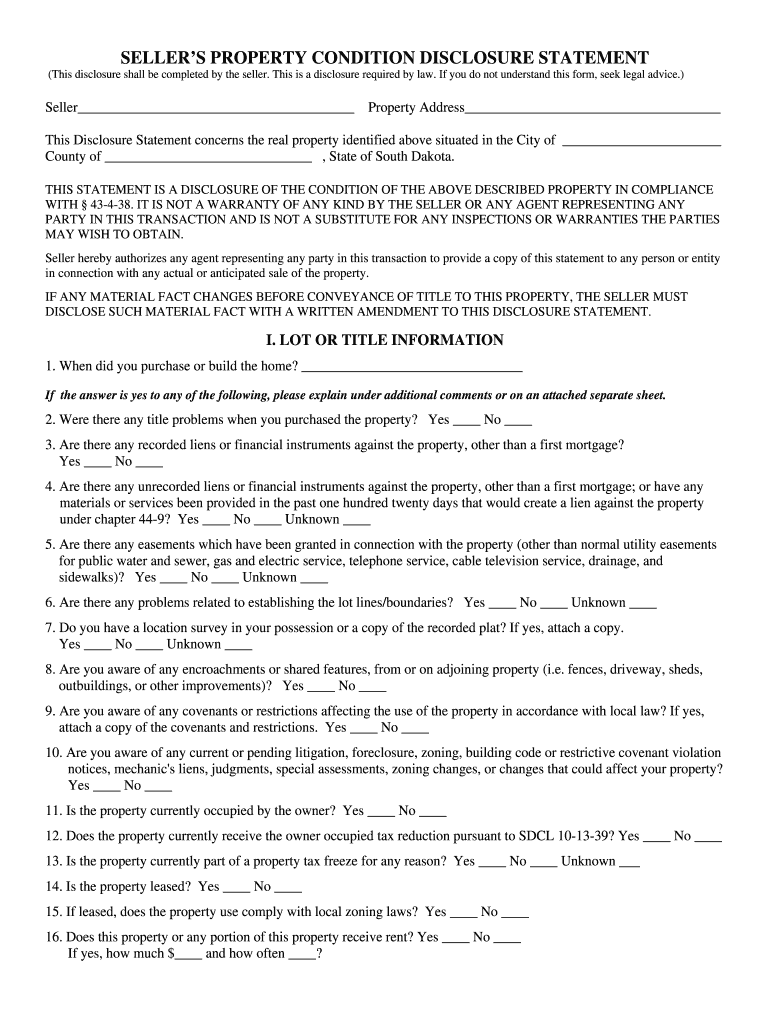
How to use or fill out South Dakota Seller's Property Condition Disclosure Statement

- Click ‘Get Form’ to open it in the editor.
- Begin by entering the seller's name and property address at the top of the form. This information is crucial for identifying the property in question.
- Proceed to Section I, where you will answer questions regarding lot or title information. Be thorough, especially if there are any title problems or liens against the property.
- In Section II, provide details about structural information. Indicate any known issues such as water penetration or roof leaks, and document any repairs made.
- Move on to Section III to assess systems and utilities. Mark whether each system is working or not, ensuring accuracy for potential buyers.
- Review Section IV for hazardous conditions. If applicable, note any tests performed related to hazardous materials like lead paint or radon gas.
- Complete Section V with miscellaneous information, including road maintenance agreements and any known issues that may affect property value.
- Finally, sign and date the closing section to certify that all provided information is accurate. Ensure all necessary attachments are included before submission.
Start using our platform today for free to streamline your document editing and ensure a smooth completion of your Seller's Property Condition Disclosure Statement!
It's free
Got questions?
Can I complete and sign my South Dakota Seller's Property Condition Disclosure Statement online?
Sure, and it’s really easy! DocHub is a web-based PDF editor with advanced document processing capabilities that allow you quickly adjust your documents, complete empty fields and add new ones for other people to fill out, and create electronic signatures in several ways. Add your South Dakota Seller's Property Condition Disclosure Statement, provide information as requested, and choose how you want to eSign your template - by typing your name, drawing your signature, uploading its image, or using a QR code.
Can I edit South Dakota Seller's Property Condition Disclosure Statement on my phone?
As a comprehensive document editing service, DocHub is accessible on smart phones. Open DocHub in your choice of mobile internet browser and use our intelligent mobile-friendly toolset to fill out your South Dakota Seller's Property Condition Disclosure Statement.
When must an agency disclosure statement be given to a consumer?
When must a listing agent present the disclosure regarding real estate?
When must a sellers agent deliver a specified written agency disclosure form to the seller?
Security and compliance
At DocHub, your data security is our priority. We follow HIPAA, SOC2, GDPR, and other standards, so you can work on your documents with confidence.
Learn more


