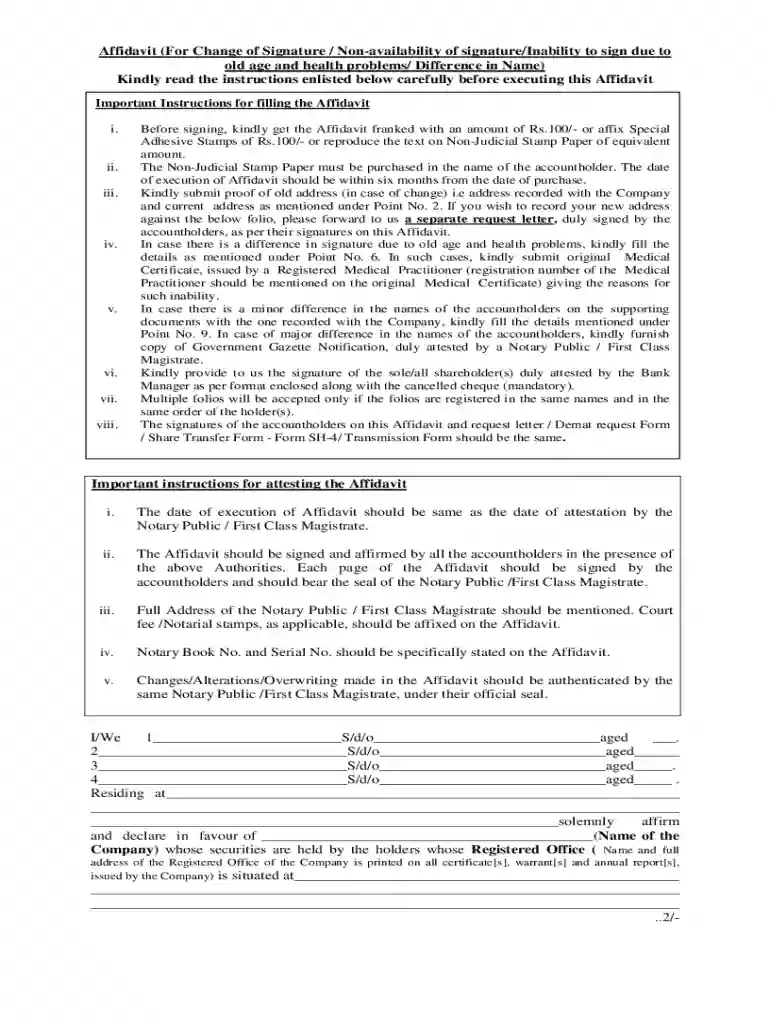
Affidavit (For Change Of Signature - TSR Darashaw Limited - Fill andAffidavit for Change of Signatur 2026

Get Form
tsr darashaw affidavit Preview on Page 1

Here's how it works

01. Edit your tsr darashaw affidavit online
Type text, add images, blackout confidential details, add comments, highlights and more.

02. Sign it in a few clicks
Draw your signature, type it, upload its image, or use your mobile device as a signature pad.

03. Share your form with others
Send tsr darashaw affidavit form via email, link, or fax. You can also download it, export it or print it out.

How to use or fill out Affidavit (For Change Of Signature - TSR Darashaw Limited)

Form edit decoration
9.5
Ease of Setup
DocHub User Ratings on G2
9.0
Ease of Use
DocHub User Ratings on G2
  1. Click ‘Get Form’ to open it in the editor.
  2. Begin by filling in your personal details, including your name, address, and age. Ensure that the information matches your identification documents.
  3. In section 1, specify the number of shares or securities you hold and provide the relevant folio numbers.
  4. If there is a change of address, attach proof of both your old and new addresses as required under Point No. 2.
  5. For signature changes due to health issues, include a medical certificate from a registered practitioner as mentioned in Point No. 6.
  6. Ensure all signatures are consistent across the affidavit and any supporting documents. This includes attestation by a Notary Public or Bank Manager.
  7. Review all entries for accuracy before finalizing the document. Make sure to sign where indicated and affix necessary stamps.

Start using our platform today to easily complete your Affidavit for Change of Signature!

See more Affidavit (For Change Of Signature - TSR Darashaw Limited - Fill andAffidavit for Change of Signatur versions

We've got more versions of the Affidavit (For Change Of Signature - TSR Darashaw Limited - Fill andAffidavit for Change of Signatur form. Select the right Affidavit (For Change Of Signature - TSR Darashaw Limited - Fill andAffidavit for Change of Signatur version from the list and start editing it straight away!
Versions Form popularity Fillable & printable
2019 4.9 Satisfied (40 Votes)
2018 4.8 Satisfied (58 Votes)
be ready to get more

Complete this form in 5 minutes or less

Get form

Got questions?

We have answers to the most popular questions from our customers. If you can't find an answer to your question, please contact us.
Contact us
Must be signed by the applicant and docHubd (with Stamp and Notary Signatory) IMPORTANT: Affidavit for Change in Appearance Signature is Mandatory for all applicants.
Steps to Fill Out an Affidavit Step 1: Obtain the Correct Form. Start by selecting the appropriate affidavit form for your jurisdiction and purpose. Step 2: Enter Personal Information. Step 3: Write the Statement of Truth. Step 4: Sign in Front of a Notary.
All statements and documents are subject to verification. Approximate Date Current Name Was Assumed (mm-yyyy) Former Name of Applicant. Applicants Date of Birth. Suffix. Last. Middle. First. Number of Years You Have Known the Applicant. Your Relationship to the Applicant. Current Name of Applicant. Applicants Place of Birth.
An Affidavit For Change of Signature is a crucial legal instrument in Nigerian jurisdiction that allows individuals to formally declare and document modifications to their official signature.
Format Of Affidavit/declaration For Change Of Signature That I, Shri/Smt , having signature now to be changed as copy of specimen is attached. I am residing at the abovementioned address and have not changed my address in the past three years. That I have changed my signature.

Security and compliance

At DocHub, your data security is our priority. We follow HIPAA, SOC2, GDPR, and other standards, so you can work on your documents with confidence.

Learn more
ccpa2
pci-dss
gdpr-compliance
hipaa
soc-compliance
be ready to get more

Complete this form in 5 minutes or less

Get form

People also ask

I, son/daughter/spouse of aged , residing at , do hereby solemnly affirm and declare as under: 1. That I, Shri/Smt , having signature now to be changed as copy of specimen is attached.
You can change your signature whenever you want. Theres no legal form you have to fill out or an official process to go through. You dont need to notify a government office. You just start using a new one.