Application for Contractor Registration - City of Nichols Hills 2026

Get Form
Application for Contractor Registration - City of Nichols Hills Preview on Page 1

Here's how it works

01. Edit your form online
Type text, add images, blackout confidential details, add comments, highlights and more.

02. Sign it in a few clicks
Draw your signature, type it, upload its image, or use your mobile device as a signature pad.

03. Share your form with others
Send it via email, link, or fax. You can also download it, export it or print it out.

How to use or fill out Application for Contractor Registration - City of Nichols Hills with our platform

Form edit decoration
9.5
Ease of Setup
DocHub User Ratings on G2
9.0
Ease of Use
DocHub User Ratings on G2
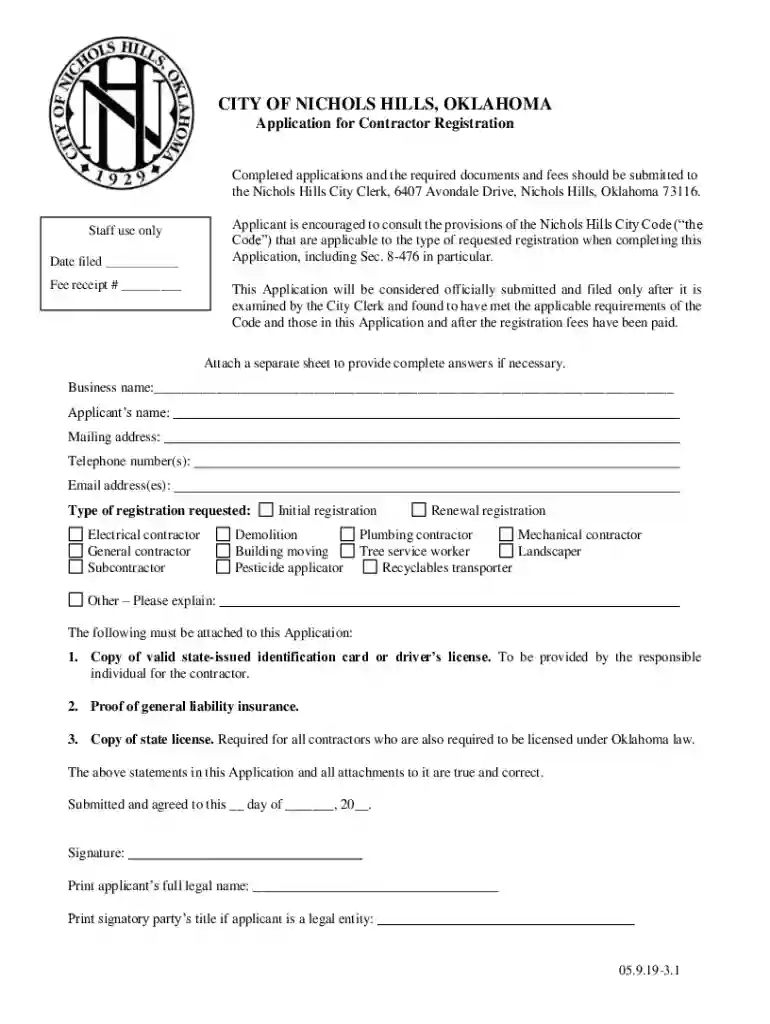
  1. Click ‘Get Form’ to open the Application for Contractor Registration in the editor.
  2. Begin by entering your business name in the designated field. Ensure that it matches your official business registration.
  3. Fill in your name, mailing address, telephone number(s), and email address(es) accurately to ensure proper communication.
  4. Select the type of registration you are requesting from the options provided, such as Electrical contractor or General contractor. If applicable, indicate whether this is an initial or renewal registration.
  5. Attach the required documents: a copy of your valid state-issued ID, proof of general liability insurance, and a copy of your state license. Use our platform’s attachment feature to upload these documents easily.
  6. Review all entered information for accuracy. Sign and print your full legal name at the bottom of the form before submitting.

Start filling out your Application for Contractor Registration today using our platform for free!

See more Application for Contractor Registration - City of Nichols Hills versions

We've got more versions of the Application for Contractor Registration - City of Nichols Hills form. Select the right Application for Contractor Registration - City of Nichols Hills version from the list and start editing it straight away!
Versions Form popularity Fillable & printable
2023 4.5 Satisfied (50 Votes)
2019 4.4 Satisfied (29 Votes)
be ready to get more

Complete this form in 5 minutes or less

Get form

Got questions?

We have answers to the most popular questions from our customers. If you can't find an answer to your question, please contact us.
Contact us

With DocHub, you can quickly approve your Application for Contractor Registration - City of Nichols Hills or any other paperwork on iOS, even without installing additional applications. You can access your DocHub account from any internet-connected browser and fill out and sign your document in any way you like with just a few clicks.

You can easily fill out, modify, and even eSign your Application for Contractor Registration - City of Nichols Hills using DocHub. Create a new account and begin your free trial. After that, you can upload the document with the form and simply make all the needed edits. No need to print on paper or use a third-party application to sign it, as you can put your electronic signature on your document quicker via DocHub.

Cosmetic work such as painting, tiling, carpeting and replacing cabinets do not require a permit. However, you are encouraged to contact the Building Inspection office at (479)-621-1100 before beginning any work to determine whether or not permits are required.
Contractors can register with the Village by submitting $150, proof of general liability insurance and workmens compensation insurance (if applicable), and a $10,000 surety bond with their completed contractors registration application.
Contractors must be licensed by the Village to work within Lake in the Hills. To obtain a contractors license, an online application and any required documents must be submitted through our Public Portal along with a $75.00 fee through the ePay system.

Security and compliance

At DocHub, your data security is our priority. We follow HIPAA, SOC2, GDPR, and other standards, so you can work on your documents with confidence.

Learn more
ccpa2
pci-dss
gdpr-compliance
hipaa
soc-compliance
be ready to get more

Complete this form in 5 minutes or less

Get form