Dex 93 2026

Get Form
dex 93 form Preview on Page 1

Here's how it works

01. Edit your dex 93 form online
Type text, add images, blackout confidential details, add comments, highlights and more.

02. Sign it in a few clicks
Draw your signature, type it, upload its image, or use your mobile device as a signature pad.

03. Share your form with others
Send dex 93 via email, link, or fax. You can also download it, export it or print it out.

How to use or fill out dex 93 with our platform

Form edit decoration
9.5
Ease of Setup
DocHub User Ratings on G2
9.0
Ease of Use
DocHub User Ratings on G2
  1. Click ‘Get Form’ to open dex 93 in the editor.
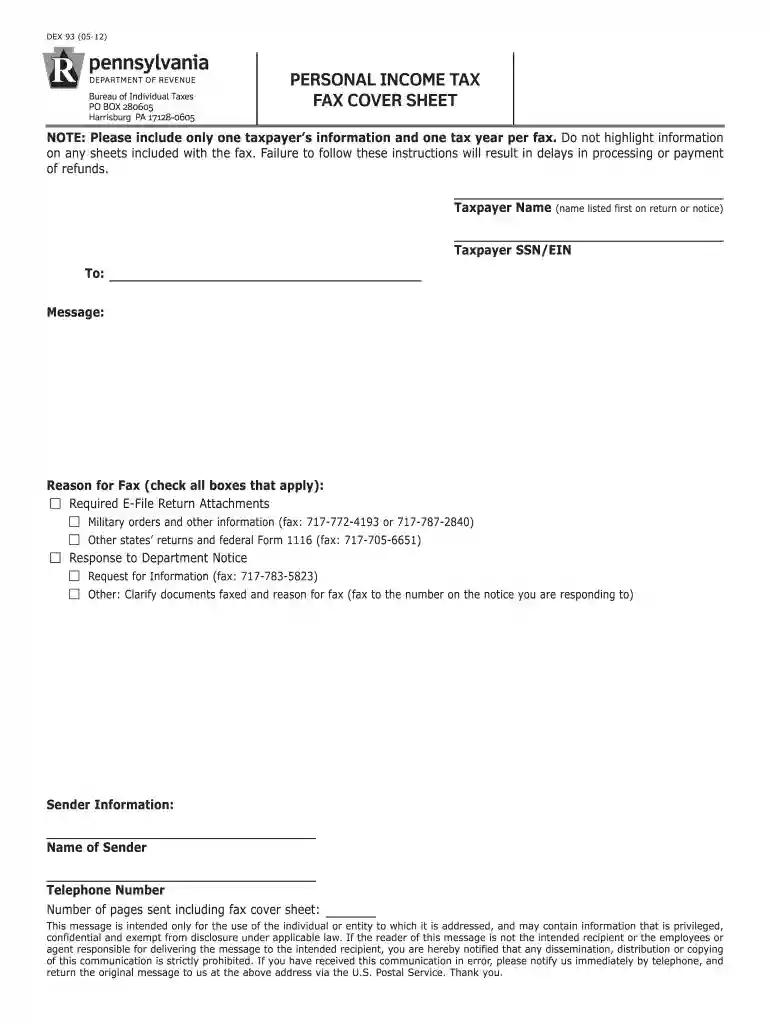
  2. Begin by entering the Taxpayer Name in the designated field. This should be the name listed first on the tax return or notice.
  3. Next, input the Taxpayer SSN/EIN in the appropriate section to ensure accurate identification.
  4. In the 'To:' field, specify the recipient of the fax. This is crucial for proper delivery.
  5. Type your message in the 'Message' box, providing any necessary context for your fax.
  6. Check all applicable boxes under 'Reason for Fax' to indicate why you are sending this document.
  7. Fill out your Sender Information, including your name and telephone number for follow-up purposes.
  8. Finally, indicate the total number of pages being sent, including this cover sheet, before submitting your fax.

Start using our platform today to streamline your document editing and submission process for free!

See more dex 93 versions

We've got more versions of the dex 93 form. Select the right dex 93 version from the list and start editing it straight away!
Versions Form popularity Fillable & printable
2023 4.9 Satisfied (34 Votes)
2023 4.7 Satisfied (39 Votes)
2018 4.8 Satisfied (75 Votes)
2012 4.4 Satisfied (277 Votes)
be ready to get more

Complete this form in 5 minutes or less

Get form

Got questions?

We have answers to the most popular questions from our customers. If you can't find an answer to your question, please contact us.
Contact us
Online. New electronic payments options are now available through myPATH. myPATH allows you to make estimated, extension, or return payments for PA-40, PA-41, or PA-20S/PA-65 filers directly from the homepage without the need to create an account.
Overview. Pennsylvania personal income tax is levied at the rate of 3.07 percent against taxable income of resident and nonresident individuals, estates, trusts, partnerships, S corporations, business trusts and limited liability companies not federally taxed as corporations.
Who Must File. Every resident, part-year resident or nonresident individual must file a Pennsylvania Income Tax Return (PA-40) when he or she realizes income generating $1 or more in tax, even if no tax is due (e.g., when an employee receives compensation where tax is withheld).
For starters, you can use HR Block Free Online to file a simple federal return and state return for $0. Depending on your tax situation, you might need more than just a Form 1040 to complete your taxes which may require an upgrade.
Pennsylvania exempts all forms of retirement income from taxation for residents 60 and older. That can mean thousands of dollars in annual savings as compared with other states in the region.

People also ask

Many Pennsylvanians are eligible to use Direct File, a free and secure online tool that can be used to file both your federal tax return and PA personal income tax return (PA-40). You can save hundreds of dollars and time by using Direct File.
myPATH is a service offered exclusively through the Department of Revenue. You can prepare and submit your Pennsylvania personal income tax return for free. E-file for free: A safe, convenient online filing option available from reputable vendors. File your state and federal returns for free.
(b) A person who willfully fails to file a return, files a fraudulent return or attempts to evade or defeat the tax, shall be guilty of a misdemeanor and upon conviction be subject to fines or be imprisoned as provided for in the law, or both.

pa dex 93