




Here's how it works

01. Edit your form online
Type text, add images, blackout confidential details, add comments, highlights and more.

02. Sign it in a few clicks
Draw your signature, type it, upload its image, or use your mobile device as a signature pad.

03. Share your form with others
Send it via email, link, or fax. You can also download it, export it or print it out.
How to use or fill out documents court wa with our platform

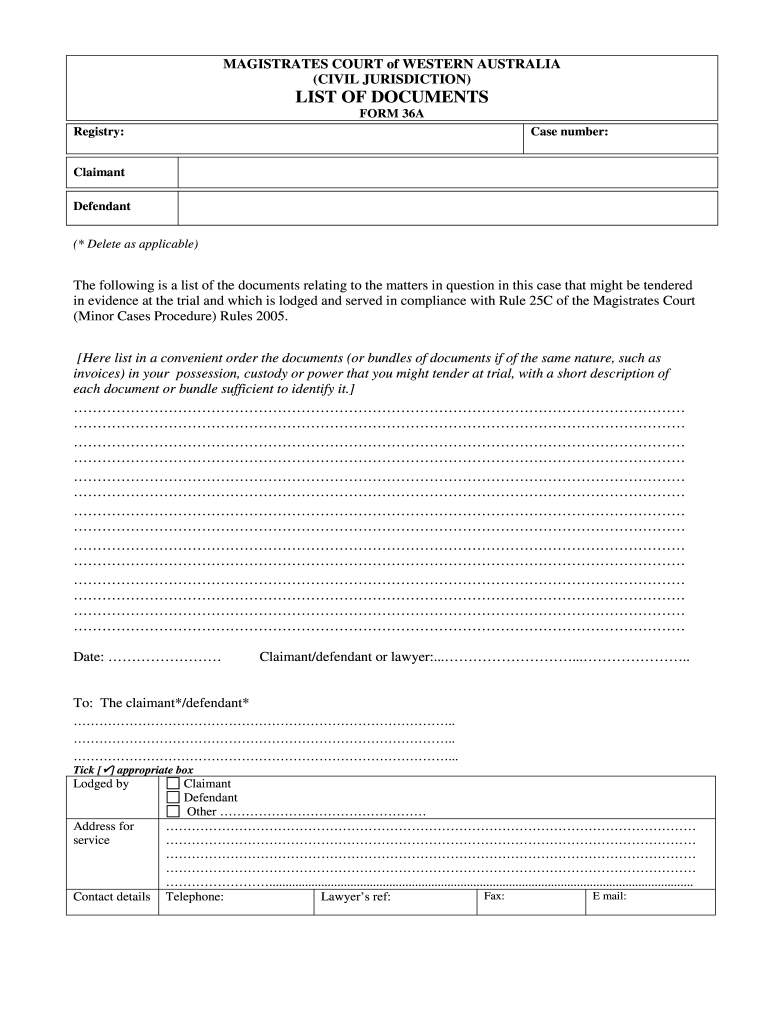
- Click ‘Get Form’ to open the documents court wa in the editor.
- Begin by entering the registry and case number at the top of the form. This information is crucial for identifying your case.
- Specify whether you are the claimant or defendant by selecting the appropriate option. Delete the one that does not apply.
- In the section provided, list all documents related to your case that you intend to present at trial. Include a brief description for each document to ensure clarity.
- Fill in the date on which you are completing this form. This helps maintain an accurate timeline of submissions.
- Sign off with your name as either claimant, defendant, or lawyer, ensuring that all parties involved are correctly identified.
- Complete the address for service and contact details section, including fax, email, and telephone numbers for effective communication.
Start using our platform today to streamline your document editing and submission process for free!
Fill out documents court wa online
It's free
It's free
Got questions?
We have answers to the most popular questions from our customers. If you can't find an answer to your question, please contact us.
Contact us
How to get copies of court documents in Washington state?
Many Washington State courts have a public access terminal in the courthouse where you can view JIS public record case information such as an index of filed cases and a list of documents filed in each case. Contact your local court to see if they have a public access terminal.
Security and compliance
At DocHub, your data security is our priority. We follow HIPAA, SOC2, GDPR, and other standards, so you can work on your documents with confidence.
Learn more


