







Definition and Purpose of Using the IPST Forms
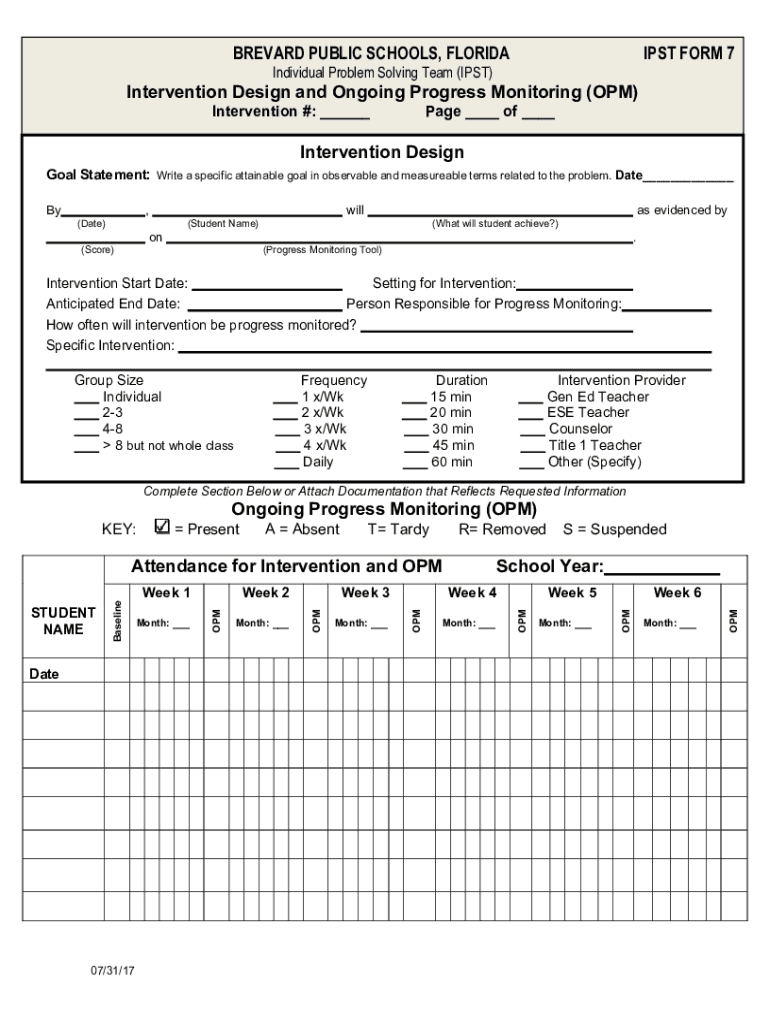
The Individual Problem Solving Team (IPST) Forms are essential tools used within the educational framework in the United States, particularly in Brevard Public Schools, Florida. These forms serve to document and facilitate the problem-solving process for students requiring tailored interventions. IPST Forms systematically outline intervention strategies, specific goals, and methods of progress monitoring, ensuring that each student receives personalized support to enhance academic and behavioral outcomes.
Key Elements of the IPST Forms
IPST Forms are comprehensive documents consisting of several critical sections. Each section serves a distinct purpose in documenting the intervention process:
- Goal Setting: Helps establish specific, measurable, attainable, relevant, and time-bound (SMART) goals for student improvement.
- Intervention Details: Includes specifics such as start and end dates, responsible staff members, and frequency and duration of each intervention.
- Progress Monitoring: Outlines procedures for regularly assessing student progress and making necessary adjustments to the intervention plan.
Steps to Complete the IPST Forms
Completing the IPST Forms involves a structured process to ensure thorough documentation:
- Initial Evaluation: Collect detailed observations and data on the student's current performance and challenges.
- Define Goals: Work collaboratively with team members, including educators and parents, to set SMART goals tailored to the student's needs.
- Design Interventions: Outline intervention strategies and logistical details, such as who will implement them and when.
- Monitor and Adjust: Regularly assess the student's progress with the interventions and make data-driven adjustments as needed.
Who Typically Uses the IPST Forms
IPST Forms are primarily used by educators, school psychologists, and other specialists involved in the student support process. These forms facilitate a collaborative approach to problem-solving, engaging multiple stakeholders in the development and execution of intervention plans. Additionally, parents and guardians are typically involved, ensuring transparency and cooperation in supporting their child's educational journey.


Practical Examples of Using the IPST Forms
One example of IPST Forms in action involves a student struggling with reading comprehension. An IPST could establish a bi-weekly reading intervention facilitated by a reading specialist. In another scenario, a student displaying behavioral challenges might receive support through a structured behavioral modification plan, complete with regular progress check-ins documented in the IPST Forms.
Legal Use of the IPST Forms
While the primary focus of the IPST Forms is educational support, it's crucial that these documents comply with relevant education policies and privacy laws, such as the Family Educational Rights and Privacy Act (FERPA) in the United States. Schools must handle all student information recorded in these forms with confidentiality and adhere to legal standards for data protection.
Software Compatibility with IPST Forms
The electronic management of IPST Forms is facilitated by compatibility with various software platforms. Using tools like DocHub, educators can digitally fill, edit, and share these forms seamlessly. This compatibility ensures that forms are easily integrated into digital workflows, providing a more efficient and organized approach to managing the problem-solving process.
Variations and Alternatives to the IPST Forms
While IPST Forms are tailored for specific use within the educational system of certain regions, similar tools and frameworks are available elsewhere to support student intervention. Schools might utilize comparable protocols under different names or adopt digital solutions that align with their specific administrative requirements.
Filing Deadlines and Important Dates for IPST Processes
While there may not be federally mandated deadlines for submitting IPST Forms, schools typically establish their internal timelines to coordinate intervention processes effectively. Adhering to these schedules ensures timely action and optimal support for students, making time management a vital component of the IPST process.
Conclusion on Using IPST Forms Effectively
The use of IPST Forms is a cornerstone in supporting individualized education strategies. By meticulously documenting each step from goal setting to intervention evaluation, these forms ensure that all students have the opportunity to achieve their full potential through customized educational plans.


