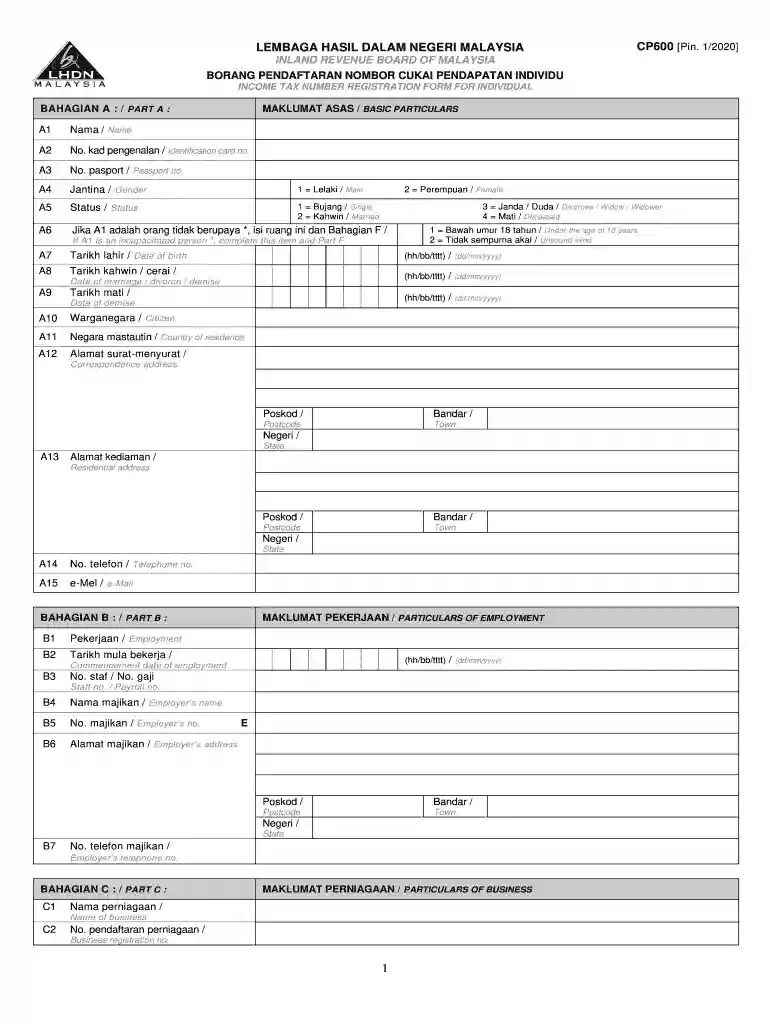
Definition and Meaning of Pendaftaran Fail Cukai
"Pendaftaran Fail Cukai - Lembaga Hasil Dalam Negeri" refers to the formal process of registering for a tax file with the Inland Revenue Board of Malaysia (IRBM). This registration is essential for individuals and entities to comply with Malaysian tax regulations. The process allows the IRBM to maintain accurate records of taxpayers and ensures compliance with tax obligations. The registration form captures critical information such as personal details, employment information, and details of business operations.
Steps to Complete the Pendaftaran Fail Cukai
Gather Necessary Information:
- Personal identification details such as name, address, and identification number.
- Employment or business operation details, including job title and business registration number.
- Information about legal representatives or tax agents if applicable.
Access the Registration Form:
- The form can be downloaded from the IRBM's official website or obtained at their branches.
Complete the Form:
- Fill out the required sections accurately. Errors can result in delays or penalties.
- Include all necessary declarations and ensure that information is up-to-date.
Submit the Form:
- Submit the form through the appropriate channels, either online or in-person at an IRBM office.
- Keep a copy for personal records.
Required Documents for Pendaftaran Fail Cukai
- Personal Identification: Copy of identity card or passport.
- Employment Details: Employer's declaration form or a copy of the employment contract.
- Business Registration: Certificate of business registration for self-employed individuals or business entities.
- Legal Authorization: Power of attorney or authorization letter for representatives filing on behalf of the taxpayer.
How to Obtain the Pendaftaran Fail Cukai Form
The Pendaftaran Fail Cukai form can be obtained in several ways:
- Online Download: Available for download as a PDF from the IRBM website. This is often the most convenient method for tech-savvy individuals.
- In-Person Retrieval: Physical copies can be acquired by visiting an IRBM branch. This method may be preferred by those who require assistance or have complex tax situations.
Importance of Registering a Tax File
Registering for a tax file is a legal requirement in Malaysia for:
- Compliance: It ensures you abide by the national tax regulations, helping you avoid penalties.
- Financial Tracking: Helps in maintaining a transparent financial record for personal or corporate accounting.
- Eligibility for Tax Benefits: Only registered taxpayers are eligible for certain tax deductions and credits.
Key Elements of the Pendaftaran Fail Cukai
- Tax Identification Number: Assigns a unique number to each taxpayer for recording and tracking tax-related activities.
- Personal Details Section: Captures information like name, address, and contact number.
- Employment and Business Information: Details about the job or business operations, including employer or business details.
- Declarations and Signatures: Mandatory affirmations to certify the truthfulness and accuracy of the information provided.
Legal Use of the Pendaftaran Fail Cukai
The form ensures that taxpayers fulfill legal obligations to declare income and pay taxes. It supports the IRBM's efforts to enforce tax laws and prevent tax evasion. Additionally, it provides a legal pathway for individuals or businesses to challenge tax assessments if necessary, ensuring their rights within the Malaysian taxation system.
Penalties for Non-Compliance
- Fines: Monetary penalties can be imposed for late registration or failure to register.
- Audits and Investigations: Unregistered individuals or entities might be subjected to audits by the IRBM, potentially resulting in more severe penalties.
- Legal Action: Persistent non-compliance can lead to court actions, resulting in further fines or imprisonment under Malaysian tax law.
These detailed sections aim to cover all relevant aspects of the "Pendaftaran Fail Cukai," providing comprehensive guidance for those involved in the registration process.