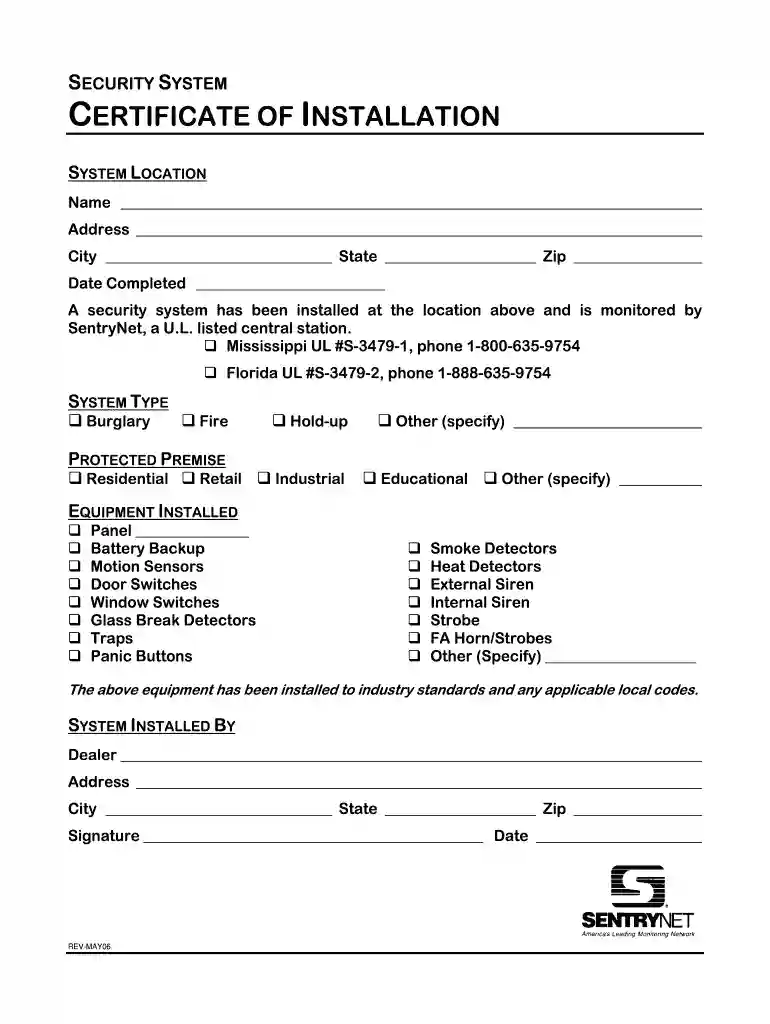
cctv work completion certificate format in word Preview on Page 1

Cctv installation certificate format 2026

Here's how it works

  • 01. Edit your cctv work completion certificate format in word online

    Type text, add images, blackout confidential details, add comments, highlights and more.

  • 02. Sign it in a few clicks

    Draw your signature, type it, upload its image, or use your mobile device as a signature pad.

  • 03. Share your form with others

    Send cctv certification sample via email, link, or fax. You can also download it, export it or print it out.

Overview of CCTV Installation Certificate Format

The CCTV installation certificate serves as a formal record verifying that a specific security system has been properly installed at a designated location. This document is essential for both compliance with industry standards and validation of the installation work completed.

Key Components of CCTV Installation Certificates

The primary elements included in a CCTV installation certificate often encompass:

  • Installation Details:

    • Name and address of the installation site
    • Date of installation
    • Installer's name and company details
  • Device Information:

    • Types of cameras installed (e.g., dome, bullet)
    • Quantity and locations of cameras
    • Associated equipment, such as DVRs or NVRs
  • Compliance Statement:

    • Confirmation that the installation meets applicable safety and regulatory standards
    • Relevant codes and guidelines adhered to during installation

Importance of Having a Standard Certificate Format

Having a standardized format for the CCTV installation certificate ensures consistency and reliability across projects. It benefits all stakeholders involved by providing clear documentation which:

  • Assures Quality:

    • Validates that a professional installation has been completed
    • Establishes an accountability mechanism for future reference
  • Facilitates Customer Trust:

    • Enhances customer confidence in the service provided
    • Provides official documentation that can be presented to insurance companies or local authorities

Step-by-Step Process to Complete a CCTV Installation Certificate

Creating and finalizing a CCTV installation certificate involves several key steps:

  1. Document Creation:

    • Choose a suitable template for the certificate to ensure all necessary information is captured.
    • Insert the relevant project details, including client information and installation specifics.
  2. Information Verification:

    • Confirm that all details provided are accurate and reflect the actual installation performed.
    • Ensure all device types and quantities are recorded correctly.
  3. Quality Check and Signature:

    • Review the certificate for any errors or omissions before finalizing.
    • Obtain signatures from the licensed installer as well as the client for authentication.

Example Testimonials and Areas of Use

CCTV installation certificates are used across various sectors including:

  • Residential Installations:

    • Homeowners require certificates for insurance claims or home security audits.
  • Commercial Entities:

    • Businesses may present certificates during security audits or to comply with local regulatory requirements.

Variations in Certificate Formats

CCTV installation certificates may vary depending on specific needs, such as:

  • Project Completion vs. Work Completion Certificates:

    • A project completion certificate might include more extensive project history and detailed reports of the installation process.
  • Template Formats:

    • Standard Word formats enable easy customization while PDF formats provide a professional finish for sharing.

Legal Considerations

When providing CCTV installation, installers must be aware of legal requirements surrounding installation certificates which may include:

  • Regulatory Compliance:
    • Different states may have varying legal mandates defining what should be included in the certificate.
  • Licensing Requirements:
    • Only install technicians with applicable licenses should issue these certificates, ensuring legal compliance and the legitimacy of the documentation.

Essential Terms Related to CCTV Installations

Understanding the terminology associated with CCTV systems is crucial for both installers and customers. Key terms include:

  • DVR (Digital Video Recorder): Device that records video footage for security cameras.
  • NVR (Network Video Recorder): Similar to DVRs, but used for IP-based security systems.
  • Monitoring: The practice of observing video feeds in real-time for security purposes.

By ensuring familiarity with these terms and concepts, all stakeholders can communicate effectively regarding CCTV installations and certifications.

See more cctv work completion certificate format in word versions

We've got more versions of the cctv work completion certificate format in word form. Select the right cctv work completion certificate format in word version from the list and start editing it straight away!

VersionsForm popularityFillable & printable
20064.8 Satisfied (155 Votes)

be ready to get more

Complete this form in 5 minutes or less

Security and compliance

At DocHub, your data security is our priority. We follow HIPAA, SOC2, GDPR, and other standards, so you can work on your documents with confidence.

cctv installation certificate format

Telecommunications Design and Installation Standards

The intent of this document is to provide recommended practices for the design and installation of. UTKs Telecommunications infrastructure that willRead more

Learn more
Microsoft DSRE PKI

May 8, 2014 DSRE PKI maintains detection and prevention controls to protect Certificate Systems against viruses and malicious software and document andRead more

Learn more
CCTV Technology Handbook

CCTV systems are often used to support comprehensive security systems by incorporating video coverage and security alarms for barriers, intrusion detection, andRead more

Learn more
If you believe that this page should be taken down, please follow our DMCA take down process here