Sce w8 2026

Get Form
sce w8 Preview on Page 1

Here's how it works

01. Edit your form online
Type text, add images, blackout confidential details, add comments, highlights and more.

02. Sign it in a few clicks
Draw your signature, type it, upload its image, or use your mobile device as a signature pad.

03. Share your form with others
Send it via email, link, or fax. You can also download it, export it or print it out.

How to use or fill out sce w8 with our platform

Form edit decoration
9.5
Ease of Setup
DocHub User Ratings on G2
9.0
Ease of Use
DocHub User Ratings on G2
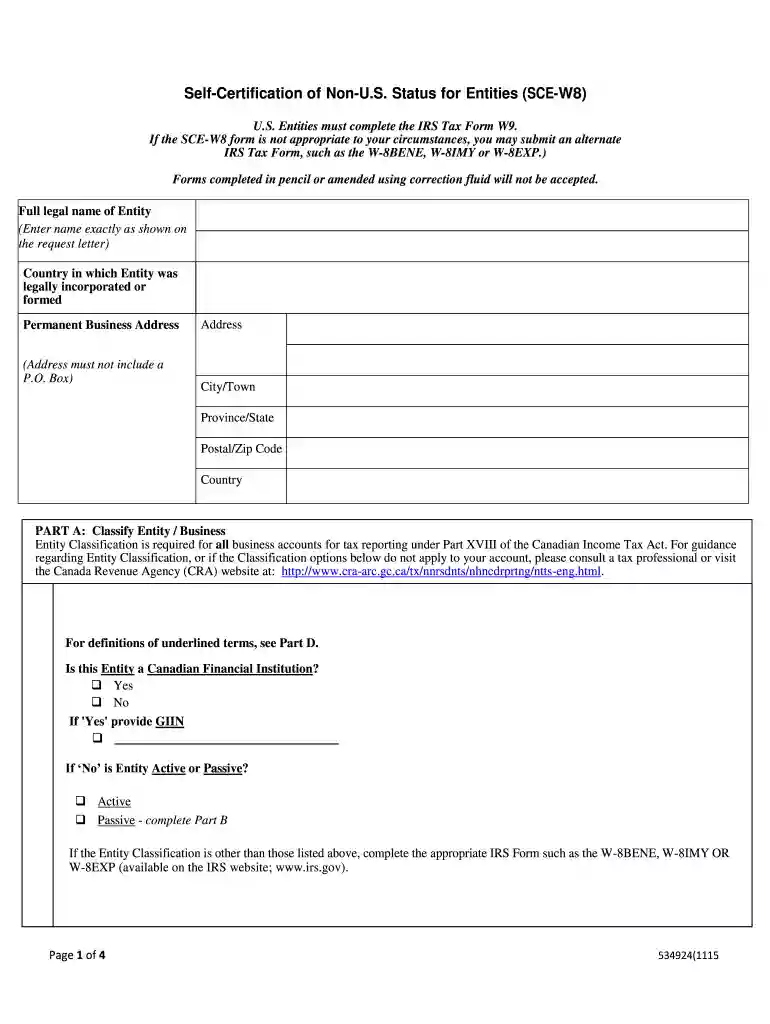
  1. Click ‘Get Form’ to open the sce w8 in the editor.
  2. Begin by entering the full legal name of your entity in the designated field. Ensure accuracy as this will be used for tax identification.
  3. Fill in the country of incorporation and permanent business address. Remember, the address must not include a P.O. Box.
  4. In Part A, select your entity classification. Choose only one option that best describes your entity's status for tax purposes.
  5. If applicable, complete Part B by identifying any U.S. controlling persons associated with your entity. Provide their names, addresses, and Taxpayer Identification Numbers (TIN).
  6. In Part C, certify that your entity is not a U.S. entity for tax purposes by signing and dating the form.

Start filling out your sce w8 form online for free today!

be ready to get more

Complete this form in 5 minutes or less

Get form

Got questions?

We have answers to the most popular questions from our customers. If you can't find an answer to your question, please contact us.
Contact us

Yes, a typed name is accepted as a valid electronic signature when you create it on your paperwork using a compliant solution like DocHub. Simply add your sce w8 to our editor, click Sign in the top tool pane → Create your signature → Type your name in the appropriate tab, and select how it will look on your document.

If you edit your sce w8 with DocHub, you merely need a stable internet connection and virtually any browser installed on your device. No need to install any third-party software or study guides. Just open a tab with DocHub, drag and drop your file, and modify it on the spot.

Form W8-BEN, Certificate of Foreign Status of Beneficial Owner for U.S. Tax Withholding, is used by a foreign person to establish both foreign status and beneficial ownership, and to claim income tax treaty benefits with respect to income other than compensation for personal services.
A W-8 form allows non-US individuals and businesses to confirm they are not US taxpayers. A W-8 form from the US Internal Revenue Service (IRS) allows non-US individuals and businesses to confirm they are not a US taxpayer. There are different variations to the W-8 form, each of which serves a different purpose.
A W-9 tax form is for US residents or citizens and is used to confirm your tax ID number (TIN). A W-8 tax form is for non-US residents and is used to confirm that you are not a US taxpayer.

Security and compliance

At DocHub, your data security is our priority. We follow HIPAA, SOC2, GDPR, and other standards, so you can work on your documents with confidence.

Learn more
ccpa2
pci-dss
gdpr-compliance
hipaa
soc-compliance

People also ask

How Do I Fill Out Form W-8BEN? Part I Identification of Beneficial Owner: Line 1: Enter your name as the beneficial owner. Line 2: Enter your country of citizenship. Line 3: Enter your permanent residence/mailing address. Line 4: Enter your mailing address, if different.
Non-US individuals who receive certain types of income from US sourcessuch as interest, dividends, rents, royalties, and certain other types of incomeneed to fill out the W-8 BEN. The form is used to claim any applicable tax treaty benefits and to verify that the individual is not a US resident for tax purposes.
Give Form W-8 BEN to the withholding agent or payer if you are a foreign person and you are the beneficial owner of an amount subject to withholding. Submit Form W-8 BEN when requested by the withholding agent or payer whether or not you are claiming a reduced rate of, or exemption from, withholding.

Related links