




Here's how it works

01. Edit your garda vetting form online
Type text, add images, blackout confidential details, add comments, highlights and more.

02. Sign it in a few clicks
Draw your signature, type it, upload its image, or use your mobile device as a signature pad.

03. Share your form with others
Send f20 form via email, link, or fax. You can also download it, export it or print it out.
How to use or fill out Data Access Request form (F20) - Garda ie with our platform

- Click ‘Get Form’ to open it in the editor.
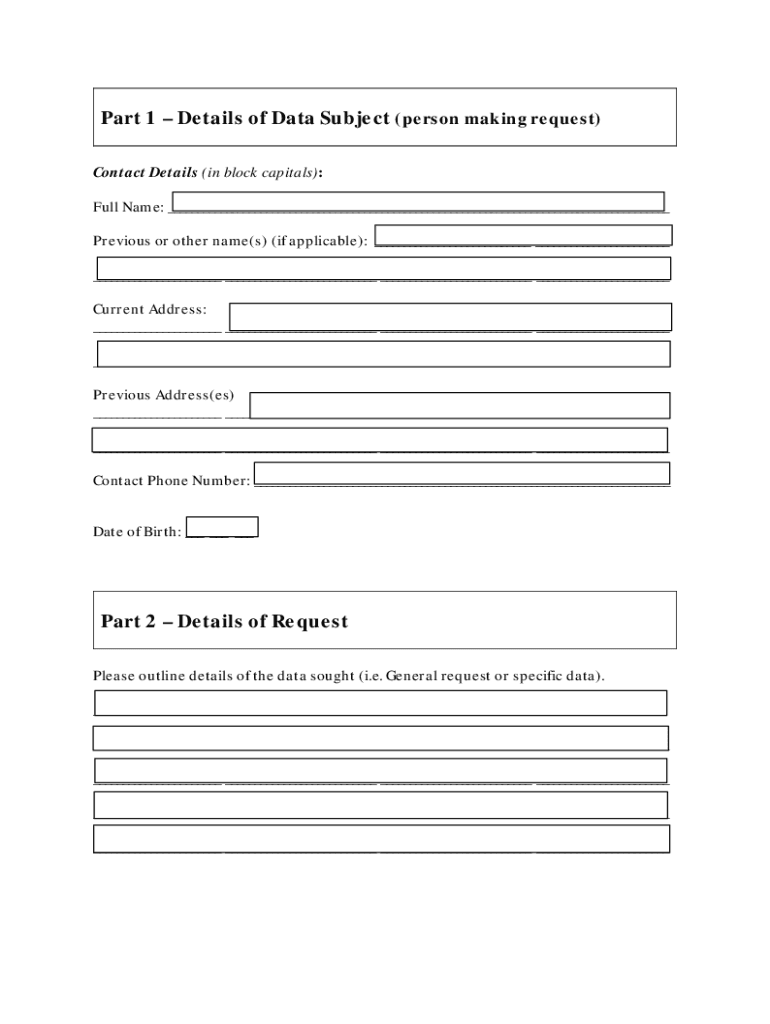
- Begin by filling out Part 1, which requires your personal details. Enter your full name, any previous names, current address, and contact phone number in block capitals.
- In Part 2, outline the details of the data you are requesting. Specify whether it is a general request or for specific data and provide any relevant reference numbers.
- For verification in Part 3, upload a copy of your Photo ID and a recent utility bill or government letter that confirms your current address.
- Complete Part 4 by signing the declaration to confirm that all information provided is accurate. If applicable, include a letter of consent if you are applying through a solicitor.
- Review the checklist at the end of the form to ensure all sections are completed before submitting.
Start using our platform today to easily fill out and submit your Data Access Request form for free!
Fill out Data Access Request form (F20) - Garda ie online
It's free
It's free
See more Data Access Request form (F20) - Garda ie versions
We've got more versions of the Data Access Request form (F20) - Garda ie form. Select the right Data Access Request form (F20) - Garda ie version from the list and start editing it straight away!
Got questions?
We have answers to the most popular questions from our customers. If you can't find an answer to your question, please contact us.
Contact us
How do I submit a data access request?
Online - many organisations let you submit SARs through their website. If you do this, you should take a screenshot of your request for your records before you press submit. Email - use our SAR service to create and send an email request to an organisation or contact the organisation directly.
Who can submit a data subject access request?
Individuals can make SARs verbally or in writing, including via social media. A third party can also make a SAR on behalf of another person. In most circumstances, you cannot charge a fee to deal with a request.
How do I get an Garda clearance in Ireland?
To apply, you must complete a Police Certificate Application form (pdf) and post it to the District Superintendent for your local Garda Station. You can find your District Superintendent on the Garda Station Directory. The Police Certificate is issued free of charge and usually takes about 3 weeks to process.
How do I submit an access request?
Your SAR should include: A clear label for your request (use subject access request as your email subject line or a heading for your letter) The date of your request. Your name. Any other information used by the organisation to help prove to them that you are who you say you are. Your current contact details.
How do I upload data into Access?
How to import Excel data in Access Choose the content you want to import. Review the settings and correct any formatting errors. Close the Excel workbook. Open your Access file. Set up the table. Begin the import. Click through the Import Spreadsheet Wizard. Repeat accordingly.
Security and compliance
At DocHub, your data security is our priority. We follow HIPAA, SOC2, GDPR, and other standards, so you can work on your documents with confidence.
Learn more


People also ask
Can Gardai request CCTV footage?
It is acceptable for a Garda to view any footage on your site, but you must retain a record of them viewing it, including their Badge Number and Station, and the reason given for the viewing. For them to receive a copy of any footage then the rules are slightly different.
What is a SAR request form?
What is a subject access request (SAR)? A SAR is a request made by or on behalf of an individual for the information which they are entitled to ask for under Article 15 of the UK GDPR.


