




01. Edit your prescription claim reimbursement online
Type text, add images, blackout confidential details, add comments, highlights and more.

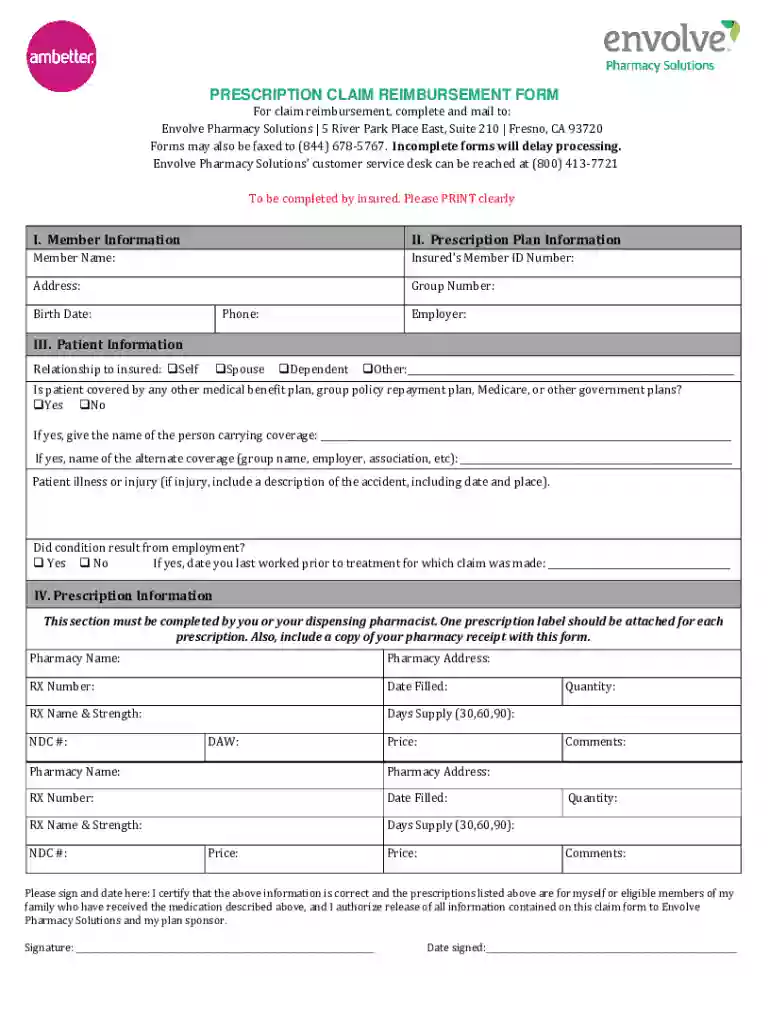
Type text, add images, blackout confidential details, add comments, highlights and more.

Draw your signature, type it, upload its image, or use your mobile device as a signature pad.

Send prescription claim reimbursement form via email, link, or fax. You can also download it, export it or print it out.
The term "form online" refers to digital documents that are accessible and fillable via internet-based platforms, such as DocHub. These forms replicate the functionality of physical paperwork, allowing users to input data, modify content, and submit forms electronically. The primary intent behind online forms is to streamline administrative processes and enhance efficiency by reducing the need for physical document handling. They are widely used in various settings, ranging from business applications to government operations, and offer benefits such as convenience, accuracy, and easy access.
Using an online form involves several straightforward steps that begin with accessing the platform where the form is hosted. Once the form is displayed, users can fill out fields with their relevant information. Platforms like DocHub provide intuitive interfaces featuring options for text input, dropdown selections, and signature attachments. Users can navigate from one section of the form to another seamlessly, ensuring that each part is completed properly. The system might include validation rules to prevent submission of incomplete forms, thus enhancing data integrity and reducing errors.
To obtain an online form, users typically start by accessing a prescribed website or platform, such as DocHub, that hosts or generates the necessary documents. This process can involve logging into the platform with a secure account and then searching for the specific form needed. Once located, the form can be opened directly within the platform or downloaded for offline completion. Some platforms provide options for importing the form via email or cloud storage services, maximizing accessibility from multiple devices and locations.
Forming online offers significant advantages over traditional paper forms. These benefits include increased efficiency due to the elimination of manual data entry processes, reducing paper consumption, and generating real-time data insights that can lead to more informed decision-making. For organizations, online forms decrease administrative workload and facilitate easier data handling and storage. For individuals, they provide a more convenient experience, allowing users to submit information from any location, often with quicker processing times than paper forms.
Online forms are composed of several key elements that ensure their functionality and utility. These include:
Online forms hold legal equivalency to paper forms when utilized properly within jurisdictions that recognize digital documentation and signatures under laws such as the ESIGN Act in the United States. This provides users the assurance that electronically completed and signed forms have the same binding power as their physical counterparts. Organizations must ensure that their processes comply with data protection regulations to maintain form legality, including securing digital signatures and safeguarding user data.
Many online forms are associated with specific filing requirements, including deadlines and time frames within which they must be submitted to remain compliant. For example, tax-related documents often have hard deadlines imposed by the IRS. Users should be aware of these crucial dates, as failing to adhere can result in penalties or delayed processing. Online platforms often offer reminders or notification settings to help keep users aware of upcoming deadlines and ensure timely submission.
We've got more versions of the prescription claim reimbursement form. Select the right prescription claim reimbursement version from the list and start editing it straight away!
At DocHub, your data security is our priority. We follow HIPAA, SOC2, GDPR, and other standards, so you can work on your documents with confidence.
Just complete this form and attach the prescription receipt(s) that shows the co-payment or coinsurance amount paid at the pharmacy. The receipt(s) willRead more
You must submit claims within 36 months of date of purchase or as required by your plan. When submitting an Explanation of Benefits (EOB) from another healthRead more


