Type text, add images, blackout confidential details, add comments, highlights and more.
02. Sign it in a few clicks
Draw your signature, type it, upload its image, or use your mobile device as a signature pad.
03. Share your form with others
Send 4506 t example filled out via email, link, or fax. You can also download it, export it or print it out.
How to use or fill out INSTRUCTIONS FOR COMPLETING IRS FORM 4506-T with DocHub
Ease of Setup
DocHub User Ratings on G2
Ease of Use
DocHub User Ratings on G2
Click ‘Get Form’ to open it in the editor.
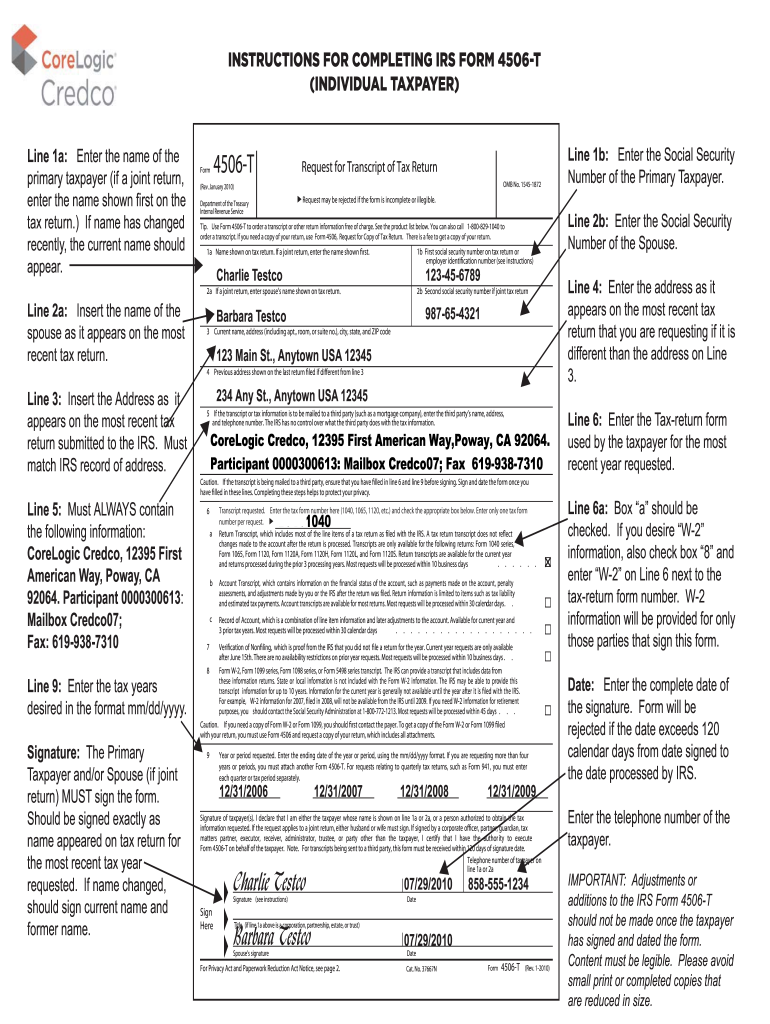
Begin by filling out Line 1a with the primary taxpayer's name as it appears on the most recent tax return. If it's a joint return, enter the first name listed.
Proceed to Line 1b and enter the Social Security Number of the primary taxpayer. For joint returns, complete Line 2a with the spouse’s name and Line 2b with their Social Security Number.
In Line 3, input your current address as shown on your latest tax return. Ensure this matches IRS records for accuracy.
If applicable, fill in Line 4 with your previous address from your last filed return. This is crucial if it differs from your current address.
For any third-party requests, complete Line 5 with their details including name, address, and phone number.
On Line 6, specify the tax-return form used for the most recent year requested and check the appropriate box for transcript type.
Enter desired tax years in Line 9 using mm/dd/yyyy format. If requesting more than four years, attach another Form 4506-T.
Finally, ensure both taxpayers sign and date the form accurately before submission to avoid rejection due to errors.
Start using our platform today to easily fill out IRS Form 4506-T for free!
Fill out INSTRUCTIONS FOR COMPLETING IRS FORM 4506-T online It's free
IRS 4506-T Form OnlineInstructions for completing irs form 4506 t pdfForm 4506-T instructionsIRS 4506-T Form Online PDFIRS Form 4506-T Verification of non filingIRS 4506-T Form Online loginIRS Form 4506 downloadIRS Form 4506-T fillable PDF
Security and compliance
At DocHub, your data security is our priority. We follow HIPAA, SOC2, GDPR, and other standards, so you can work on your documents with confidence.
Read the declaration indicating you are the tax payer listed in line 1a and check the box above the signature line; Sign and date the form; List your phoneRead more
About Form 4506-T, Request for Transcript of Tax Return
Oct 24, 2025 Use Form 4506-T to request any of the transcripts: tax return, tax account, wage and income, record of account and verification of non-filling.Read more
Feb 8, 2018 Order your transcript by calling 1-800-908-9946. Mail Form 4506-T or Form 4506T-EZ (both available on IRS.gov). Using online tools to helpRead more
Cookie consent notice
This site uses cookies to enhance site navigation and personalize your experience.
By using this site you agree to our use of cookies as described in our Privacy Notice.
You can modify your selections by visiting our Cookie and Advertising Notice.